
How it works
- You map a segment to a custom audience in one of your Meta ad accounts
- Sequenzy uploads the segment’s active subscribers to the audience on your chosen schedule
- Meta matches the uploaded emails to Facebook and Instagram accounts
- You use the audience in Meta Ads Manager for retargeting, exclusions, or as the seed for a lookalike audience
Connecting Meta Ads
- Go to Settings → Integrations in Sequenzy
- Find Meta Ads under Ads & Audiences
- Click Connect, then Connect Meta account
- Sign in with the Meta account that has access to your ad accounts and approve the requested permissions
- You’ll land back in Sequenzy with the connection ready
Your Meta account needs at least one Facebook Page and access to at least one
ad account. Meta requires both for customer list audiences.
- The ad account must belong to a Business Portfolio. Personal ad accounts can’t create customer list audiences. Add yours at Meta Business settings under Accounts → Ad accounts.
- The Custom Audience terms must be accepted once for the ad account, by an admin.
Creating an audience sync
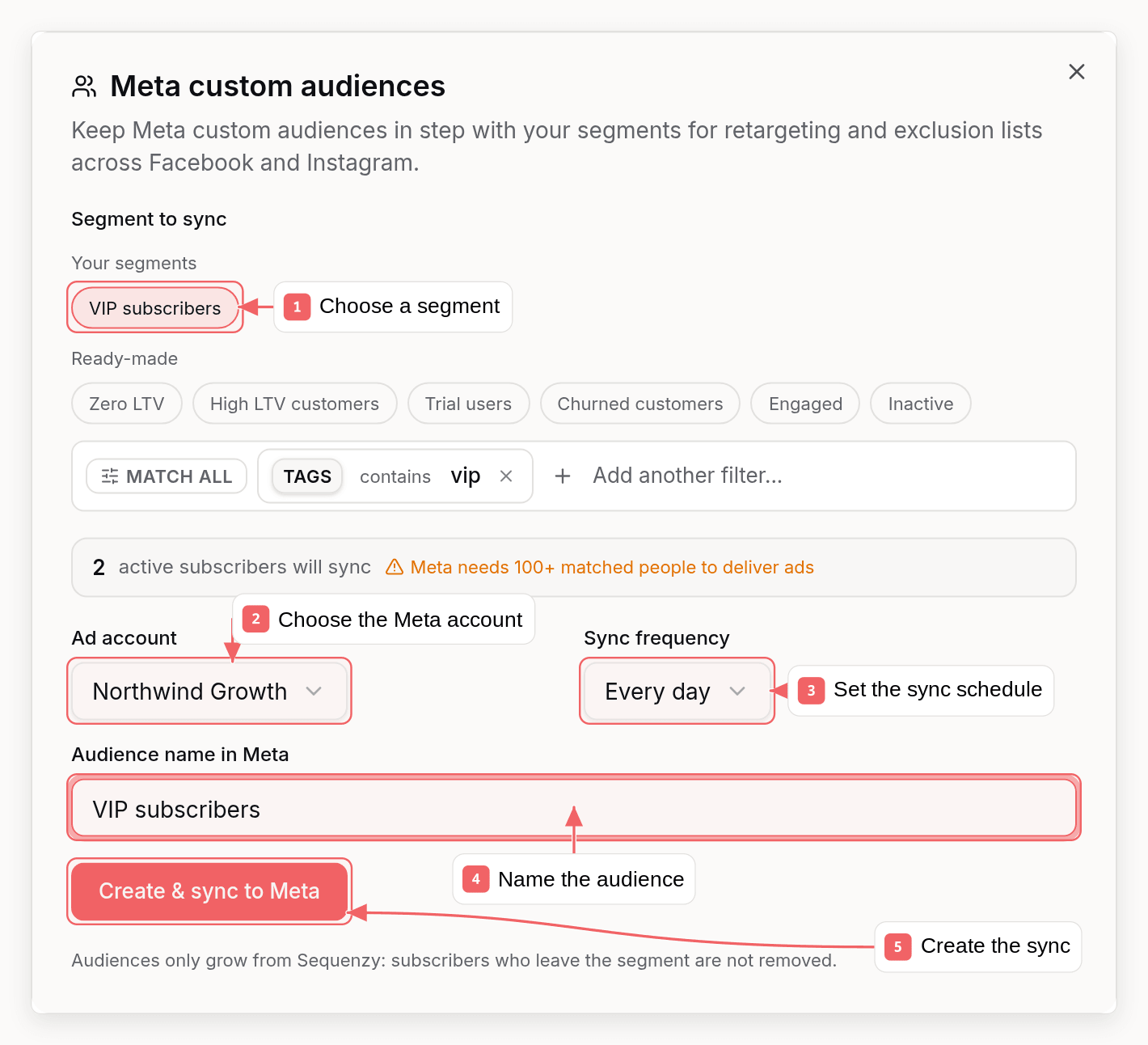
- Open Manage Audiences on the Meta Ads integration
- Pick a segment - either one of your existing segments or a ready-made one:
- Zero LTV - subscribers who have never paid
- No purchase in 1 year - lapsed customers worth re-engaging
- Recent buyers - placed an order in the last 30 days
- High spenders, Non-buyers, Engaged, and more
- Choose the ad account and a name for the audience in Meta
- Pick a dashboard sync frequency (daily or weekly)
- Click Create & sync to Meta
API, CLI, and MCP
Audience syncs are fully manageable outside the dashboard:- API - List, create, update, delete, and run syncs, plus list ad accounts
- CLI -
sequenzy audience-syncs list|create|update|delete|sync|ad-accounts(CLI docs) - MCP -
list_audience_syncs,create_audience_sync,update_audience_sync,delete_audience_sync,sync_audience_now, andlist_ad_accounts(MCP docs)
Things to know
- Audiences are add-only. Subscribers who leave a segment stay in the Meta audience; new segment members are added on every sync. This is a limitation of the sync, not of Meta - you can remove people manually in Meta Ads Manager, or create a new sync with a new audience name for a clean slate.
- Meta needs 100+ matched people before an audience can be used for ad delivery. Small segments will sync but won’t be targetable until they grow.
- Match rates vary. Meta typically matches 30-70% of uploaded emails to accounts, depending on your audience.
- Removing a sync keeps the audience. Deleting a sync in Sequenzy only stops future updates - the audience remains in Meta Ads Manager so running ads aren’t disrupted.
- Unsubscribed and bounced contacts are never uploaded. Only active subscribers in the segment are synced.