
Modes
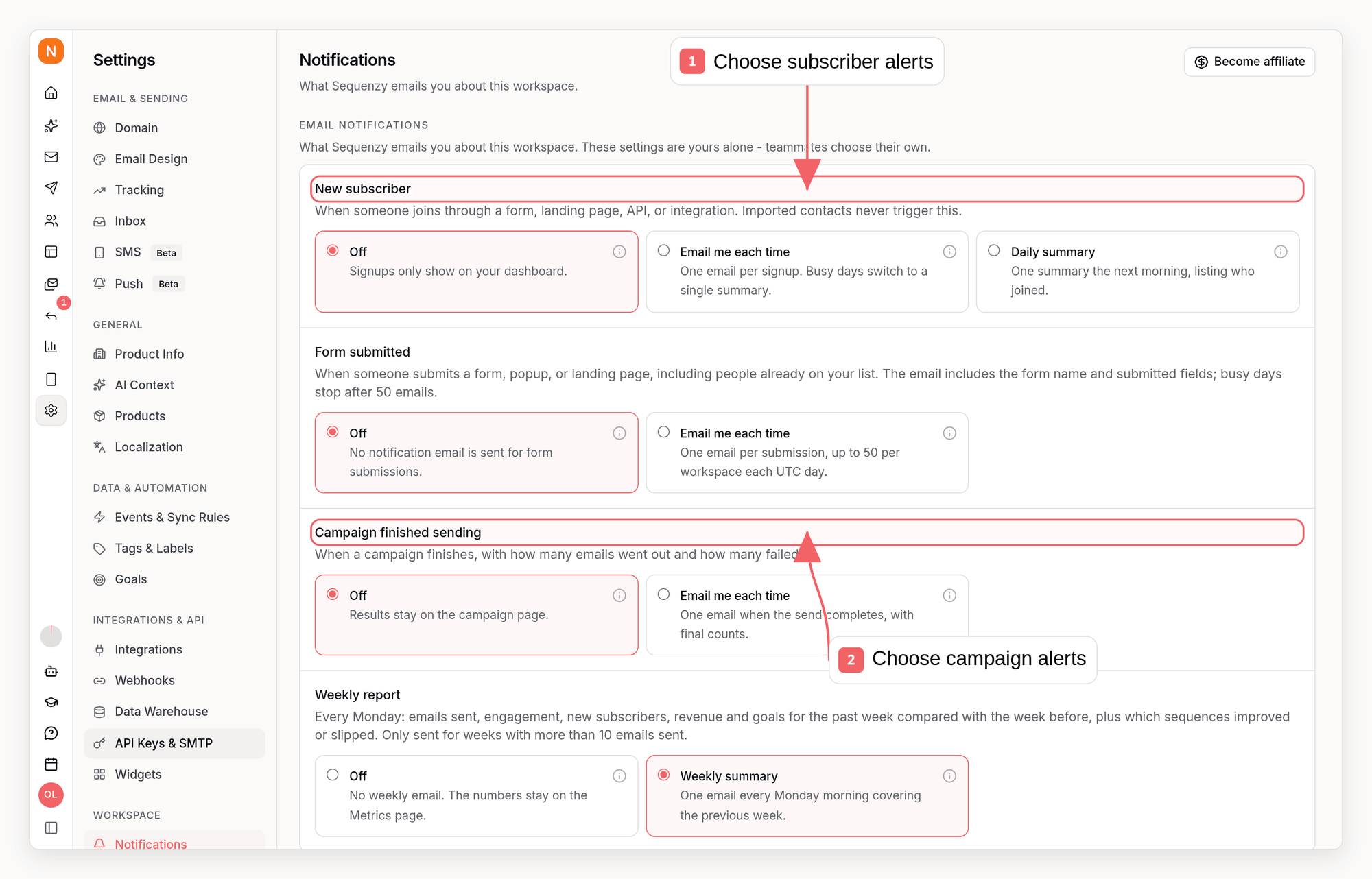
Each notification is set independently:instant- one email per occurrence (foraccount_health: after each scheduled check)daily- one summary per day, listing who joined (new subscribers only)weekly- one report per week (weekly report only)off- no email
off - turn on the ones you want in Settings → Notifications. The weekly report defaults to weekly for the workspace owner; turn it off there if you would rather read the numbers on the Analytics page. Invited members (admins and viewers) default to off and can turn it on for themselves. The account health check follows the same rule: on for the owner, opt-in for everyone else.
form_submitted and campaign_completed do not support daily. Each submission and each campaign finish is its own event, so a daily rollup would almost always be a list with a single row in it. weekly_report supports only weekly and off, and account_health only instant and off.
Use Form submitted when a form is a lead (quote request, contact form, demo request) and you need an email every time, not only the first time that address appears. New subscriber is the list-growth alert: it still fires only when a contact is created.
To protect your inbox and Sequenzy’s system sender from abusive traffic on public forms, instant form-submission notifications stop after 50 accepted submissions per workspace per UTC day. Submissions continue to be processed normally; only the account-notification email is suppressed until the next UTC day.
What does not trigger a new-subscriber notification
Imports never notify. Uploading a CSV or running a migration creates thousands of contacts, and none of them produce an email. This holds even when you turn Enroll in sequences on for the import - that setting decides what happens to the contacts, not whether you hear about each one. The same applies to an integration’s initial backfill sync and to events replayed from more than an hour in the past. For a single contact created through the API, CLI or MCP, a suppliedcreatedAt at most one hour old still qualifies for a new-subscriber notification. Older signup dates do not notify on creation; a later double opt-in confirmation can still notify. This does not change sequence enrollment defaults or the rule that bulk imports do not notify on creation.
Everything that represents a real-time signup counts, whether or not it enrolls the contact in sequences: form and popup submissions, landing pages, the subscribers and events APIs, tagging a brand-new address, payment-provider and plugin webhooks, and adding a contact by hand from the dashboard.
With double opt-in on, you are notified when the contact confirms, not when they sign up. Someone who requests the confirmation email and never clicks it never produces a notification, so what lands in your inbox matches who actually joined your list. A confirmation is a real person clicking a link, so it notifies even if the pending contact originally arrived in an import.
The daily cap
If you are set toinstant and your workspace passes 50 signups in one UTC day, per-signup emails stop for the rest of that day. You get one email explaining the switch, and the remainder arrive as a single summary.
This keeps a viral day from turning into hundreds of emails. Nothing is lost - the summary reports the true total for the day, including the signups that were not sent individually.
The weekly report
Every Monday from 08:00 UTC, each workspace that sent more than 10 emails during the previous Monday-to-Sunday week gets one short email. It fits on one screen:- One row of numbers against the week before: sent, open rate, click rate, and revenue (or new subscribers for workspaces that track no revenue)
- Worth a look: up to two sequences whose open rate, click rate, unsubscribe rate, or attributed revenue got meaningfully worse, each linked to the sequence. A sequence needs at least 20 sends in both weeks and a change of at least one percentage point and 15% relative before it is called out, so a sequence that sent twelve emails does not read as a collapse
Unusual signup activity alerts
Separately from the notifications you opt into, Sequenzy watches each workspace’s public form signup volume. If a day’s signups climb far above the workspace’s recent baseline - the pattern of a bot scripting a public form (list-bombing) - every non-restricted workspace member gets one security alert email for that day, regardless of their notification settings. The email shows the day’s count against the baseline and suggests next steps: review the newest subscribers, pause any welcome sequence on the affected list, and consider enabling double opt-in so unconfirmed signups never reach your lists.Per person, not per workspace
These settings belong to you, not to the workspace. Each teammate chooses their own, and changing yours never changes anyone else’s. Members with restricted (link-only) access do not receive account notifications at all. If you belong to several workspaces, you configure each one separately.Changing your settings
- Dashboard
- CLI
- API
- MCP
Go to Settings → Notifications.
Sending this somewhere other than email
For Slack, Zapier, or your own service, use an outbound webhook on thesubscriber.created event instead. Unlike the notification above, that event fires for every created contact, including imports, and carries a source field you can filter on.