
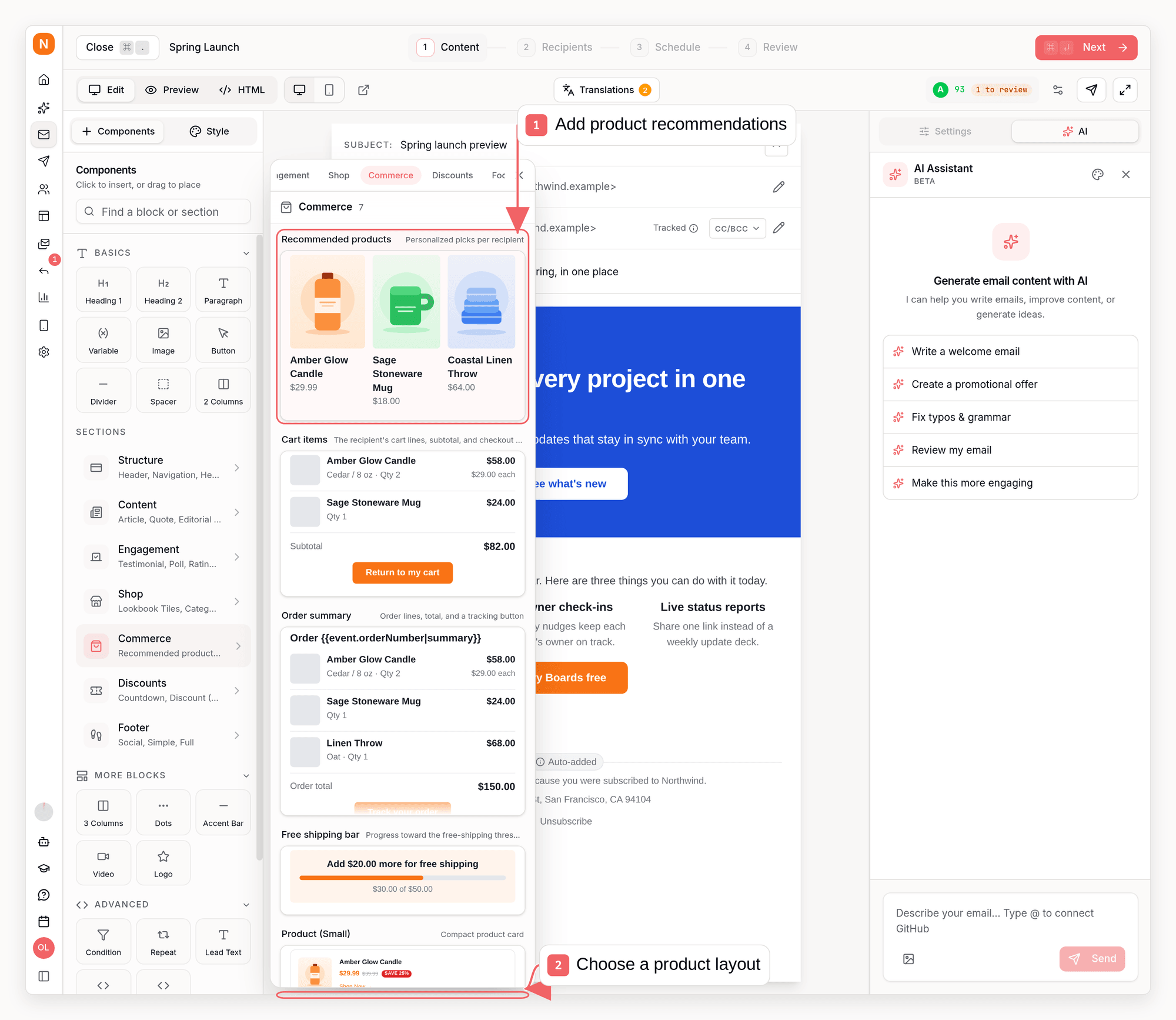
Adding a recommendations block
In the email editor, open the block picker’s Commerce section and add Recommended products. You get a ready-made product card list bound to the recommendation engine - image, title, price, and a Shop now button per product. The same capability is available on any Repeat block by setting What to show to Recommended products.Ranking strategies
Choose how products are ranked in the block settings under Ranking. Each option is theproductSource.strategy field when you author the block over the
API, CLI, or MCP:
- Personalized for each recipient (
"personalized", the default) - products the recipient recently viewed or added to cart, then products browsed by shoppers with similar activity, then your store’s most-browsed products, then the newest in-stock products so the list never renders empty. - Best sellers (
"bestsellers") - products with the most orders across your store in the activity window. - Newest products (
"newest") - the latest in-stock products by their source-catalog creation time (with local import time used only when the source does not provide one). - Recently viewed (
"recently_viewed") - only the recipient’s own browsing, topped up from the catalog when there is not enough activity.
lookbackDays, 7 to 180 days in the editor and 1 to 365 over the API, default 30) controlling how far back browsing or orders are considered.
Authoring the block over the API
Ranking lives on the repeat block’sproductSource, and it applies to mode: "recommended". The catalog modes (all, filtered) ignore strategy and order by sort instead, which defaults to newest - so mode: "all" is a plain catalog feed, not a best-seller ranking.
excludePurchased and rotateSeen both default to true under mode: "recommended", which keeps the list varying per recipient even for a store-wide strategy. Set both to false, as above, when you want every recipient to receive the identical list.
get_email_block_schema (MCP), sequenzy blocks repeat (CLI), and GET /api/v1/email-blocks/repeat (API) return the full productSource field reference, including the accepted values of mode, strategy, and sort.
Fine-tuning
- Skip already-purchased products (on by default) leaves out anything the recipient bought in the last year.
- Don’t repeat products (on by default) rotates content between sends so a recipient never sees the same products twice; the oldest-seen products come back when nothing new is left.
- Catalog filters narrow recommendations by tag, collection, vendor, product type, or price range.
- Match the trigger event’s product restricts event-triggered sequence emails (for example browse abandonment) to products related to the product on the trigger event.
Measuring results
Sequenzy tracks the full recommendation funnel:- Products shown - how many recommended products were rendered across sends.
- Clicks - clicks on recommended products, attributed to the exact block and product.
- Attributed orders and revenue - orders that contain a product the subscriber clicked in a recommendation within the previous 7 days.
revenueByCurrency; UNKNOWN identifies older or custom order events that did
not provide a currency. The legacy revenueCents aggregate remains for
compatibility, but should not be displayed when more than one currency is
present.
The funnel appears on the campaign stats page whenever a sent email used recommendation blocks, including a per-product breakdown of what was shown and clicked. Sequence metrics aggregate the same funnel across every email and A/B test node in the sequence.
Via the API, GET /api/v1/metrics/campaigns/{campaignId} and GET /api/v1/metrics/sequences/{sequenceId} return a recommendations object with the same numbers. It also flows through the CLI (sequenzy stats --campaign <id> --period 30d --json, or use --start and --end) and the MCP get_campaign_stats / get_sequence_stats tools, whose period, start, and end inputs apply the same filters. Period and custom date-range filters scope recommendation impressions, clicks, and their attributed orders consistently with the surrounding metrics.