
What is Zapier?
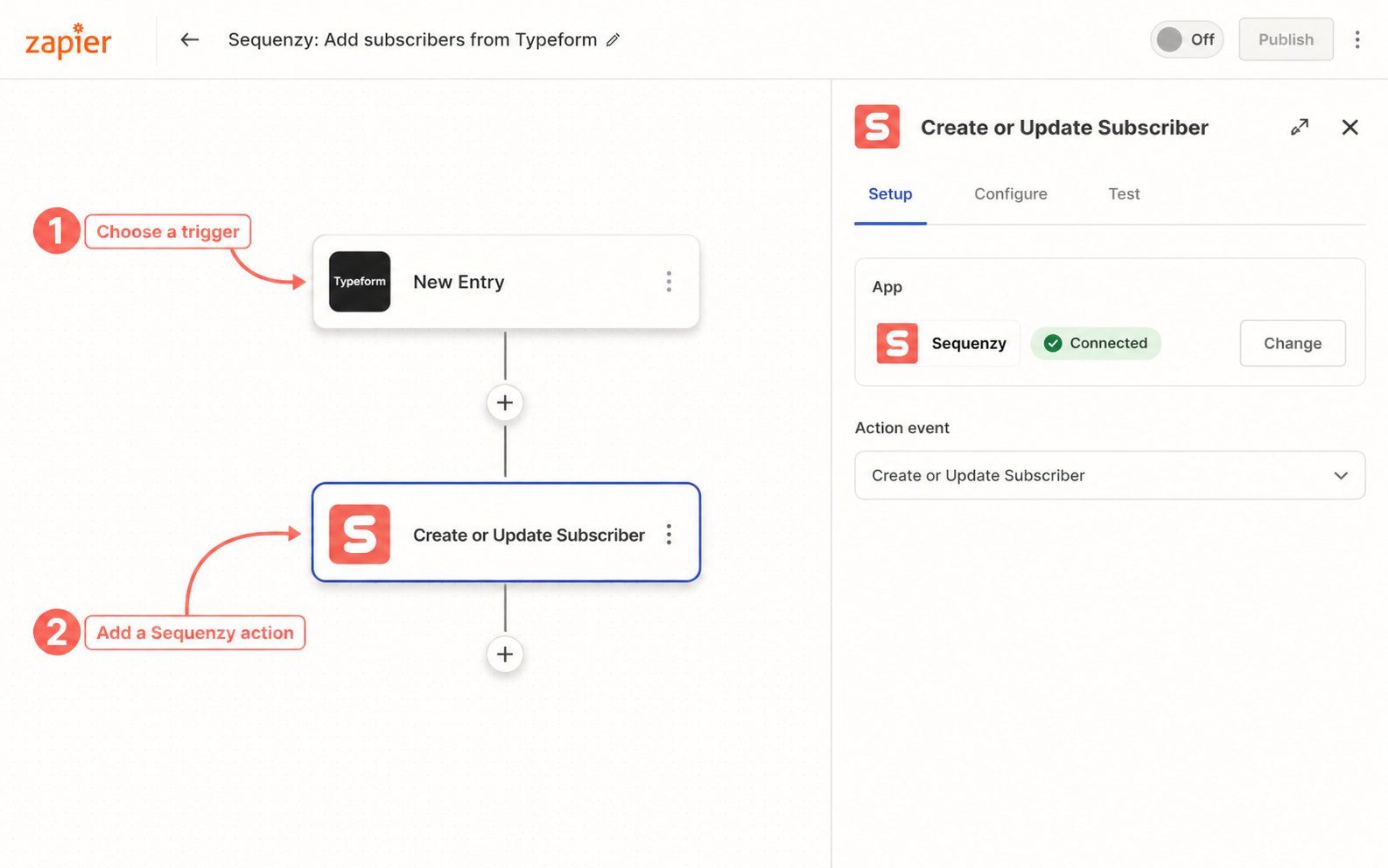
Zapier is a no-code automation platform that connects different apps together. With the Sequenzy integration, you can start Zaps from new subscribers and completed campaigns, or add subscribers, apply tags, and trigger events from other apps.Getting Started
- Go to Zapier’s Sequenzy integration page
- Click Create Zap or choose a template
- Follow the prompts to authenticate your Sequenzy account
- Configure your workflow
Authentication
When connecting Sequenzy to Zapier, you’ll need your API key: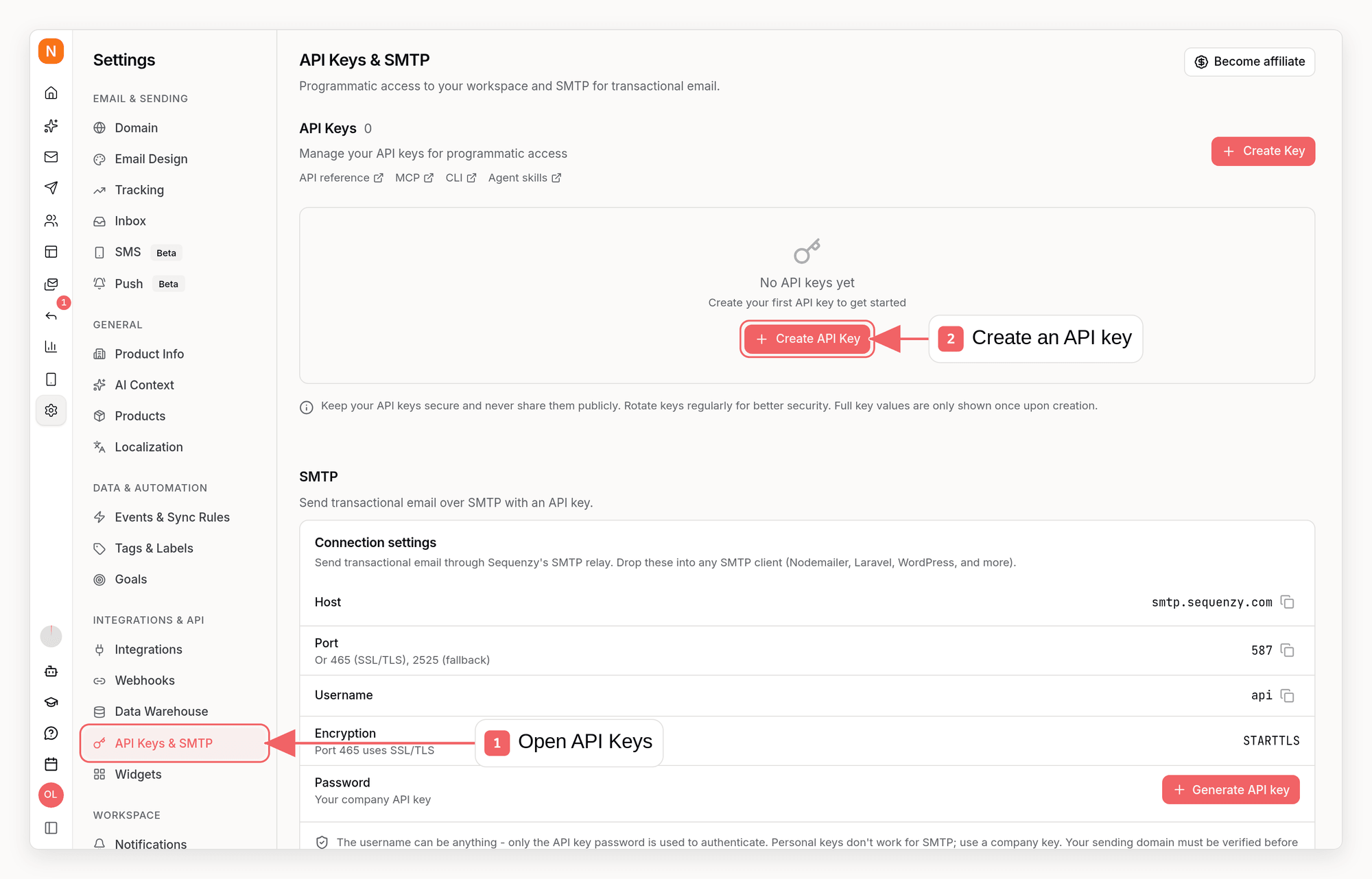
- Go to Settings → API Keys & SMTP in Sequenzy
- Create a new API key or copy an existing one (current keys start with
seq_live_for a workspace orseq_user_for an account; legacyek_keys are also supported) - Paste it in Zapier when prompted
Required API key scopes
Zapier uses one API key for the connection, so give it the union of the scopes needed by the steps in your Zaps:
For a connection that uses both triggers and every action, select
account:read, webhooks:write, webhooks:delete, subscribers:read, subscribers:write, subscribers:delete, campaigns:read, events:write, and automations:trigger.
Available Triggers
Both triggers are instant REST hooks. Turning on a Zap creates a dedicated Sequenzy outbound-webhook endpoint; turning it off permanently deletes that endpoint and its delivery history.New Subscriber
Starts a Zap when a subscriber is created. Every creation source qualifies, including forms, the API, imports, and integration syncs. With double opt-in enabled, the trigger waits until the contact confirms; an unconfirmed contact does not trigger it. The record includes subscriber identity and profile fields, custom attributes, creation source, and the list IDs joined during creation.Campaign Sent
Starts one Zap when an email campaign reachessent. This is an aggregate completion event, not one task per recipient. Empty-audience campaigns and completed A/B tests qualify; SMS campaigns do not. The record includes sentAt, totalSent, and totalFailed from the terminal campaign state.
Sequenzy signs every delivery over the exact raw body with HMAC-SHA256. The Zapier app checks every v1= signature, requires a timestamp within five minutes, and rejects missing, stale, malformed, wrong-event, or invalidly signed requests. A rejected or otherwise failed delivery follows Sequenzy’s existing policy of up to 16 attempts with exponential backoff spanning 7 days.
Available Actions
Sequenzy exports exactly five actions for sending data to Sequenzy: Create or Update Subscriber, Add Tag to Subscriber, Remove Tag from Subscriber, Trigger Event for Subscriber, and Delete Subscriber. For subscriber identity fields, provide Email or External ID. Use Email when the action may need to create a new subscriber. Use External ID when you already store your app’s user/customer ID on the Sequenzy subscriber.Create or Update Subscriber
Add a new subscriber by email or update an existing one by email or external ID.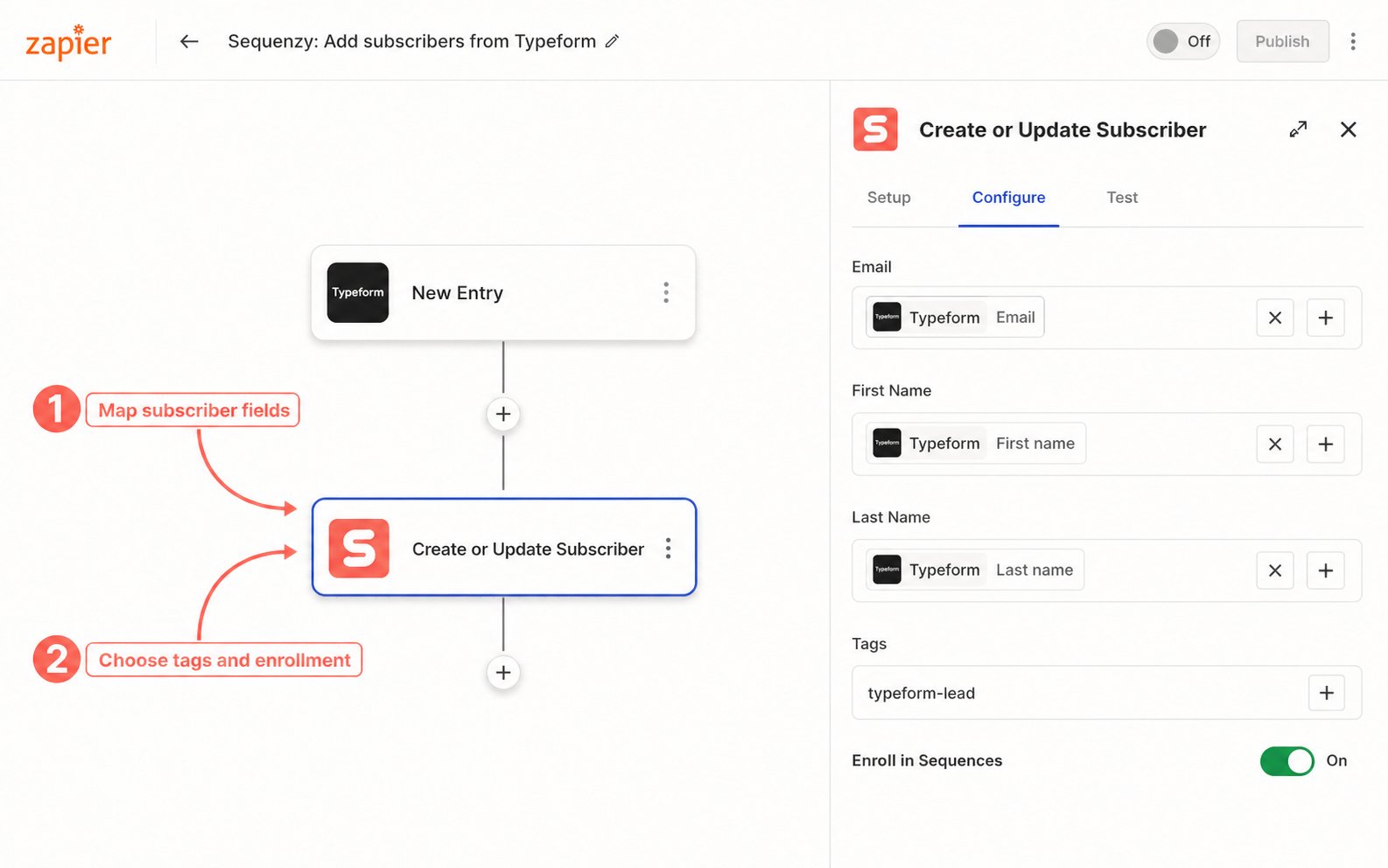
Example use cases:
- Add new leads from Typeform to Sequenzy
- Sync customers from Stripe to Sequenzy
- Import contacts from Google Sheets
Add Tag to Subscriber
Apply a tag to a subscriber. Creates the subscriber when an email address is provided.
Example use cases:
- Tag subscribers as “webinar-attendee” when they register on Eventbrite
- Tag customers as “high-value” when they make a large purchase
- Tag users as “churned” when they cancel in your billing system
Remove Tag from Subscriber
Remove a tag from a subscriber. If the supplied email does not match an existing subscriber, Sequenzy creates that subscriber without the requested tag. An External ID must identify an existing subscriber.
Example use cases:
- Remove “trial” tag when user becomes a customer
- Remove “active” tag when subscription ends
- Clean up temporary campaign tags
Trigger Event for Subscriber
Trigger a custom event that can start automations in Sequenzy. Creates the subscriber when an email address is provided.
Example use cases:
- Trigger
onboarding_startedwhen a user signs up in your app - Trigger
trial_ending3 days before trial expiration - Trigger
feature_usedwhen users engage with specific features
Delete Subscriber
Remove a subscriber from your list.
Example use cases:
- Remove unsubscribes synced from other systems
- Clean up test accounts automatically
- Handle GDPR deletion requests from other platforms
Available Searches
Find Subscriber
Look up a subscriber by email or external ID. Useful for checking if someone exists before taking action.
Returns: Subscriber data including name, tags, custom attributes, and status.
Auto-Creation Feature
The Create or Update Subscriber, Add Tag, Remove Tag, and Trigger Event actions can create subscribers if the action includes an email address. Remove Tag creates a missing subscriber without adding the requested tag. This means you can:- Tag users without first creating them
- Trigger events for users who haven’t been added yet
- Build simpler Zaps without checking if subscriber exists first
Recommended Zap Templates
These are the recommended templates to publish or promote first:- Typeform → Create or Update Subscriber: Add form respondents to Sequenzy and map answers into custom attributes.
- Tally → Create or Update Subscriber: Capture Tally form leads with source and form metadata.
- Facebook Lead Ads → Create or Update Subscriber: Send new ad leads to Sequenzy with campaign/ad set fields as attributes.
- Webflow → Create or Update Subscriber: Add website form submissions with a
webflow-leadtag. - Stripe → Add Tag / Trigger Event: Add lifecycle tags such as
customeror trigger purchase/subscription events for automations. - Google Sheets → Create or Update Subscriber: Add or update subscribers from new or updated spreadsheet rows.
Multi-Step Zaps
You can combine multiple Sequenzy actions in a single Zap:- Create or update the subscriber
- Add relevant tags
- Remove old tags
- Trigger a custom event
Troubleshooting
Subscriber Not Created
- Verify the email address is valid
- Check that your API key has the correct permissions
- Ensure the Zap is turned on
Tags Not Appearing
- Tags are case-sensitive - “Customer” and “customer” are different
- Check the tag field isn’t empty
- Verify the subscriber exists (or use an action that auto-creates)
Event Not Triggering Automation
- Verify you have an automation set up for that event in Sequenzy
- Check the event name matches exactly (case-sensitive)
- Ensure the subscriber meets any conditions on the automation
Authentication Failed
- Verify your API key is correct (current keys start with
seq_live_orseq_user_; legacyek_keys are also supported) - Try regenerating a new API key in Settings → API Keys & SMTP
- Reconnect your Sequenzy account in Zapier
FAQ
Does Sequenzy have triggers in Zapier?
Does Sequenzy have triggers in Zapier?
Yes. New Subscriber and Campaign Sent are instant triggers. New Subscriber
covers every creation source and waits for confirmation when double opt-in
is enabled. Campaign Sent fires once per completed email campaign.
Is there a delay in processing?
Is there a delay in processing?
The two triggers use instant webhooks rather than polling. Actions are also
sent immediately; normal network and Zap processing time still applies.
Can I use Zapier with the free plan?
Can I use Zapier with the free plan?
Yes, the Zapier integration works with all Sequenzy plans.
What happens if I hit rate limits?
What happens if I hit rate limits?
Zapier handles action-side rate limits. For trigger delivery, Sequenzy makes
up to 16 attempts with exponential backoff spanning 7 days. For high-volume
imports, use the bulk API rather than one Zap task per contact.
Can I connect multiple Sequenzy accounts?
Can I connect multiple Sequenzy accounts?
Yes, you can connect multiple Sequenzy accounts to Zapier by using different
API keys.
Is there a Make integration?
Is there a Make integration?
Yes. Sequenzy has a Make custom app for subscriber, tag, and event actions.
Public Make Marketplace availability depends on Make’s review; until then,
install it as a private custom app from the connector source. For a
self-hostable workflow builder, use the n8n
integration.
Can I use Zapier to sync from Sequenzy to other apps?
Can I use Zapier to sync from Sequenzy to other apps?
Yes. Start with New Subscriber or Campaign Sent, then add actions for the
destination app. Use Sequenzy outbound webhooks directly when you need an
event that the Zapier app does not yet expose.