
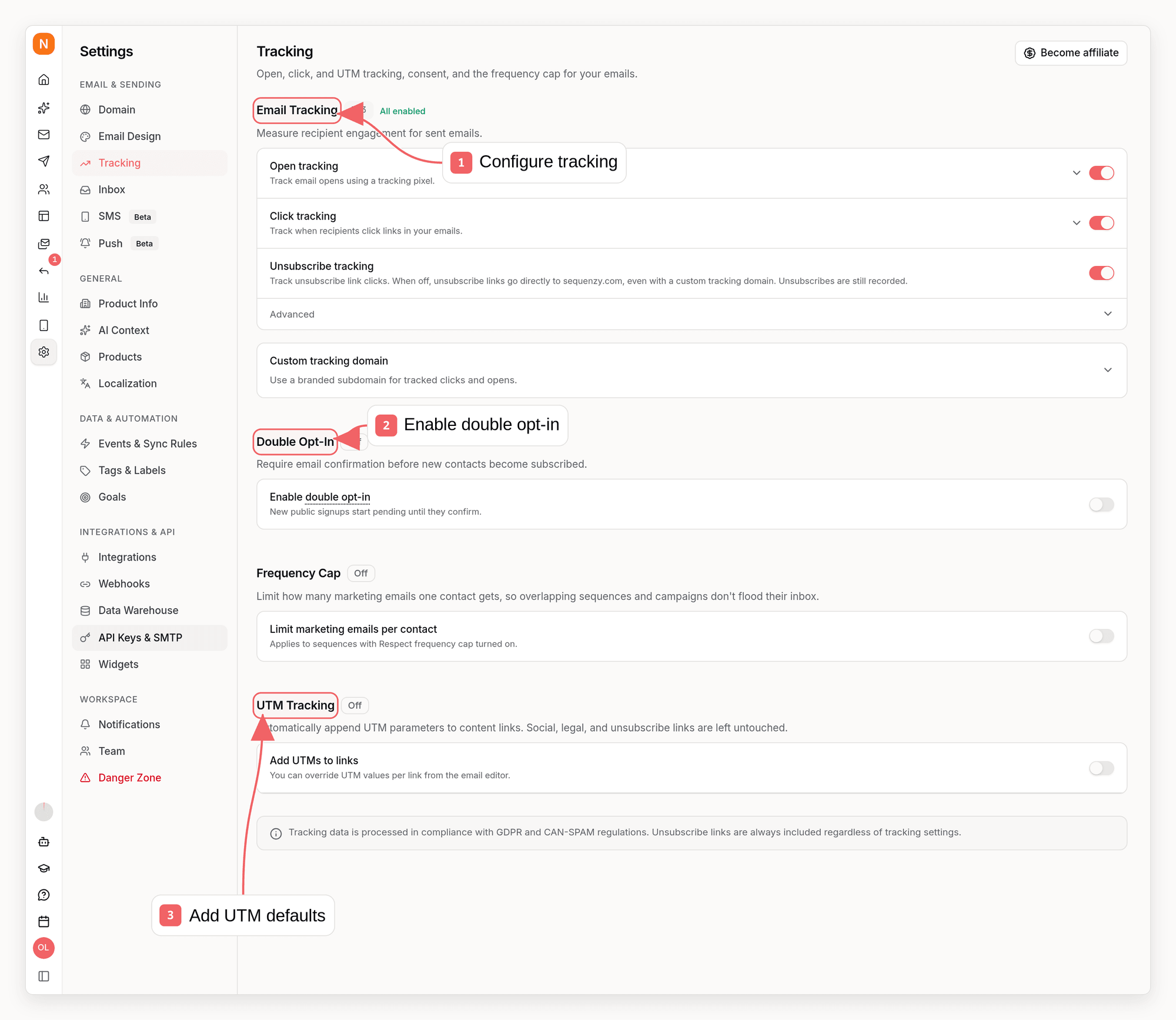
What We Track
Sequenzy tracks three types of email engagement:How Tracking Works
Open Tracking
When you send an email, Sequenzy embeds a tiny invisible image (1x1 pixel) at the end of your email. When the subscriber’s email client loads this image, we record an open event.Some email clients block images by default or use privacy features that
prevent accurate open tracking. Apple Mail Privacy Protection, for example,
can pre-fetch images, which may inflate open rates. Keep this in mind when
analyzing your metrics.
Click Tracking
All links in your emails are automatically wrapped with tracking URLs. When a subscriber clicks a link:- The click is recorded with the link URL
- The subscriber is immediately redirected to the original destination
Tracking hostname
Tracked links use your company tracking domain, for examplelinks.yourdomain.com. Every sending domain uses it, so you set it up once, in
Settings → Tracking or with Set Tracking Domain.
It is optional and never blocks sending: until it verifies, or if its DNS record
breaks or you remove it, links use Sequenzy’s shared tracking domain. See
Domain Verification.
The same hostname serves the “view in browser” link, and the unsubscribe and
preference links while unsubscribe tracking is on, so emails use it even when
open and click tracking are off.
Confirm which tracking domain is in use
To check whether your workspace uses a custom tracking domain, open Settings → Tracking, runsequenzy tracking domain, call the MCP tool
get_tracking_domain, or call Get Tracking Domain:
This shows what emails sent from now on use. Emails already sent keep the
hostname they were sent with, so to check a specific email, look at the host of
its “view in browser” or tracked links.
Unsubscribe Tracking
The unsubscribe link in your emails is tracked separately from regular clicks. This gives you visibility into:- How many people are unsubscribing
- Which emails drive the most unsubscribes
- Unsubscribe trends over time
https://sequenzy.com. This applies even
when you use a custom tracking domain. Footer links and one-click unsubscribe
headers follow the same setting. Actual unsubscribes and their email attribution
are still recorded. Links in emails already delivered keep working as before.
Disabling Tracking
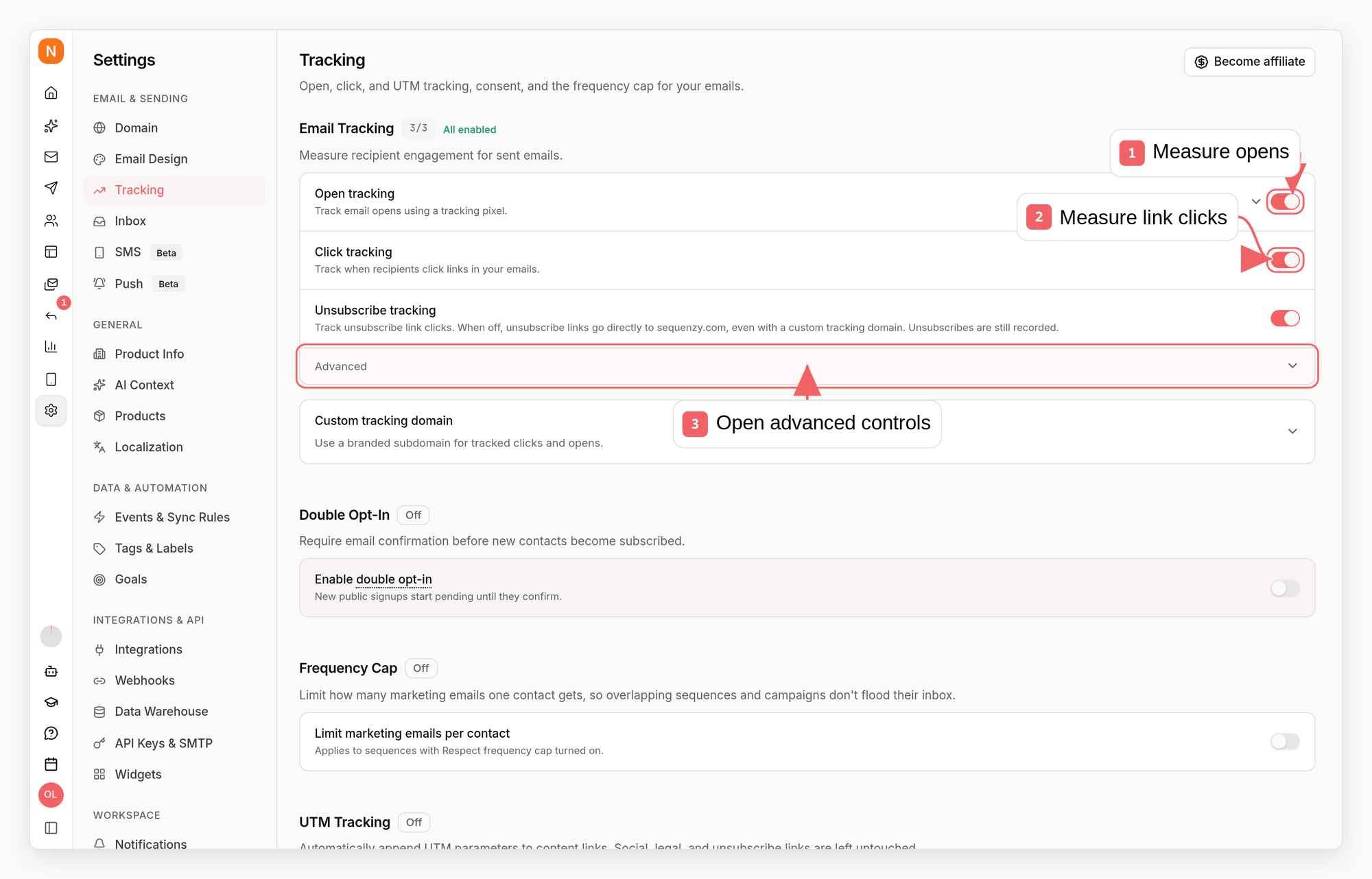
- You want to respect subscriber privacy
- Your audience is privacy-conscious (e.g., security professionals)
- You’re in a regulated industry with strict tracking requirements
- You simply don’t need engagement metrics
- Go to Settings in your dashboard
- Navigate to the Tracking section
- Toggle off the tracking options you want to disable
The account-wide switches above are the master policy for campaigns,
sequences, and Transactional API sends. To keep tracking on for marketing
emails while changing only the Transactional API defaults, expand Open
tracking or Click tracking and use its nested Transactional emails
switch. These transactional defaults are enabled for new workspaces.
The same settings are available outside the dashboard, so an agent or script
can audit and change them:
get_tracking_settings and update_tracking_settings. Changes apply to emails
sent afterwards - emails already sent keep the links and pixels they were
rendered with.
Per-send opt-out (transactional API)
Transactional API sends use the dashboard’s Transactional API Tracking defaults whentrackingSettings is omitted. A send can turn off tracking for a
single message without changing those defaults. Pass a trackingSettings
object with clickTracking: false to skip link rewriting or
openTracking: false to skip the open pixel on that send. This is useful when a
click-tracking redirect domain would break iOS/Android universal links or deep
links, so you can keep tracking on account-wide for marketing while sending
those specific emails untracked. These fields only opt out: they cannot enable
tracking that is disabled by either the account-wide or Transactional API
default.
Engagement Data and Retention
This section describes what Sequenzy stores about delivery and engagement, how long it keeps it, and what deleting a contact removes. Use it when you write a privacy notice.What is stored for each open and click
The IP address, user agent and country are part of the open or click event, so
they are kept as long as the event (below). Requests Sequenzy classifies as
bots, such as link scanners and image prefetchers, are stored the same way and
excluded from your engagement metrics. To detect scanners, Sequenzy also keeps
recent click IP addresses in a short-lived cache for about three minutes.
Deliveries, bounces, complaints and unsubscribes store no recipient IP
address, user agent or location.
With open and click tracking off, emails contain no tracking pixel or tracked
links, so no open or click events are recorded and no recipient IP address,
user agent or country is stored. While the account-wide switch is off, Sequenzy
also ignores pixels and tracked links in emails sent before you turned it off.
To keep counting opens and clicks without storing these details, turn off
email content storage instead.
How long it is kept
These periods are the same for every workspace. To keep less, turn off
email content storage or delete contacts.
When you delete a contact
When you delete a contact from the dashboard, API, CLI or MCP, Sequenzy removes the contact profile and its list memberships and cancels its active sequences. Erasing the contact’s recorded data runs in hourly batches, so it usually finishes within about an hour of the deletion. It can take longer when many contacts are deleted at once. Deleted events and attributes stop appearing in reports and segments as soon as the erasure runs, and are removed from storage, usually within a week.- Contact activity events, per-contact engagement counts, custom attributes and segment memberships are deleted. Past poll results and recommendation revenue no longer include the contact.
- Delivery and engagement events are anonymized. The email address, contact ID, IP address, user agent, country and subject are removed, along with email addresses in their delivery details and the query string of each clicked URL. The events stay, so past send, open and click totals do not change. Counts of unique recipients and per-link click reports can shift slightly.
- Sequence, goal, product recommendation, SMS and reply events keep their counts with the link to the contact removed.
- Sent emails records are deleted. If the contact marked an email as spam, that record is kept without its subject, content or contact link, because it stops the address from being emailed again. Bounce suppressions also keep the address. A bounce or spam complaint that arrives after the records are deleted is not recorded.
Don’t store email content
Most workspaces don’t need this. Leave email content storage on unless your privacy policy or a customer requires you not to keep email content or the IP addresses of opens and clicks. Turn off Store email content under Advanced in Settings → Tracking, or setemailContentStorageEnabled to false with
Update Tracking Settings,
sequenzy tracking update --store-content off or the MCP tool
update_tracking_settings. For emails sent afterwards:
- Sent emails removes the content once an email is sent or fails. An email still waiting to be sent keeps its content and subject until then.
- Once an email is sent or fails, its name (the campaign, template or sequence name) is stored in place of its subject. Events, contact activity and webhooks use the name too.
- The template of a
trackAsemail is replaced with a placeholder on its next send. - The queued job for a Send Email API call is removed once the email is sent.
Privacy Considerations
Sequenzy is designed with privacy in mind:- No third-party tracking: All tracking data stays within Sequenzy
- Subscriber data protection: Tracking data is associated with subscribers, not sold or shared
- Easy opt-out: Subscribers can unsubscribe with one click
- Configurable: You control what gets tracked
GDPR Compliance
If you’re subject to GDPR, you should:- Include tracking disclosure in your privacy policy
- Consider disabling tracking for EU subscribers if required
- Honor unsubscribe requests promptly (Sequenzy does this automatically)
Events Generated
Email tracking automatically generates events that you can use in automations and analytics:
These events can trigger sequences, apply sync rules, and appear in subscriber timelines.
Events
Learn more about events and how to use them in automations
Best Practices
1. Monitor Engagement Trends
Track open and click rates over time to identify:- Which subject lines perform best
- Optimal send times for your audience
- Content that resonates with subscribers
2. Use Tracking Data for Segmentation
Create segments based on engagement:- Active subscribers: Opened or clicked in the last 30 days
- Inactive subscribers: No engagement in 90+ days
- Highly engaged: Clicked multiple emails
3. Respect Unsubscribes
High unsubscribe rates indicate:- Email frequency is too high
- Content doesn’t match subscriber expectations
- List quality issues
4. Consider Your Audience
If your audience is privacy-focused:- Be transparent about tracking in your emails
- Consider disabling open tracking (less invasive than click tracking)
- Highlight your privacy practices
Related
UTM Tracking
Configure automatic campaign attribution for email links
Metrics
View and analyze your tracking data
Campaigns
Send broadcast campaigns
Sequences
Create automated email workflows
Subscribers
Manage your subscriber list