
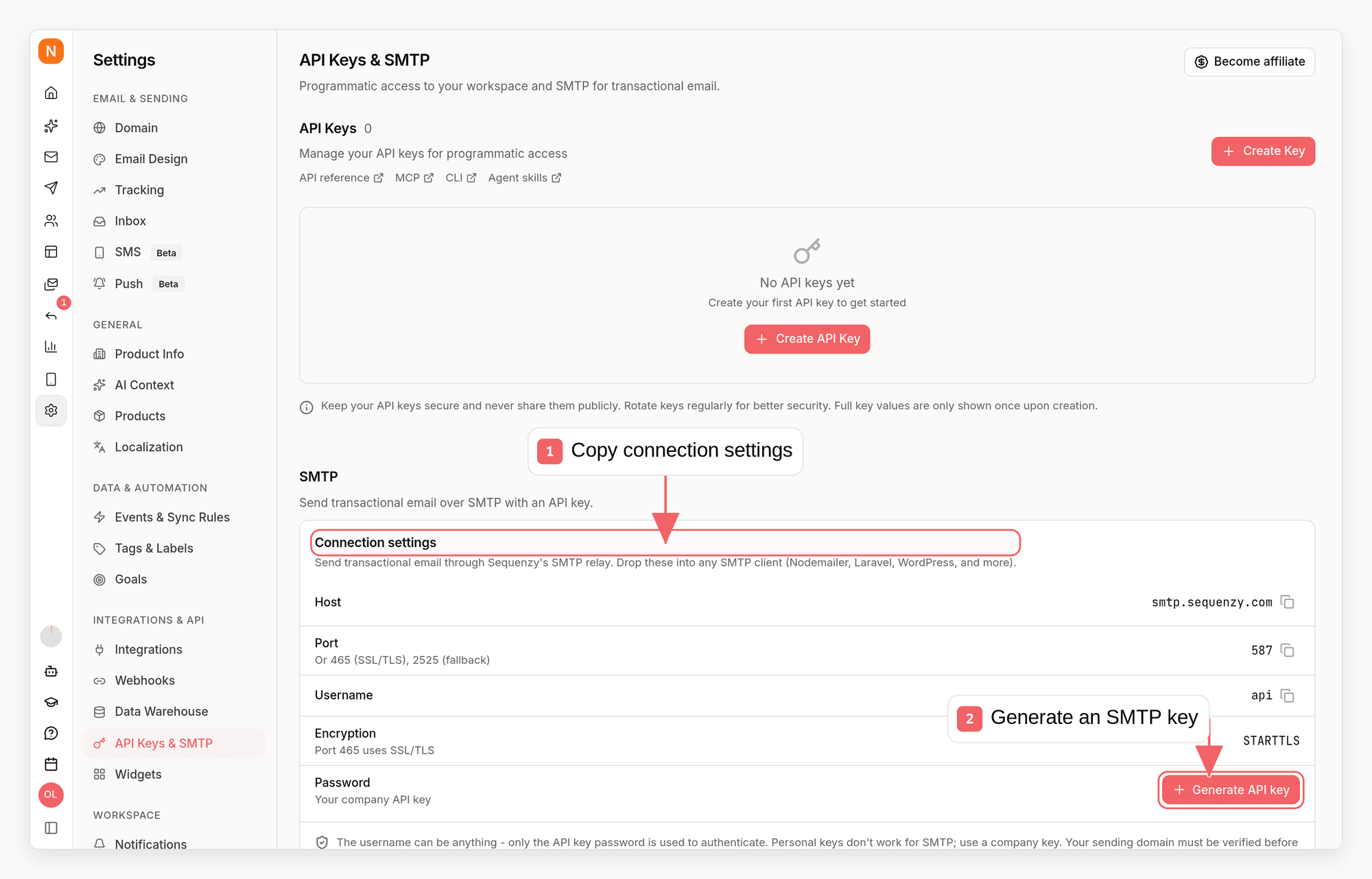
SMTP Credentials
Use these credentials to configure your application:The username can be anything: only the password (your API key) is used for
authentication. We recommend
api for clarity.SMTP requires a company API key with the
transactional:send permission.
Full-access keys and keys created with the transactional_sender preset both
work. Personal keys and keys without that permission are rejected at login.Port Options
Sequenzy supports multiple ports for different network environments:Which port should I use?
- Port 587 is the standard for email submission and works with most applications
- Port 465 is for legacy applications that require implicit TLS (connect with SSL from the start)
- Port 2525 is useful if your ISP or firewall blocks standard SMTP ports. It uses STARTTLS just like port 587.
Prerequisites
Before sending via SMTP:- Create an API key in the Sequenzy dashboard. Go to Settings → API Keys & SMTP to view your connection details and generate the key (it doubles as your SMTP password) in one click, or manage your keys on the same page
- Verify your domain in Settings → Domain
- Configure a sender profile with the email address you’ll send from
Quick Start
Framework Integrations
Laravel
Update your.env file:
Django
Update yoursettings.py:
Ruby on Rails
Updateconfig/environments/production.rb:
WordPress
Install a plugin like WP Mail SMTP and configure:- SMTP Host:
smtp.sequenzy.com - Encryption: TLS
- SMTP Port: 587
- SMTP Username:
api - SMTP Password: Your API key
Features
Same Pipeline as REST API
SMTP emails go through the same processing pipeline:- Analytics: All emails appear in your Sent Emails dashboard
- Tracking: Opens and clicks are tracked (if enabled)
- Branding: Footer added for free tier accounts
- Rate limits: Same limits apply as REST API
Custom Headers
Headers your SMTP client adds, such asOTP-Token, X-Entity-Ref-ID, In-Reply-To or your own List-Unsubscribe, are sent with the email exactly as your client wrote them. Sequenzy only joins folded lines back together and never re-encodes a value.
They follow the same rules as the headers field of the Send API: up to 50 headers, one line of printable ASCII each, and headers Sequenzy manages (From, To, Subject, Date, Message-ID, Received, DKIM-Signature, Content-* and the others listed there) always come from Sequenzy. A header that cannot be applied is left out without failing the message. When a header appears more than once, only the first one is sent.
Security Enforcement
The SMTP server applies the same security checks:Message Limits
Rate Limits
Repeated failed logins are slowed down progressively. A valid key is always
accepted.
Troubleshooting
Connection refused or timeout
Connection refused or timeout
Your ISP or firewall may be blocking SMTP ports. Try port 2525 instead of 587.
Authentication failed
Authentication failed
- Use a workspace API key as the password. It starts with
seq_live_(older keys start withek_). - Account keys (
seq_user_) are not accepted for SMTP. - Check that the key hasn’t been revoked in your dashboard.
- Connect with STARTTLS (port 587 or 2525) or TLS (port 465). Plain connections cannot authenticate.
Domain not verified
Domain not verified
The sender domain (the domain in your From address) must be verified in
Settings → Domain before you can send.
Recipient rejected
Recipient rejected
The recipient email may be on the bounce list. Check your Sent Emails
dashboard for previous bounces to this address.
Rate limit exceeded
Rate limit exceeded
You’ve exceeded 100 emails/minute. Wait a minute and try again, or contact support to increase your limit.
FAQ
Can I use any username?
Can I use any username?
Yes, the username is ignored: only the password (your API key) is used for authentication. We recommend using
api for clarity.Do SMTP emails appear in my dashboard?
Do SMTP emails appear in my dashboard?
Yes, all emails sent via SMTP appear in your Sent Emails dashboard with full
analytics, same as REST API emails.
Are opens and clicks tracked?
Are opens and clicks tracked?
Yes, if tracking is enabled for your account. SMTP emails use the same
tracking pixel and link rewriting as REST API emails.
Can I send attachments?
Can I send attachments?
Yes, standard MIME attachments are forwarded with the message. You can attach
up to 10 files, 15MB total across all of them. A message over those limits is
rejected at the SMTP transaction so you find out immediately, rather than
being delivered without the files.
Can I embed inline (CID) images?
Can I embed inline (CID) images?
Yes. Send the message as
multipart/related with a Content-ID on each embedded part and reference it from your HTML as <img src="cid:my-image">. Sequenzy keeps the cid: reference and re-sends the part as a related attachment with the same Content-ID, so it renders in Gmail, Outlook, and Apple Mail.No setting or extra header is needed - this is the default. Embedded images count toward the same 10 file / 15MB attachment limits.What's the difference between ports 587 and 465?
What's the difference between ports 587 and 465?
- Port 587 (STARTTLS): Starts unencrypted, then upgrades to TLS. This is the modern standard.
- Port 465 (Implicit TLS): Encrypted from the start. This is a legacy method but still supported.
Why use port 2525?
Why use port 2525?
Some ISPs and corporate firewalls block standard SMTP ports (25, 587, 465).
Port 2525 is an alternative that’s less likely to be blocked and still uses
STARTTLS like port 587.
Can I use SMTP for bulk campaigns?
Can I use SMTP for bulk campaigns?
SMTP is designed for transactional emails. For bulk marketing campaigns, use the Campaign feature in the dashboard or REST API.