
Double Opt-In
Double opt-in asks new subscribers to confirm their email address before they become active. Use it when you want cleaner lists, stronger consent records, and fewer fake or mistyped signups.How It Works
- A visitor submits a signup form, or an API call creates a subscriber with double opt-in enabled.
- Sequenzy stores the subscriber as
unsubscribedwhile confirmation is pending. - Sequenzy sends your confirmation email with a signed confirmation link.
- After the subscriber clicks the link, Sequenzy changes the subscriber to
active. - Sequenzy adds the subscriber to the target lists, applies signup tags, and triggers matching automations.
Requirements
Before enabling double opt-in, set a default sender profile for the workspace. Sequenzy uses that sender for the confirmation email. When you enable double opt-in for the first time, Sequenzy creates a confirmation email template for you. You can edit it like any other email, but it must include the{{DOUBLE_OPT_IN_URL}} variable somewhere in the content. Sequenzy replaces that variable with the subscriber’s confirmation link at send time.
Enable Double Opt-In
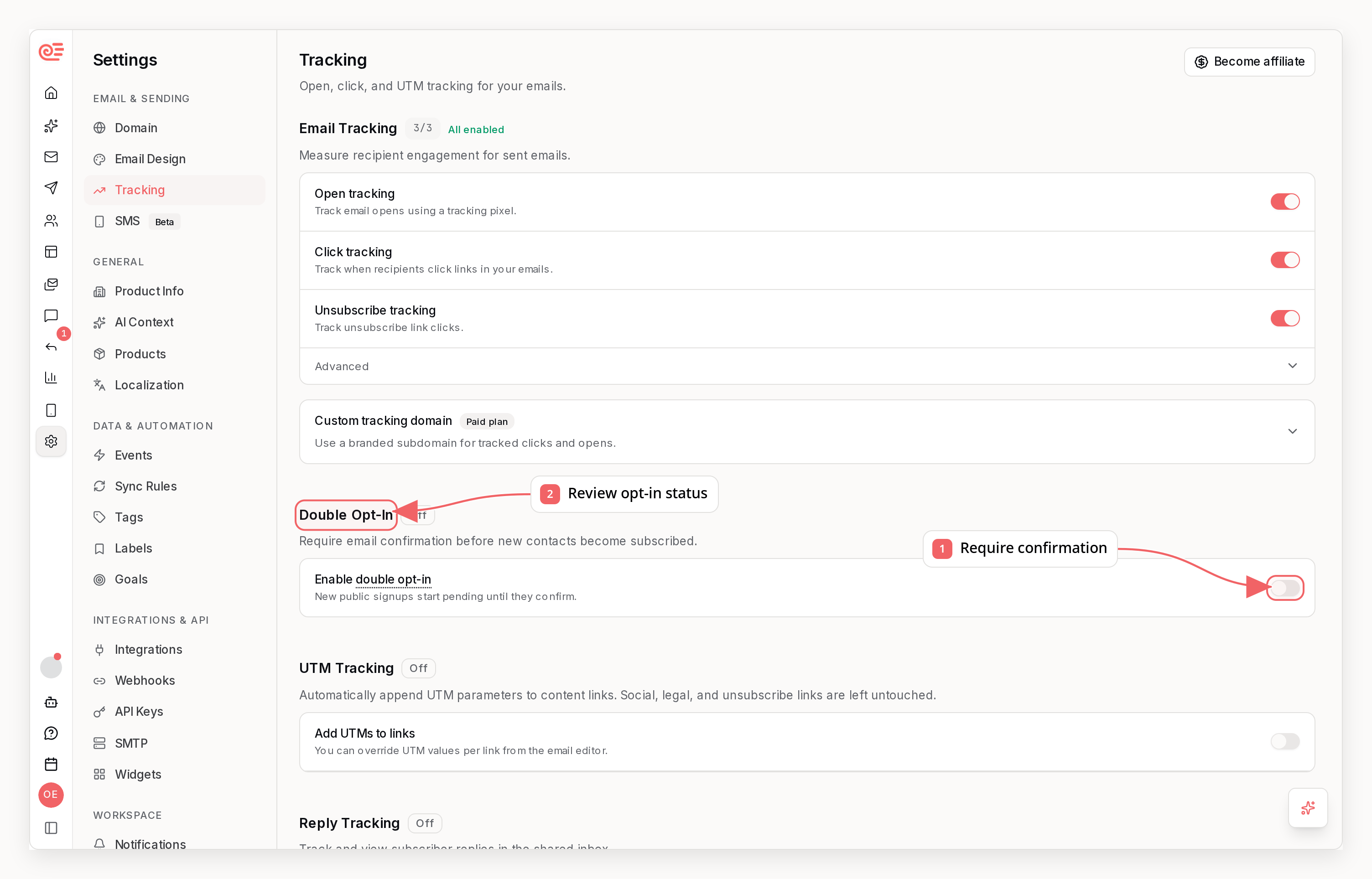
- Go to Settings → Email Tracking.
- Find Double Opt-In.
- Turn on Enable double opt-in.
- Click Edit confirmation email if you want to customize the subject, copy, design, or button text.
- Save your settings.
From the API, CLI, or MCP
The same account-wide toggle is part of the tracking settings surface, so an agent can audit and change it without the dashboard:get_tracking_settings (returned in the consent block) and set it with update_tracking_settings.
Every path behaves the same way: enabling requires a sender profile, and provisions the confirmation email automatically when the workspace does not have one yet. Contacts that are already active are not changed. Reads need the account:read scope, writes need companies:manage.
Signup Forms
Embedded signup forms follow the workspace double opt-in setting. When double opt-in is enabled:- Form submissions create pending subscribers with
status: "unsubscribed" - Selected list IDs and tags are held until confirmation
- The confirmation email is sent automatically
- The success message or redirect still runs after the form submission succeeds
resubscribeBehavior: "double_opt_in"), even when workspace double opt-in is off. That option uses this confirmation email; the form and popup builders can create it for you. It applies only to that form or popup, so turn on workspace double opt-in to require confirmation everywhere.
Signup Form Widget
Learn how embedded signup forms work with double opt-in.
Events, Webhooks, and Tags
Contacts are not only created by signup forms. Events from external apps (Tally, Cal.com, Typeform, and other webhook triggers), the events API, and tag operations can also create brand-new contacts. These paths follow the workspace double opt-in setting too. When double opt-in is enabled and an event or tag creates a new contact:- The contact is stored as
unsubscribedwhile confirmation is pending, and the confirmation email is sent automatically - The event is still recorded and tags are still applied, so your data stays complete
- List membership is held until confirmation
- Sequences triggered by the event or tag enroll the contact immediately, but the enrollment is parked at the trigger step - no emails send yet
API Behavior
The subscriber API accepts anoptInMode field:
Use
confirmed for server-side flows where your app already verified consent, such as paid customer syncs or explicit in-product opt-ins. Omit optInMode or use default when you want the workspace setting to decide for new subscribers. Use double_opt_in when this one request must require confirmation regardless of the workspace setting. default does not send confirmation email to an existing unsubscribed contact.
optIn object:
Create Subscriber API
See the full subscriber create request and response reference.
Confirmation Links
Confirmation links expire automatically. If a subscriber clicks an expired or replaced link, they see an error state and can submit the form again to receive a fresh confirmation email. If a subscriber is already active when they click a valid confirmation link, Sequenzy treats it as already confirmed instead of creating duplicate list memberships or automation entries.Confirmation Page Branding
The confirmation link opens a hosted page that shows your company name, logo, and brand color, with a confirm button. The extra click is deliberate: it stops email security scanners from confirming subscriptions by following links automatically. On free plans the page shows a small “Powered by Sequenzy” line; paid plans hide it, matching form and email branding rules.After Confirmation
By default, confirmed subscribers stay on the hosted confirmation page - it shows a confirmation message with your branding and no outbound links. To send them to your own site instead (for example a thank-you or welcome page), set a confirmation redirect:- Dashboard: Settings -> Email & Tracking -> Double Opt-In -> “After confirmation”
- API:
PATCH /api/v1/tracking-settingswithdoubleOptInRedirectUrl - CLI:
sequenzy tracking update --double-opt-in-redirect-url https://example.com/welcome - MCP:
update_tracking_settingswithdoubleOptInRedirectUrl
http(s) URL; a bare domain is normalized to https://. Clear it (pass null, or an empty value in the CLI) to keep subscribers on the hosted page.