
What is PostHog?
PostHog is an open-source product analytics platform that tracks user behavior, feature usage, and more. It’s popular with SaaS teams who want self-hosted analytics.Prerequisites
Before setting up the integration, ensure your PostHog setup includes user emails:Connecting PostHog
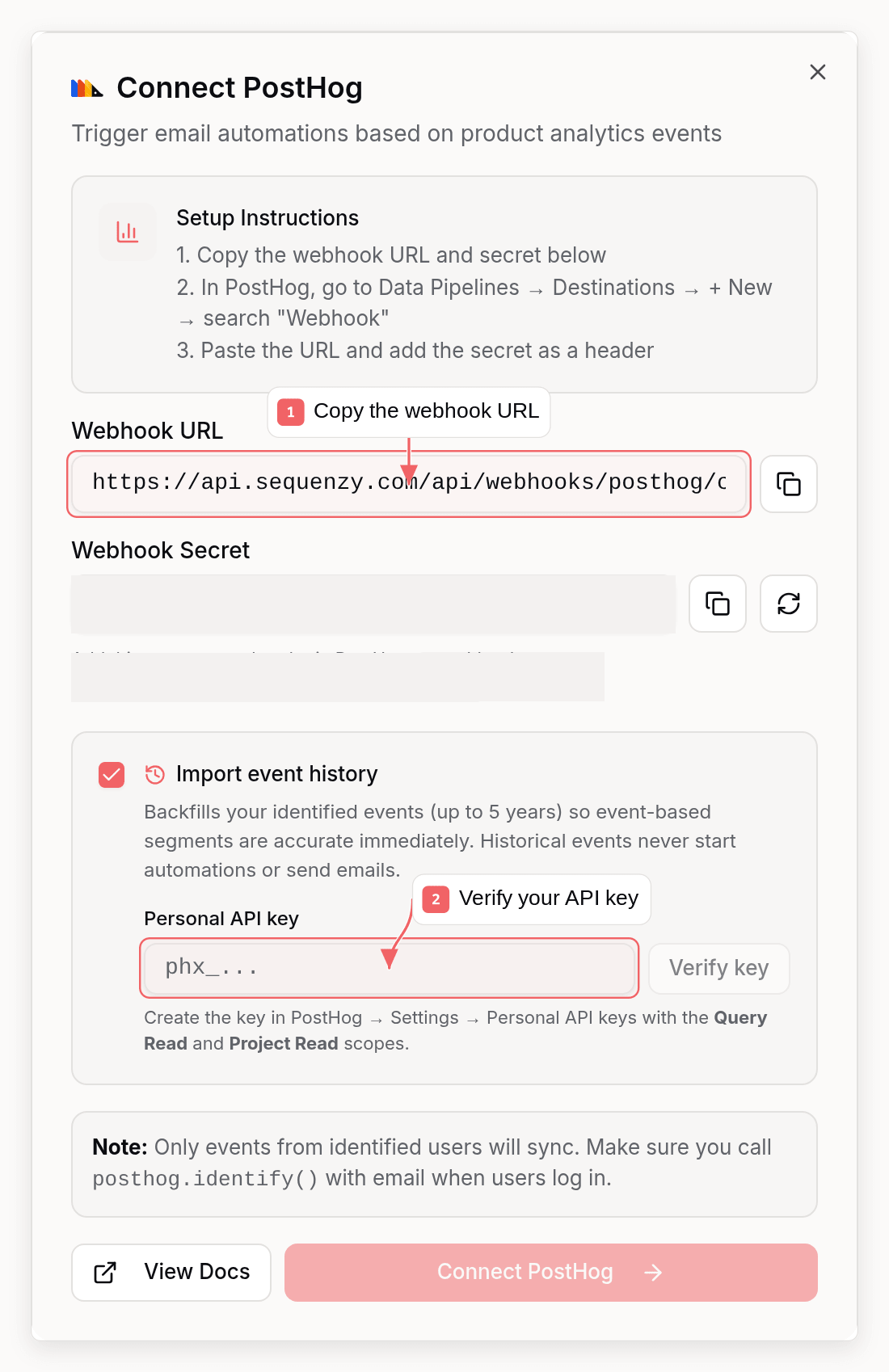
Step 1: Get Your Webhook Configuration
- Go to Settings → Integrations in Sequenzy
- Find PostHog under Product Analytics
- Click Connect
- Copy the Webhook URL and Webhook Secret shown
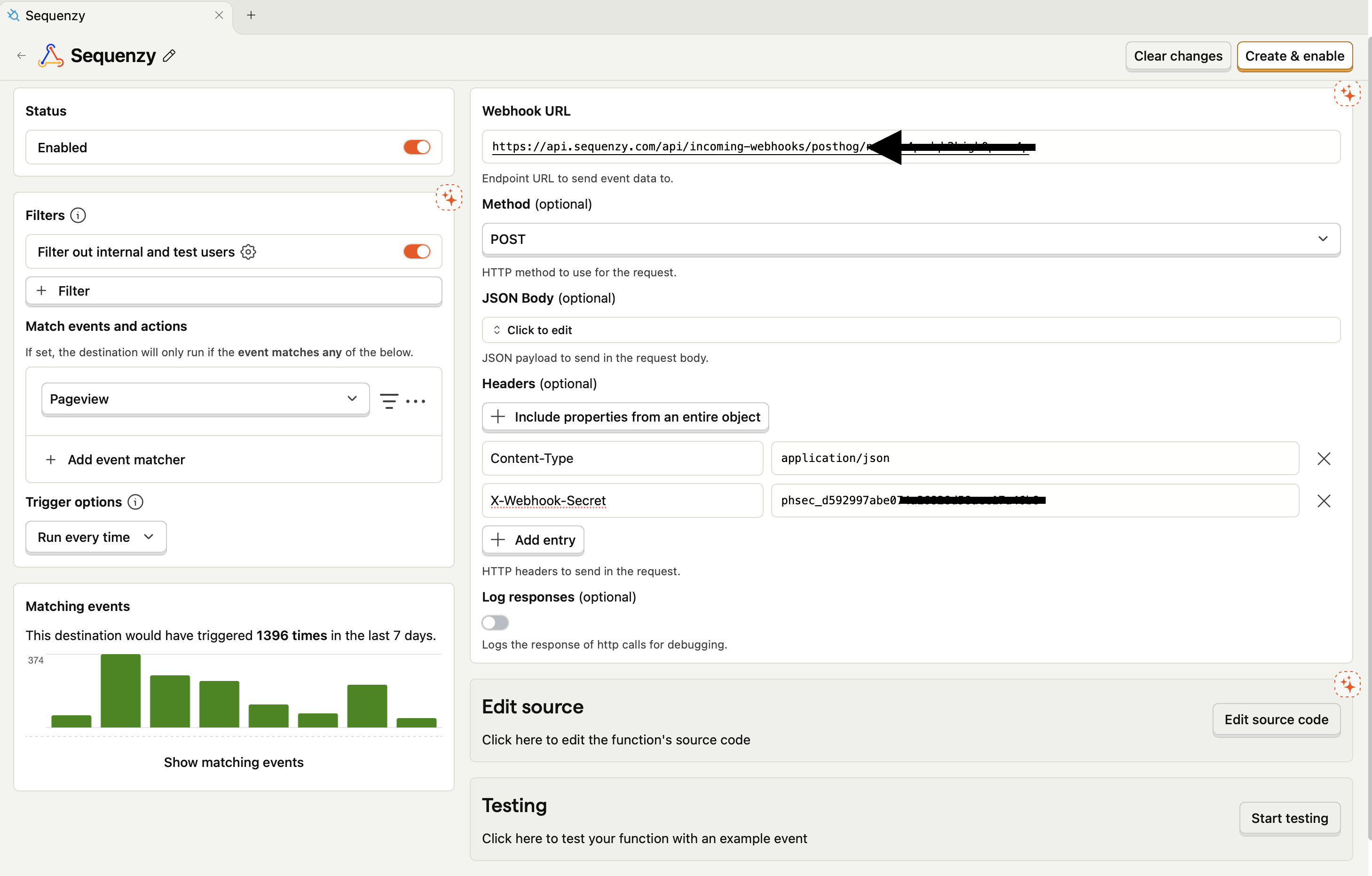
Step 2: Create Webhook Destination in PostHog
- Go to your PostHog Dashboard
- Navigate to Data Pipelines → Destinations
- Click + New → Destination
- Search for “Webhook” in the list and click + Create
- Configure the webhook:
- Webhook URL: Paste your Sequenzy webhook URL
- Headers: Add
X-Webhook-Secretwith your secret from Step 1
- Optionally filter which events to send (or send all - we’ll handle filtering)
- Click Create & Enable
Step 3: Complete Connection in Sequenzy
- Return to Sequenzy’s PostHog connection modal
- Optionally keep Import event history enabled and paste a personal API key (see below) - Sequenzy detects your region and project from the key
- Click Connect PostHog
Importing Event History
The webhook only delivers events from the moment you connect. If you want your existing PostHog data too, enable Import event history while connecting and provide a single input:- Personal API key: create one in PostHog under Settings → Personal API keys with both the Query Read and Project Read scopes. The key is encrypted at rest and never shown again.
A key with only Query Read still verifies and detects your region, but
Sequenzy cannot list your projects - you will be asked to enter the numeric
project ID, found in PostHog under Settings → Project. Add the Project
Read scope to have the project selected for you. An invalid key is rejected
the moment you verify it, instead of surfacing later as a failed background
import.
product.signed_up in the last 30 days” is accurate immediately
after connecting.
What historical events do and do not do
Historical events count everywhere you look at data: event-based segments, campaign audiences, filters, and the contact timeline. They deliberately do not run anything: no sequences are started, no waiting steps resume, no sync rules apply, and no goal conversions are recorded. Importing years of history can never send an email. A few more rules:- Only identified events with a resolvable email are imported; anonymous rows are counted as skipped
- Rows whose address cannot be used - malformed, a dead or disposable domain, or one that has already hard-bounced - are counted as skipped too. A handful of unusable addresses in an old archive never fails the import
- Your event allowlist applies to history too. Without an allowlist, PostHog
internal events (names starting with
$, like$pageviewand$autocapture) are excluded from the import to avoid flooding your workspace with pageview noise - add them to the allowlist explicitly if you want them - Historical
$identifyevents never modify subscriber profiles; only live ones do - Re-running the import is safe: events are deduplicated by PostHog’s own event ID, including against events that already arrived through the webhook
Import status and retry
The PostHog card in Settings → Integrations shows the import state: importing, the number of events imported, or a failure message with a Retry import button. A failed history import never affects the real-time webhook connection. The same status is visible from the CLI (sequenzy integrations list) and the MCP list_integrations tool.
Retry is available from every surface, and they all do the same thing:
What Gets Synced
Custom events are accepted by default. Connections created from August 2026 on also skip PostHog-internal events (names starting with$, like $pageview
and $autocapture) unless you allowlist them, because that traffic usually
swamps the events you actually automate on - $identify always passes so
profile updates keep working. Integrations connected earlier keep receiving
everything their webhook destination forwards; you can enable the same
filtering from the integration’s event settings. When an event is received,
Sequenzy:
- Checks for an email in the event properties (
email,user_email,$email, or nesteduser.email), identify$setproperties, orperson.properties - Skips events without email - anonymous events are silently ignored
- Creates or updates the subscriber with that email
- Records the event with the
product.prefix (e.g.,product.$pageview,product.feature_used) - Triggers any automations listening for that event
Which lists new contacts join
PostHog has no per-integration list targeting. An identified person who is not already a subscriber is created and joined to your workspace Default Lists, the same setting forms, imports, and Dodo Payments follow. A JSONnull there means every current and future list, not “no lists”.
[] joins nothing. Read and set it before you rely on list-scoped segments:
defaultSubscriberListIds on get_company /
update_company. Changing it only affects later writes and repoints every
other untargeted contact source too. This setting applies to live PostHog
events only. Historical imports create new contacts without any list
memberships and do not enroll sequences.
Event Naming
PostHog events are prefixed withproduct. in Sequenzy:
Synced Attributes
Only$identify events update subscriber attributes. Raw properties from all other events stay on the event (available to automations and event-based segments) and are never copied onto the subscriber profile:
To set subscriber attributes from your product, use PostHog’s
identify call. Passing $set or person properties on another event does not update the subscriber profile in Sequenzy.
Using with Automations
Feature Adoption Sequence
Trigger emails when users haven’t used a key feature:- Go to Automations → Create New
- Set trigger to Event Received →
product.signup_completed - Add a Wait step: 3 days
- Add a Condition: Check if
product.feature_usedwas NOT received - Send a “Did you know about this feature?” email
Onboarding Based on Product Usage
Send different onboarding based on what users do:Re-engagement for Inactive Users
Target users who stopped using the product:- Create a segment: “No
product.events in last 14 days” - Send a re-engagement campaign to this segment
Event Properties as Variables
Use PostHog event properties in your emails:Event Allowlist (Optional)
To sync only specific events:- Go to Settings → Integrations
- Click the gear icon next to PostHog
- Uncheck Sync all events
- Pick events from the list, or add names manually
$ events are skipped.
Troubleshooting
Events Not Appearing
- Verify the webhook URL is correct in PostHog
- Check that the
X-Webhook-Secretheader matches your Sequenzy secret - Most common issue: Events don’t have an email - call
posthog.identify()with user email when they log in
Subscriber Not Created
Events without email are silently skipped. Ensure:- You’re calling
posthog.identify(userId, { email: '...' })when users log in - The email is in one of these fields:
email,user_email,$email,userEmail,user.email(nested), identify$set.email, orperson.properties.email - The email is a valid format
Anonymous Events Being Skipped
This is expected behavior. Sequenzy can’t send emails to anonymous users, so we skip events without email addresses. Once a user is identified withposthog.identify(), all their subsequent events will be synced.
Missing Subscriber Attributes
Subscriber attributes are updated only by$identify events. If an attribute isn’t appearing on the subscriber, set it via posthog.identify(userId, { ... }); $set, $set_once, and person properties attached to other event types do not update the subscriber profile in Sequenzy. PostHog internal fields (starting with $) are always excluded.
FAQ
Do I need PostHog Cloud or can I use self-hosted?
Do I need PostHog Cloud or can I use self-hosted?
Both work for real-time events! The webhook destination feature is available
in PostHog Cloud and self-hosted installations. History import is available
for PostHog Cloud (US and EU) only.
Can I import history after connecting without it?
Can I import history after connecting without it?
Yes. Open the connect modal again from Settings → Integrations, enable
Import event history, and reconnect with your API key. Already-imported
and already-received events are never duplicated.
My history import stopped partway through. What now?
My history import stopped partway through. What now?
Retry it - from the Retry import button,
sequenzy integrations sync, or
POST /v1/integrations/{id}/sync. The import starts over from the beginning
and events already imported are deduplicated, so the retry only fills in what
is missing. Live webhook events are unaffected throughout.Will imported history trigger my automations?
Will imported history trigger my automations?
No, never. Historical events populate segments, audiences, and the contact
timeline, but they do not start sequences, resume waiting steps, apply sync
rules, or record conversions. Only live events trigger automations.
What happens to events without email addresses?
What happens to events without email addresses?
They’re silently skipped. Sequenzy needs an email to match events to
subscribers. Make sure you call
posthog.identify() with the user’s email
when they log in.Will pageviews work?
Will pageviews work?
Yes, if you want them: add
$pageview to your event allowlist (or disable
“Skip PostHog-internal events” in the integration settings) and they sync like
any other event, appearing as product.$pageview. New connections skip them
by default because pageview volume usually drowns out the events you automate
on.Can I filter which events are sent?
Can I filter which events are sent?
Yes, you can configure event filtering in PostHog’s webhook destination
settings, or use Sequenzy’s event allowlist feature in the integration
settings.
Is there a delay in event processing?
Is there a delay in event processing?
Events are processed in real-time. Most events appear in Sequenzy within
seconds of being sent from PostHog.
Is this included in my plan?
Is this included in my plan?
Yes, PostHog integration is included at no extra cost.