
Sender Health & Thresholds
Sequenzy monitors your email bounce and complaint rates to protect your sender reputation. We use volume-aware thresholds that become stricter as you send more emails.Thresholds by Volume
We use tiered thresholds based on your total email volume (all-time, not time-windowed) to determine when to warn or pause sending.
Permanent bounces (invalid or non-existent addresses) and temporary bounces
(full mailboxes, throttling, greylisting) are tracked separately, with looser
thresholds for temporary failures because they can recover on their own.
At low volumes (under 100 emails), we use fixed counts instead of
percentages because a single bad event could skew your rate dramatically. For
example, 1 complaint out of 3 emails would be a 33% complaint rate - clearly
not representative of your actual sending quality.
How It Works
Warning Level
When your rates exceed the warning threshold:- A yellow banner appears on your dashboard
- Telegram notification sent to admins
- Email sent to your account with tips to improve
Pause Level
When your rates exceed the pause threshold:- Sending is stopped for the affected company workspace
- A red banner appears on your dashboard
- Telegram notification sent to admins (urgent)
- Email sent explaining the pause and next steps
Restoring paused sending
A pause caused by a high permanent-bounce rate can be cleared by you, once the cause is fixed. Every other pause reason (complaints, temporary bounces, phishing guard, or a manual pause) needs a support review.1. Fix the cause
- Fix the source of the invalid addresses - the import, signup form, or integration that let them in.
- Leave every permanent bounce suppressed. Removing suppressions re-sends to known-bad addresses and pauses the workspace again.
- Require real mailbox proof (double opt-in or a verification step) on any intake that produced the bad addresses.
2. Check the restore path
When sending is paused, Sequenzy runs an automated sender-health review of the account. Check where it landed:selfResume.canSelfResume. Reading it needs only the account:read scope, so a
read-only key can diagnose a blocked account.
If selfResume.canSelfResume is false, selfResume.unavailableReason names
the gate:
3. Resume
OnceselfResume.canSelfResume is true, confirm the cleanup and resume:
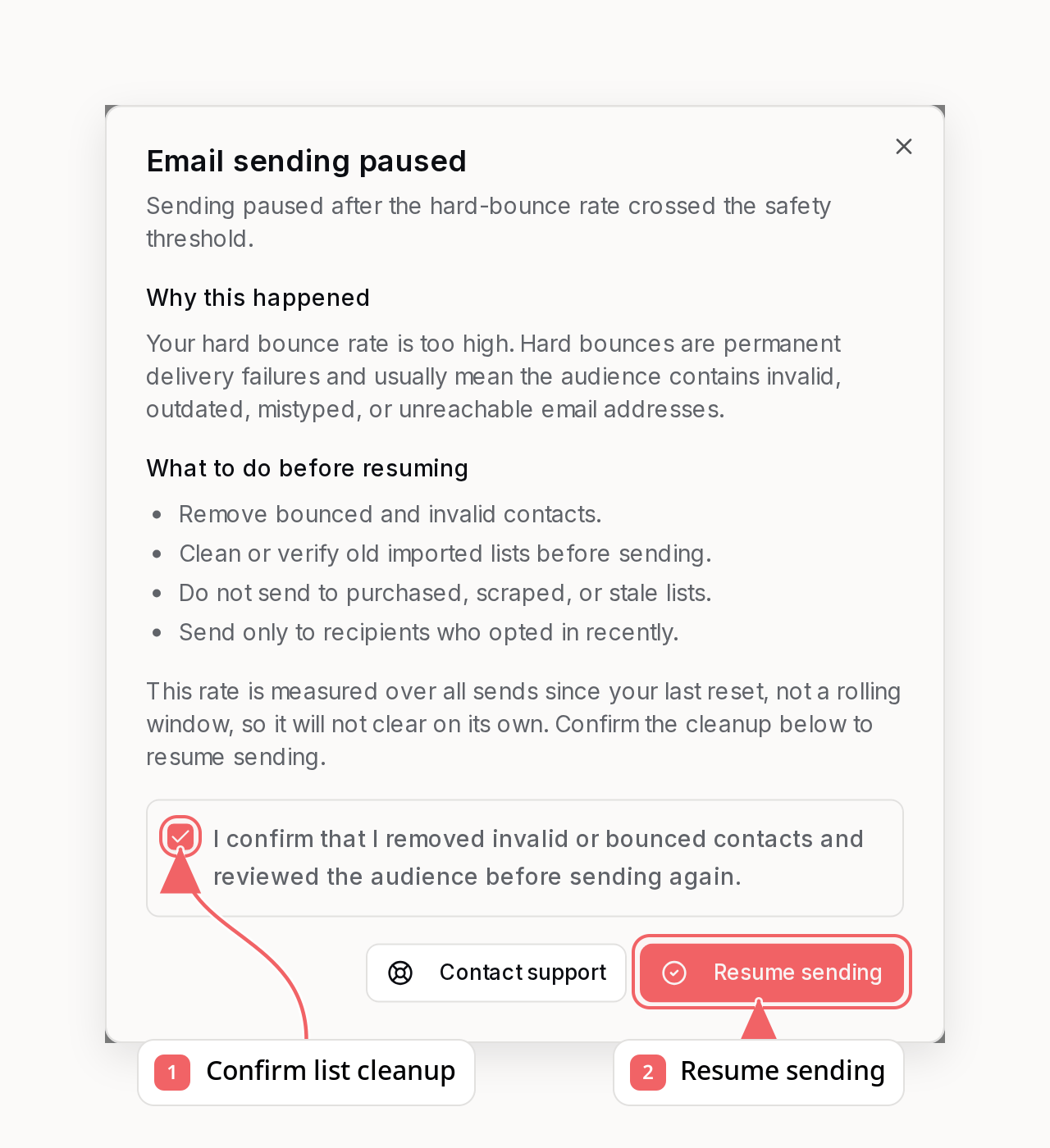
companies:manage scope plus owner or admin access. The
confirmation is recorded on the account’s audit trail, so only send it once the
fix is actually live. On success the bounce watermark moves to now, so your rate
is recalculated from later sends, and the service attempts to requeue paused
campaigns plus due sequence steps. If part of that handoff is unavailable, the
successful response includes support guidance rather than reporting the resume
itself as failed.
Resuming never removes suppressions, and automatic resume is available a limited
number of times before a support review is required.
Why These Thresholds?
Email service providers like Gmail and Yahoo require complaint rates under 0.1% for good deliverability. AWS SES (which powers Sequenzy’s sending infrastructure) enforces similar limits. Our tiered approach ensures:- New senders aren’t unfairly penalized for a single bad email at low volume
- Growing senders are held to industry standards as their volume increases
- High-volume senders maintain excellent reputation with the strictest thresholds
Examples
Improving Your Sender Health
If you’re seeing warnings or have been paused:- Clean your list - Remove invalid addresses and unengaged subscribers
- Use double opt-in - Confirm subscribers before adding them to your list
- Make unsubscribing easy - A clear unsubscribe is better than a spam complaint
- Send relevant content - Segment your list and personalize your emails
- Maintain consistent sending - Sporadic sending can hurt engagement rates
FAQ
Why are my emails going to spam?
First, check whether you’re sending from a verified custom domain that you own. If you’re using Sequenzy’s free sharedsequenzymail.com domain, your emails share sending reputation with other users on that domain. That shared reputation can make inbox placement less predictable, especially with Gmail, Outlook, and Yahoo.
For better deliverability, add and verify your own sending domain in Sequenzy, then send from an address on that domain. See Domain Verification for setup instructions.
Why was my account paused with only a few complaints?
At low volumes (under 100 emails), we use fixed counts to protect your sender reputation early. While 2 complaints might seem small, it indicates a significant portion of recipients are marking your emails as spam. This early intervention prevents larger reputation damage.How do I get unpaused?
If the pause was caused by a high permanent-bounce rate, fix the source of the invalid addresses and then resume it yourself - see Restoring paused sending. For any other pause reason, email nic@sequenzy.com with your account email, what caused the issue, and the fix you shipped.Do these thresholds reset over time?
No. These are total metrics counted from a reset watermark, not a rolling window, so a paused rate does not expire and waiting does not restore sending.GET /api/v1/sending-status reports this explicitly: metricsWindow.expiresAt
is always null.
The rate only moves in two ways: as more legitimate sends accumulate in the
denominator, or when the watermark is reset - which happens when you resume a
paused workspace, or when support resets it for you.
Why did my test send fail even though the email is valid?
A pause blocks test sends too.send_test_email and send_sequence_test_email
return a SENDING_PAUSED error with the pause reason and the steps to clear it.
Test sends are also excluded from the sender-health denominator, so they cannot
be used to dilute a bounce rate.
What counts as a complaint?
A complaint is recorded when a recipient marks your email as spam using the “Report Spam” or similar button in their email client. This feedback is sent to us through feedback loops with major email providers.What types of bounces affect my rate?
All bounce types (permanent, transient, and undetermined) count toward your bounce rate. Permanent bounces (invalid addresses) are the most concerning, but high transient bounce rates can also indicate issues.Account Review
If your company’s sending is paused repeatedly or we detect severe abuse, support may review the broader account and can apply a real account ban when product access should be blocked entirely. Company sender-health metrics and pauses are otherwise isolated. Billing is different: companies with the same owner share the owner’s email plan and usage pool. See Workspaces, Billing, and Shared Limits for the complete scope breakdown, including shared domains and dedicated IP reputation.When support review is required
Most permanent-bounce pauses can be cleared without us - see Restoring paused sending. Email nic@sequenzy.com whenselfResume.canSelfResume stays false, and include:
- Your account email address and company ID
- What caused the bounce or complaint issues
- What steps you’ve taken to clean your email list and fix the intake
Related
Metrics Dashboard
Monitor your email performance in real-time
Domain Verification
Improve deliverability with proper DNS setup