
What is Segment?
Segment is a customer data platform (CDP) that collects events from your product once and routes them to your downstream tools. If you already sendanalytics.track() and analytics.identify() calls, Sequenzy becomes one more destination.
Prerequisites
Sequenzy matches events to subscribers by email, so your identify calls need an email trait:Connecting Segment
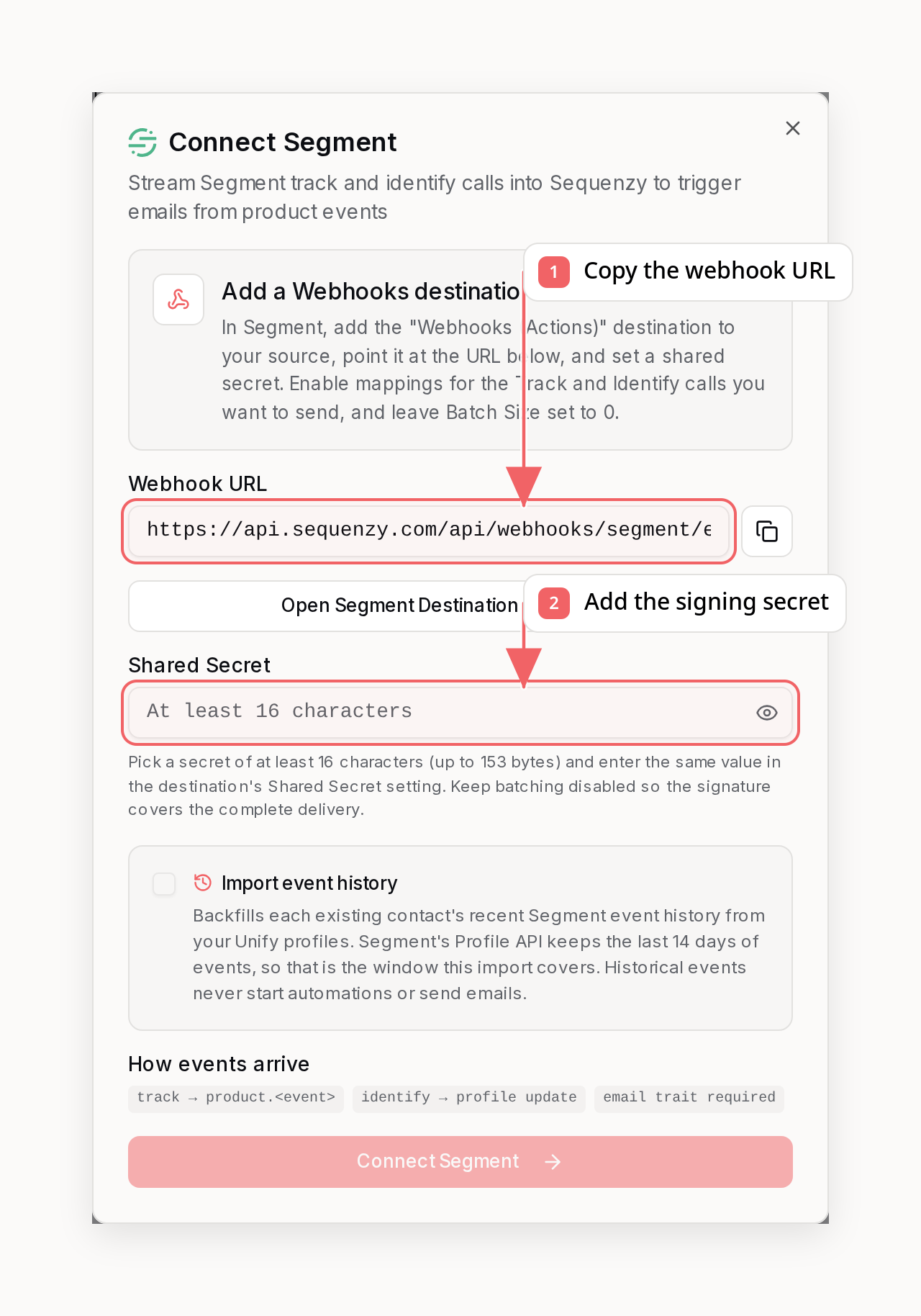
Step 1: Get Your Webhook Configuration
- Go to Settings → Integrations in Sequenzy
- Find Segment under Product Analytics
- Click Connect
- Copy the Webhook URL and choose a Shared Secret (at least 16 characters)
Step 2: Add a Webhooks Destination in Segment
- In your Segment workspace, open Catalog → Destinations
- Search for “Webhooks (Actions)” and add it to the source you want to stream
- Configure the destination:
- URL: Paste your Sequenzy webhook URL
- Shared Secret: Enter the same secret you chose in Step 1
- Enable mappings for the Track and Identify calls you want to send (Send as JSON, POST)
- Leave Batch Size set to
0so every signed request contains one message - Enable the destination
Step 3: Complete Connection in Sequenzy
- Return to Sequenzy’s Segment connection modal
- Enter the same shared secret
- Click Connect Segment
messageId.
What Gets Synced
When an event is received, Sequenzy:
- Checks for an email in the event
properties, or incontext.traitsfor identified calls (identify calls use theirtraits) - If there is no email, matches the event’s
userIdoranonymousIdagainst thesegmentUserId/segmentAnonymousIdattributes stored by an earlier identify call - only events that resolve neither way are skipped - Creates or updates the subscriber (an identify reporting a new email for a known
userIdupdates the existing subscriber’s email instead of creating a duplicate) - Records the event with the
product.prefix (e.g.,product.Order Completed,product.feature_used) - Triggers any automations listening for that event
Event Naming
Segment track events are prefixed withproduct. in Sequenzy, keeping the event name verbatim:
Segment and PostHog feed the same
product.* namespace, so sequences built on
product.* events keep working if you switch analytics providers.Synced Attributes
Onlyidentify calls update subscriber attributes. Properties on all other calls stay on the event (available to automations and event-based segments) and are never copied onto the subscriber profile:
Credential-looking trait keys (
token, password, apiKey, and similar) are always redacted before storage, and nested objects are not synced as attributes.
Importing Event History (Optional)
A fresh connection only receives events from the moment the webhook goes live. If you use Segment Unify, you can also backfill your existing contacts’ recent event history so event-based segments reflect the last two weeks of activity immediately. Segment’s Profile API serves at most the last 14 days of a profile’s events, so that is the window the import covers - older history is not available from Segment. Segment has no bulk event export, so the import works through the Profile API: Sequenzy walks your existing contacts and reads each one’s profile history (last 14 days) by email. Contacts without a Unify profile are simply skipped, and imported events dedupe against live webhook deliveries bymessageId, so the overlap window cannot double-count.
Historical events never start automations, never send emails, and never fire
outbound webhooks. They appear on the contact timeline and count toward
event-based segments, and a contact’s signup date moves earlier when history
proves they predate it.
- In Segment, go to Unify → Settings → API access and note the Space ID, then generate a Profile API token
- In Sequenzy’s Segment connection modal, check Import event history and enter both - the workspace region (US or EU) is detected automatically
- Connect. The import runs in the background; the Segment card shows its progress and offers Retry if it fails
sequenzy integrations sync <integration-id> (or the dashboard’s Retry button). Re-runs restart from the beginning and already-imported events dedupe, so nothing is duplicated.
Page and Screen Calls
Connections created from August 2026 on skippage and screen calls by default because their volume usually drowns out the events you automate on - identify always passes so profile updates keep working. To ingest them, add page or screen to your event allowlist and make sure their mappings are enabled on the Segment destination (Segment only delivers calls whose mappings are on). If you never want them, disable their mappings in Segment instead - that also keeps them out of your Segment delivery volume.
Event Allowlist (Optional)
To sync only specific events, connect via the API, CLI, or MCP with an allowlist:identify calls always pass, even when they are not on the allowlist - they carry the profile updates that keep every other event resolvable.
Or filter at the source: Segment’s destination filters and mapping triggers control which calls are delivered at all, which also keeps them out of your Segment delivery volume.
Using with Automations
Activation Sequence
- Go to Automations → Create New
- Set trigger to Event Received →
product.signed_up - Add a Wait step: 3 days
- Add a Condition: Check if
product.feature_usedwas NOT received - Send a “Did you know about this feature?” email
Re-engagement for Inactive Users
- Create a segment: “No
product.events in last 14 days” - Send a re-engagement campaign to this segment
Troubleshooting
Events Not Appearing
- Verify the destination URL in Segment matches your Sequenzy webhook URL exactly
- Check that the destination’s Shared Secret matches the secret you entered in Sequenzy - mismatches are rejected with a 401 and show up as failed deliveries in Settings → Integrations → Activity
- Most common issue: Events don’t carry an email - call
analytics.identify()with the user’s email when they log in
Subscriber Not Created
Events that resolve neither an email nor a previously identifieduserId are silently skipped. Ensure:
- You’re calling
analytics.identify(userId, { email: "..." })when users log in - The email is in
traits.email(identify),properties.email, orcontext.traits.email - The email is a valid format
Missing Subscriber Attributes
Subscriber attributes are updated only byidentify calls. If an attribute isn’t appearing, set it as an identify trait; properties on track calls never update the profile. Nested objects and credential-looking keys are excluded.
FAQ
Is this one-way or two-way?
Is this one-way or two-way?
One-way: Sequenzy ingests events from Segment and never writes anything
back. Sequenzy is a destination, not a source.
Which Segment plan do I need?
Which Segment plan do I need?
The Webhooks (Actions) destination is available on all Segment plans,
including the free tier.
Can I send events from multiple Segment sources?
Can I send events from multiple Segment sources?
Yes. Add the same Webhooks destination (same URL and shared secret) to each
source you want to stream.
What happens to events without email addresses?
What happens to events without email addresses?
Once a user has been identified with an email, later events that carry only
their
userId or anonymousId are matched back to the same subscriber.
Events from users who were never identified (and carry no email anywhere) are
silently skipped - Sequenzy needs an email or a known identifier to match a
subscriber.Will retried Segment deliveries duplicate events?
Will retried Segment deliveries duplicate events?
No. Deliveries are deduplicated by Segment’s
messageId, so a retry of the
same message is acknowledged without creating a second event.Is there a delay in event processing?
Is there a delay in event processing?
Events are processed in real-time. Most events appear in Sequenzy within
seconds of being delivered by Segment.
Is this included in my plan?
Is this included in my plan?
Yes, the Segment integration is included at no extra cost.