
What is Dodo Payments?
Dodo Payments is a simple payments platform designed for indie developers and small businesses. It offers straightforward pricing, easy integration, and handles payments globally with minimal setup.Connecting Dodo Payments
Dodo Payments requires manual API key and webhook setup. Here’s how to connect:Step 1: Get Your Dodo API Key
- Go to your Dodo Payments Dashboard
- Navigate to Settings → API Keys & SMTP
- Create a new API key or copy an existing one
- Copy the API key
Step 2: Find Your Business ID
- In the Dodo Payments Dashboard, go to Settings
- Your Business ID is displayed in your account settings (format:
bus_xxxxxxxxx) - Copy this ID for later
Step 3: Set Up Webhooks in Dodo Payments
- In Dodo Payments, go to Settings → Webhooks
- Click Add Endpoint
- Enter your Sequenzy webhook URL:
You can find this URL in Sequenzy when connecting Dodo Payments - it’s automatically shown in the connection modal.
- Select these events to listen for:
payment.succeededpayment.failedpayment.cancelledsubscription.activesubscription.updatedsubscription.renewedsubscription.plan_changedsubscription.cancelledsubscription.expiredsubscription.on_holdsubscription.failedrefund.succeeded
- Click Create to save the webhook endpoint
- Copy the Webhook Secret (format:
whsec_xxxxxxxxx)
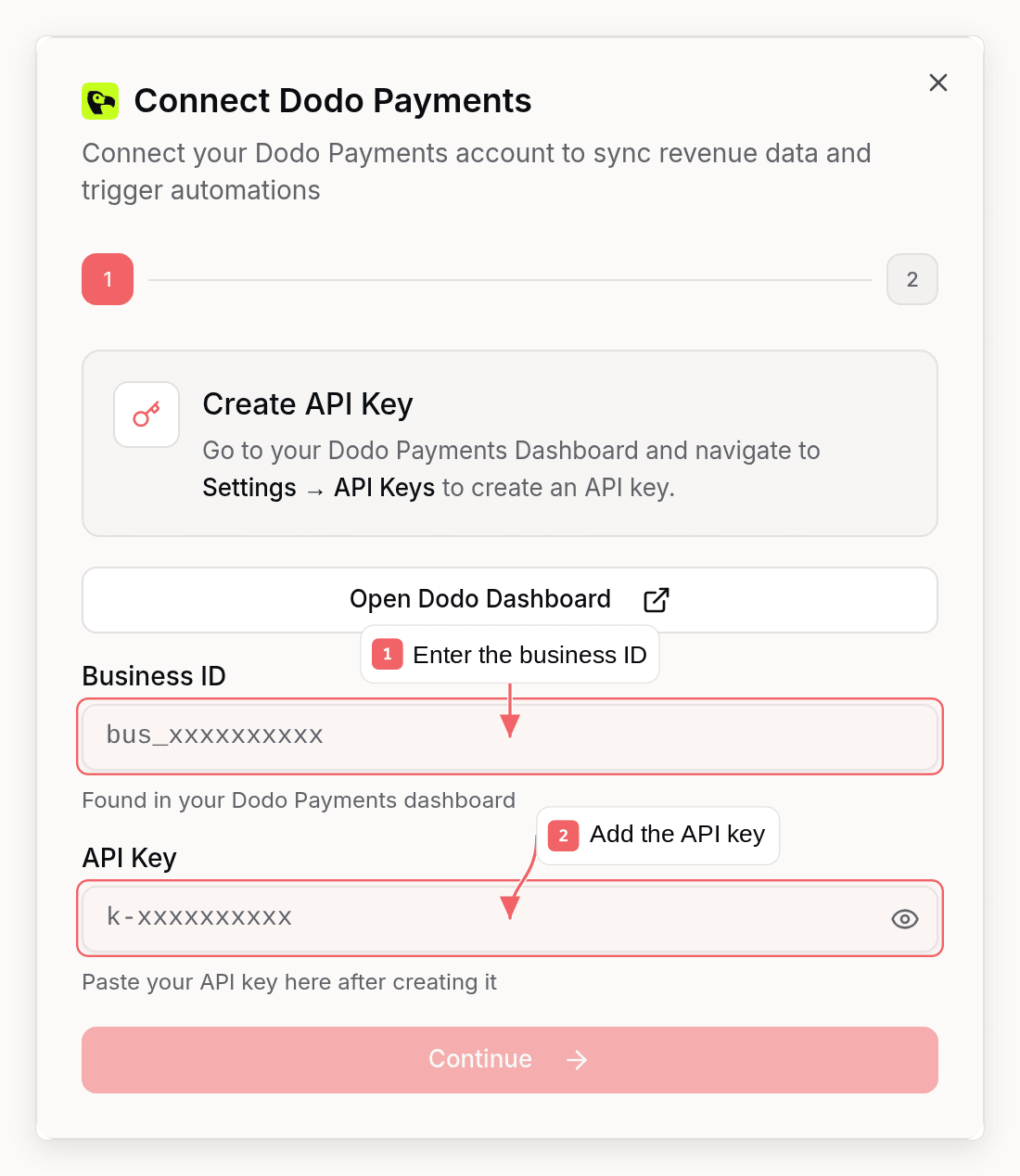
Step 4: Connect in Sequenzy
- Go to Settings → Integrations in Sequenzy
- Click Connect next to Dodo Payments
- Enter your:
- Business ID (from Step 2)
- API Key (from Step 1)
- Webhook Secret (from Step 3)
- Click Connect Dodo Payments
Synced Attributes
When connected, Sequenzy adds these attributes to each subscriber matched by email:MRR Calculation
MRR is normalized from any billing interval:- Monthly: Used as-is
- Yearly: Divided by 12
- Weekly: Multiplied by 52, then divided by 12
- Daily: Multiplied by 365, then divided by 12
active subscriptions count toward MRR.
Automatic Tags
Sequenzy automatically applies tags to subscribers based on their Dodo Payments subscription status:
These tags update automatically whenever subscription status changes via webhooks.
Dodo sends
subscription.cancelled when a subscription actually ends, whether
the customer cancelled immediately or a scheduled cancellation reached its
billing date. A scheduled cancellation arrives as subscription.updated with
cancel_at_next_billing_date set, and un-scheduling it removes the
cancelled tag again. Both paths match what a manual Sync revenue run
produces from the Dodo API.
Tracked Events
When you connect Dodo Payments, these events are automatically tracked for use in automations:Subscription lifecycle events keep subscription attributes up to date without
firing a separate purchase event.
subscription.plan_changed also updates MRR
without increasing LTV. Dodo’s payment.succeeded event updates
payment-driven MRR and LTV and triggers saas.purchase.Using Revenue Data
Building Segments
With MRR and LTV synced as numeric attributes, you can create sophisticated segments: Revenue-based segments:mrr >= 100: High MRR customersltv > 1000: Lifetime high-value customersmrr >= 50 AND mrr < 200: Mid-tier customers
tag = churned AND ltv > 500: High-value churned customers (win-back targets)tag = cancelled AND mrr >= 100: At-risk high-value customers needing attentiontag = saas.yearly AND mrr >= 100: Yearly enterprise customers
Automations
Trigger automations when revenue attributes change:- Send a thank-you email when
ltvexceeds a threshold - Trigger a win-back sequence when a subscriber gets the
churnedtag - Notify your team when a high-value customer cancels
Which Lists Contacts Join
Dodo Payments has no per-integration list targeting. Customers it creates, including the initial revenue backfill, join your workspace Default Lists. A JSONnull on that setting means every current and future list, not “no
lists”. [] is the value that joins nothing. Check it before connecting, and
set it to specific lists (or to none) if you do not want paying customers in
every marketing list:
defaultSubscriberListIds on get_company /
update_company. Changing the default only affects later writes and also
repoints forms, imports, and every other untargeted source. Stripe can be
pointed at its own lists with set_integration_list_targeting; Dodo cannot.
How Matching Works
Subscribers are matched by email address (case-insensitive). A Dodo Payments customer with emailUser@Example.com will match a subscriber with email
user@example.com.
A customer with an email that is not already in Sequenzy is created as a new
subscriber and joined to the workspace Default Lists. Events with no email are
acknowledged and skipped.
Troubleshooting
Webhooks Not Arriving
- Verify your webhook URL is correct in Dodo Payments settings
- Check that you’ve selected the correct events
- Check Dodo Payments webhook logs for failed delivery attempts
- Ensure your Sequenzy webhook endpoint is accessible
Invalid Webhook Signature
If webhooks are failing with signature errors:- Verify you copied the complete webhook secret from Dodo Payments
- Re-create the webhook endpoint in Dodo Payments and update the secret in Sequenzy
- Ensure you’re using the correct secret format
Customer Email Not Found
Dodo Payments webhooks include customer data with email addresses. A customer with a valid email is created if they are not already a subscriber. If events are acknowledged but nobody appears:- Confirm the webhook payload includes a customer email - events without one are skipped
- Check that the address in Dodo Payments is a valid email
- Read workspace Default Lists if the
contact exists but is missing from the lists your segments use - a JSON
nullthere means every list,[]means none