
Connect And Configure
- Install Sequenzy from the Webflow Marketplace, or open Settings → Integrations → Websites & Forms → Webflow → Connect.
- Review the requested scopes in Webflow. Choose only the sites or workspace Sequenzy should be authorized to read, then approve the connection.
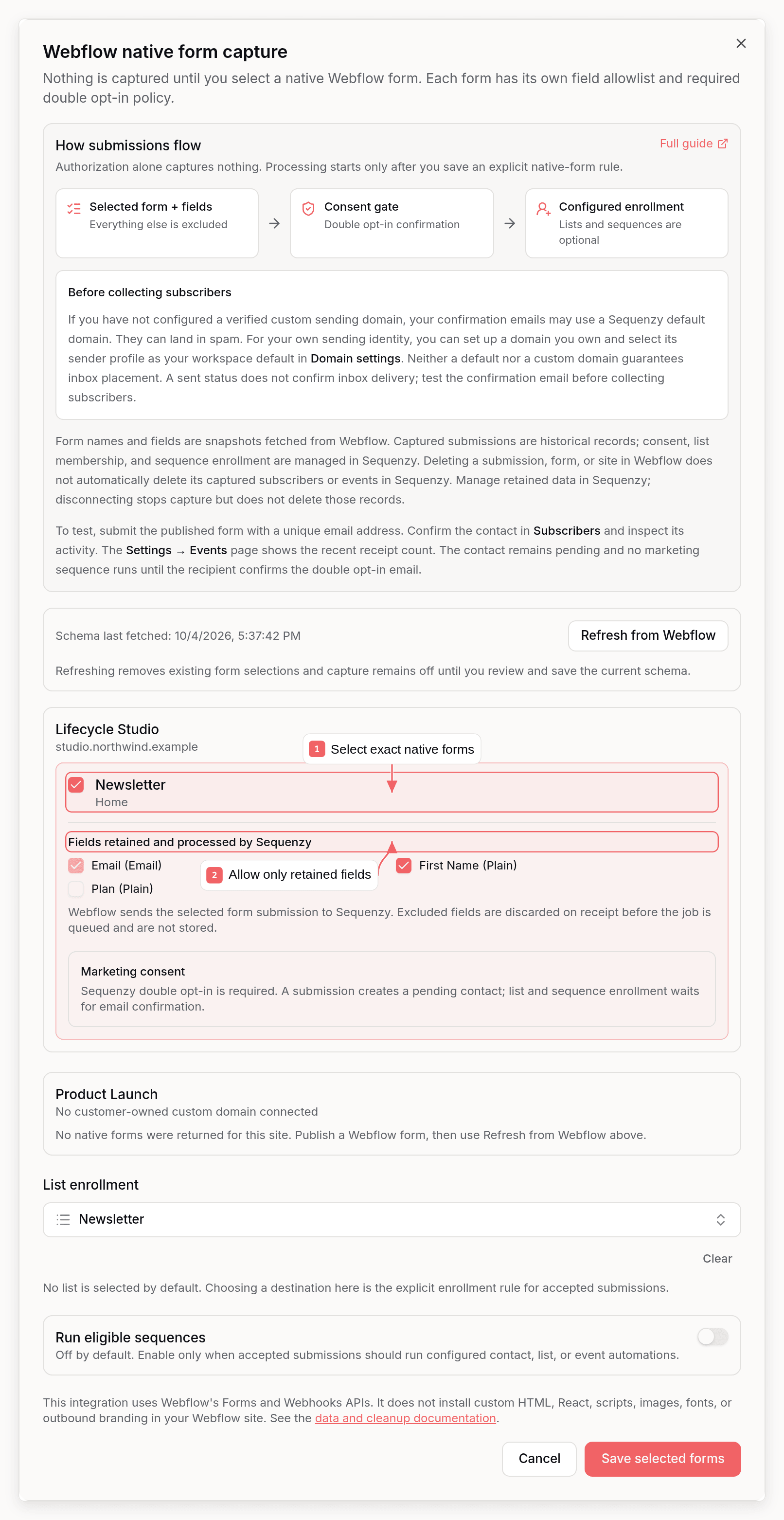
- Back in Sequenzy, open Webflow → Select forms.
- Select each native form Sequenzy may process. Unselected forms are excluded.
- For each selected form:
- confirm the native Email field;
- allow only the additional fields Sequenzy needs;
- review the required Sequenzy double opt-in policy.
- Choose explicit list enrollment. No lists is the default.
- Leave Run eligible sequences off unless submissions should start configured automations.
- Save. Sequenzy creates one
form_submissionwebhook filtered to each selected form name.
Form And Field Selection
GET /v2/sites/{siteId}/forms to show the native forms returned
by Webflow. A form is processed only when its Webflow form ID and site ID match
a saved capture rule.
- Unselected sites and forms are rejected.
- Removing a selected form reconciles and removes its Sequenzy-owned webhook.
- Clearing every selection turns capture off and removes the integration’s webhooks.
- Duplicate form names on one site cannot be selected because Webflow’s webhook filter is name-based. Rename the forms in Webflow, then use Refresh from Webflow to load the current schema.
- Forms without a native Email field cannot be selected.
- Password, passcode, credential, authentication-token, and secret fields are never selectable.
- Use Refresh from Webflow after publishing or changing a native form. Refresh removes every saved selection and webhook, then leaves capture off until an administrator reviews the new schema and saves exact rules again. It also clears destination lists and turns off sequence enrollment, so review those settings before saving. The form-selection screen shows Schema last fetched beside the refresh control and flags forms with duplicate names.
Consent And Enrollment
A Webflow submission is not marketing consent by itself. Every selected form uses Sequenzy double opt-in. A valid submission creates a pending contact and queues the confirmation email; the contact cannot receive marketing email until they confirm. Sequenzy does not infer consent from a Webflow submission or from an undocumented field type. List enrollment and sequence enrollment are separate controls:- New connections default to No lists.
- Selecting one or more lists adds accepted contacts only to those lists.
- Run eligible sequences defaults to off.
- Event automations do not run while the contact is pending. Eligible contact/list automations run only after confirmation and only when Run eligible sequences is enabled.
Data Flow And Storage
Form schemas are snapshots from Webflow as of Schema last fetched. Captured submissions are historical copies of the allowed fields at capture time, not a live view of Webflow. Consent status, list membership, and sequence enrollment are managed in Sequenzy. Consent metadata on a submission event describes that event, not the subscriber’s current consent status. Later changes or deletions of submissions, forms, or sites in Webflow do not automatically update or delete subscribers or events already captured in Sequenzy. Disconnecting stops capture but does not delete those records. Delete subscribers in Sequenzy: deleting a subscriber also deletes their captured events, usually within an hour. Deleting the workspace deletes all of them.
Sequenzy does not publish or modify Webflow pages, Designer elements, form
markup, CMS content, assets, custom code, or site styles. The integration adds
no fonts, images, third-party asset requests, or “Powered by Sequenzy” link to
the published site. While Webflow is connected, Sequenzy also disables its
custom form and popup embed code and rejects submissions to previously deployed
Sequenzy embed endpoints for that workspace. This policy is enforced by the
public API, not only hidden in the dashboard.
Event Shape
Accepted submissions recordwebflow.form_submission. Only fields selected in
the allowlist appear under formData:
Security And Ownership
For every delivery, Sequenzy:- verifies
x-webflow-signatureover the timestamp and exact raw body using the Webflow app secret; - rejects timestamps older than five minutes or more than 30 seconds in the future;
- claims short-lived delivery and submission replay keys before queueing;
- requires an active local integration and an exact saved form/site rule;
- re-introspects the OAuth token in the worker and verifies the site or workspace is still authorized immediately before any subscriber write;
- uses a stable Webflow submission event ID so worker retries cannot create a second event.
Custom Domains And Sending Domains
Sequenzy reads customer-owned domains from Webflow’s Custom Domains API for site context and domain suggestions. It never suggests a*.webflow.io staging
domain as a sending domain. You can still enter another domain manually, but
you must own and verify it before sending.
Your workspace may initially use a Sequenzy default sending domain. You can use
it for confirmation emails, but neither a default domain nor a verified custom
domain guarantees inbox placement. Sent does not prove that Gmail placed a
message in the inbox. A confirmation email in spam can prevent a new contact
from completing double opt-in.
For your own sending identity, you can open Settings → Domain, configure a
sending domain you own, complete the DNS verification instructions, and select
a sender profile on that domain as your workspace default. A custom domain is
optional. The Webflow form-selection
screen displays this guidance even when you already have a custom domain.
Submit a test form and complete confirmation to verify the full flow. If a
confirmation email lands in spam, inspect its authentication results and
contact support with the sending address and message details. Do not assume
that changing domains alone fixes deliverability.
Disconnect And Cleanup
When an administrator clicks Disconnect, Sequenzy immediately marks the integration inactive. New webhook requests stop processing. A cleanup job then:- deletes only webhook IDs recorded by Sequenzy and matching this workspace’s callback URL;
- lists Webflow app-owned webhooks as a recovery check and deletes only the same matching callback registrations;
- revokes the OAuth authorization when no other active Sequenzy workspace uses that grant;
- deletes the encrypted token, Webflow user/site/form metadata, capture rules, and local webhook registrations.
privacy@sequenzy.com with the Sequenzy workspace
ID and Webflow site ID for an assisted deletion check.
Verify The Complete Flow
- Confirm the integration says capture off immediately after OAuth.
- Select one native form and exclude at least one non-required field.
- Review double opt-in, configure lists and sequences, then save.
- Submit an unselected form. Confirm no Sequenzy contact or event appears.
- Submit the selected form with a unique email.
- Verify the contact is pending and no marketing sequence runs before email confirmation.
- Confirm the email, then verify the subscriber, consent metadata, exact list membership, and
webflow.form_submissionevent. Confirm the excluded field is absent. - Disconnect and confirm webhook cleanup completes; verify the app grant is removed when it is no longer shared.