
The SDK names are the wire format. Each identified event lands on the
contact’s timeline as the built-in event shown above - the same
names you see under Settings → Events & Sync Rules and pick as sequence triggers. They
are not a separate event system, and they are unrelated to any custom
events you define yourself. Sequenzy also derives
ecommerce.cart_abandoned and ecommerce.browse_abandoned from this
activity; your site never sends those directly.
Where is the purchase event?
There is deliberately noorder_completed in the browser SDK. A browser event
is not trustworthy proof of payment (anyone can fire one from the console),
and checkout often finishes where the snippet is not running - a hosted
payment page, another device, a retried card. Purchases instead come from
your backend: call POST /api/v1/orders with
your secret API key whenever an order is placed.
That one call does everything the “order complete” event would:
- Fires
ecommerce.order_placedon the contact, with revenue attributes (ltv,totalSpent,ordersCount) updated for segmentation. - Clears the tracked cart immediately, so a pending cart-abandonment check finds nothing to email about.
- Stops in-flight recovery sequences: cart and checkout recovery triggers get
a default stop condition on
ecommerce.order_placed, so remaining emails are cancelled the moment the order arrives.
identify), and the order is matched to whatever cart that contact had
tracked. See Custom commerce for the full
orders and checkouts flow, including ecommerce.checkout_started for
abandoned-checkout sequences.
Anonymous visitors are not lost
Most people browse before they ever type an email address. The SDK keeps that history:- A visitor browses anonymously. Their events are held in their browser. The
SDK still pings the endpoint so the dashboard’s
lastUsedAtshows the snippet is alive, but nothing is stored server-side for an anonymous visitor - the server answersqueued: false. - The visitor signs in or reaches checkout. Your backend mints a short-lived
identity token, and your site calls
sequenzy.identify(email, token). - The held events are replayed against that contact at their original timestamps.
Step 1: Create a tracking key
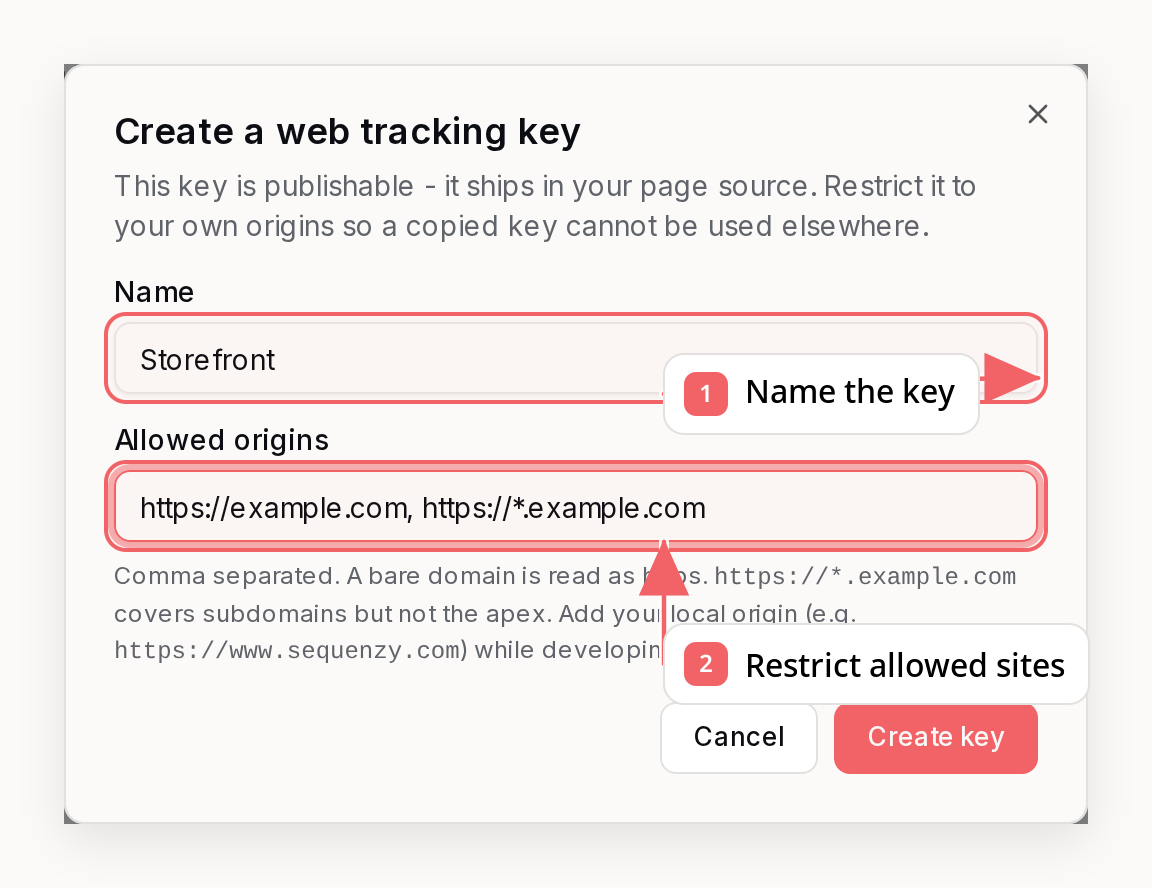
Origin header. Identified events therefore also require a signed,
short-lived identity token minted by your backend.
A bare domain is read as
https. https://*.example.com covers subdomains at
any depth but not the apex, so list https://example.com separately if you
need both. Add your development origin (for example http://localhost:3000)
while you are wiring things up.Step 2: Install the snippet
Paste the snippet from the dashboard or CLI into every page. Its first script creates lightweight method stubs synchronously, so calls made while the SDK is still downloading are queued rather than lost:Install from npm
If your site has a JavaScript build, install the side-effect-free package and create the client explicitly:Step 3: Identify your visitors
Callidentify as early as your backend has authenticated someone - on sign-in,
and again at checkout. First mint a token from your backend using a secret API
key with commerce:write, automations:trigger, and subscribers:write (the
last one because minting can create the contact). Pass the same publishable
key that is in your snippet:
ttlHours accepts up to 720). Mint a fresh
one on each sign-in and at checkout rather than reaching for a long lifetime -
the token is a bearer proof, and a short expiry is what limits a leaked one.
Minting also establishes the email as a contact if it is not one yet, so
identified events always have a profile to land on. The contact is created
active with no list memberships and no automations triggered - enroll it
through your normal signup flows when you want more than event attribution.
Return only identityToken to that signed-in browser, then pass it with the
same normalized email:
reset() on sign-out so the next person using that browser starts clean:
Step 4: Track events
Each event has a convenience method:providerProductId is your own product id. Use the same value you push to the product catalog so recommendations and product blocks in emails resolve to the right item.
Cart abandonment needs the cart contents, so include
quantity on every cart
event. Without it, a recovery email cannot say what was left behind.Page views
Callpage() on pages you want to segment on or trigger sequences from, such
as pricing, a plan comparison or a feature page:
web.page_viewed with url, path and title properties, taken
from the current document unless you pass them. Use it as a sequence trigger
with an event property filter on path, for example to start a flow when
someone views /pricing. Segment event filters count every web.page_viewed
event and cannot filter on path, so if you segment on page views (“viewed a
page at least 2 times in the last 7 days”), call page() only on the pages you
want to count.
If you installed the snippet before page() existed, copy the current snippet
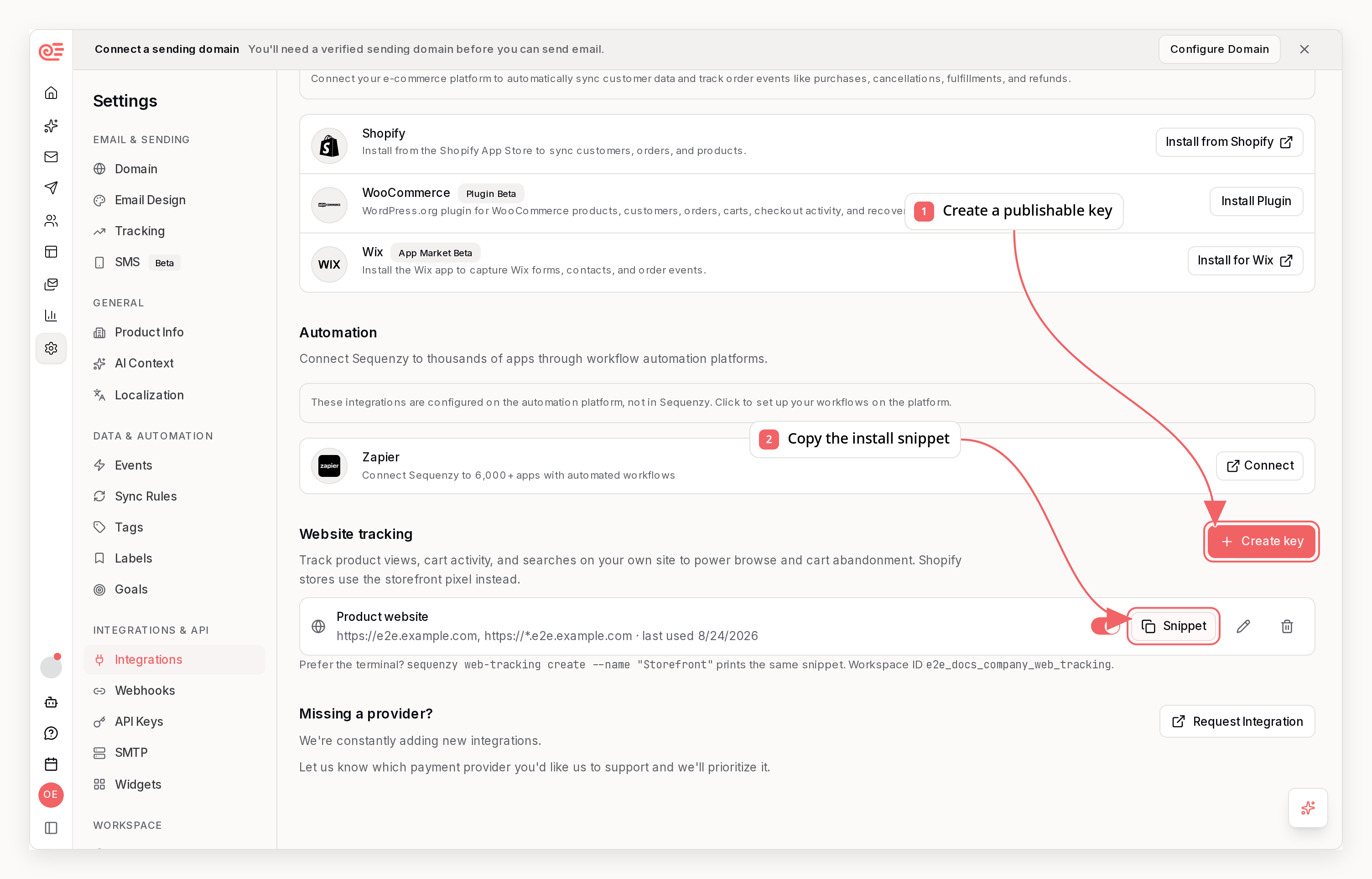
from Settings → Integrations → Website tracking first. Older snippets have no page stub,
so calling page() before the SDK finishes loading throws an error.
Page views are sent only for visitors you have identified. Anonymous page views
are dropped rather than held for replay, so they cannot crowd product and cart
activity out of the visitor’s buffer. Every page view is stored on the contact’s
timeline, so call page() on the pages that matter to your campaigns rather
than on every page of a large site.
When a cart disappears without telling us
The tracked cart is only as current as the events your site sends. Plenty of sites empty a cart without ever firing a removal: a session-scoped cart timing out, a reservation or inventory hold being released, the shopper finishing checkout on another device, or the snippet simply not loading on a page. So a tracked cart expires. AfterexpireAfterHours (default 72) with no
activity, the cart is dropped instead of being emailed about, and a later add
starts a fresh cart rather than merging into the old items. That is what stops
a recovery email from listing things the shopper no longer has.
Sites using the browser SDK currently always use the default expiry.
sequenzy shopify settings update --cart-expire-after-hours applies per
connected Shopify store only - it has no effect on SDK-tracked carts.
The cleanest fix is still to tell us directly - call
sequenzy.viewedCart({ ... }) with the current contents whenever your site
knows them, or fire removedFromCart when the cart empties. An explicit cart
view replaces the whole snapshot, so it corrects any drift in one call -
including sequenzy.viewedCart({ lineItems: [] }), which clears the tracked
cart so no abandonment email goes out for items the shopper no longer has.
Configuration
Extra attributes on the script tag:
The stored identity only applies while its identity token is also unexpired, so with the default 24-hour token the browser stays identified for at most a day after the last
identify call regardless of this setting. data-sequenzy-identity-ttl-days caps the window from the other side.
Lower data-sequenzy-identity-ttl-days on any site where one device is routinely shared between buyers rather than belonging to one of them - shared workstations, kiosks, in-store terminals, or any flow where people commonly buy on someone else’s behalf. A stored identity means “this browser was last used by this person”, not “this browser belongs to this person”, and a long window on a shared machine can attribute one person’s browsing to another.
Setting data-sequenzy-storage="off" disables the anonymous buffer as well, so visitors who identify later arrive with no prior history. Use it only where a consent policy requires it.
Server-side alternative
If your visitors are signed in, you do not need the browser at all. Post the same events from your backend with your secret API key:Managing keys
list_web_tracking_keys, get_web_tracking_key, create_web_tracking_key, update_web_tracking_key, and delete_web_tracking_key. See the MCP reference.
Revoking a key stops its events within about a minute while keeping the key value visible, so you can still find the matching snippet on your site. Delete it once the snippet is gone.
Troubleshooting
No events arriving. Check the key’slastUsedAt. If it is null, no event has successfully authenticated yet: the snippet may be missing or not loading, the page may not have fired an instrumented event, or the origin allowlist may be rejecting the request. Open your site’s network tab and look for a POST to /customer-events and its response status.
Events rejected with 403. Either the page’s origin is not on the key’s
allowlist, or an identified event has a missing, expired, or mismatched identity
token. Note that https://example.com and https://www.example.com are
different origins, as are http and https.
Anonymous history not appearing. Confirm token minting succeeds and
sequenzy.identify(email, identityToken) runs at sign-in and checkout. Without
a valid proof, events stay anonymous and are never attached to a contact.
Nothing works in an ad-blocked browser. Some blockers drop third-party tracking scripts. Those visitors are covered by the server-side approach above if they sign in.