
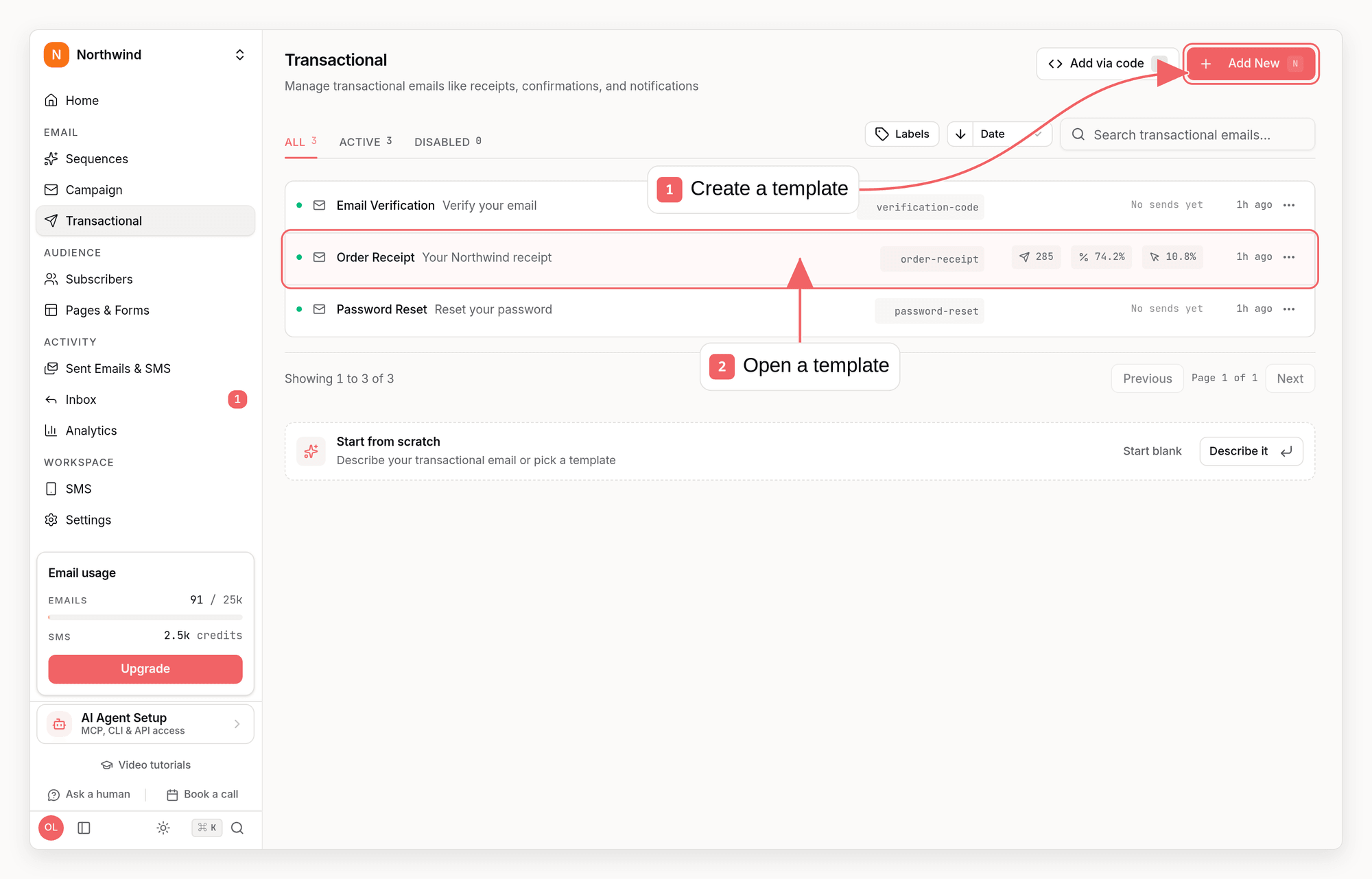
Transactional vs Marketing
Examples of transactional emails:
- Order confirmation
- Shipping notification
- Password reset
- Account verification
- Payment receipt
- Security alert
Sending Modes
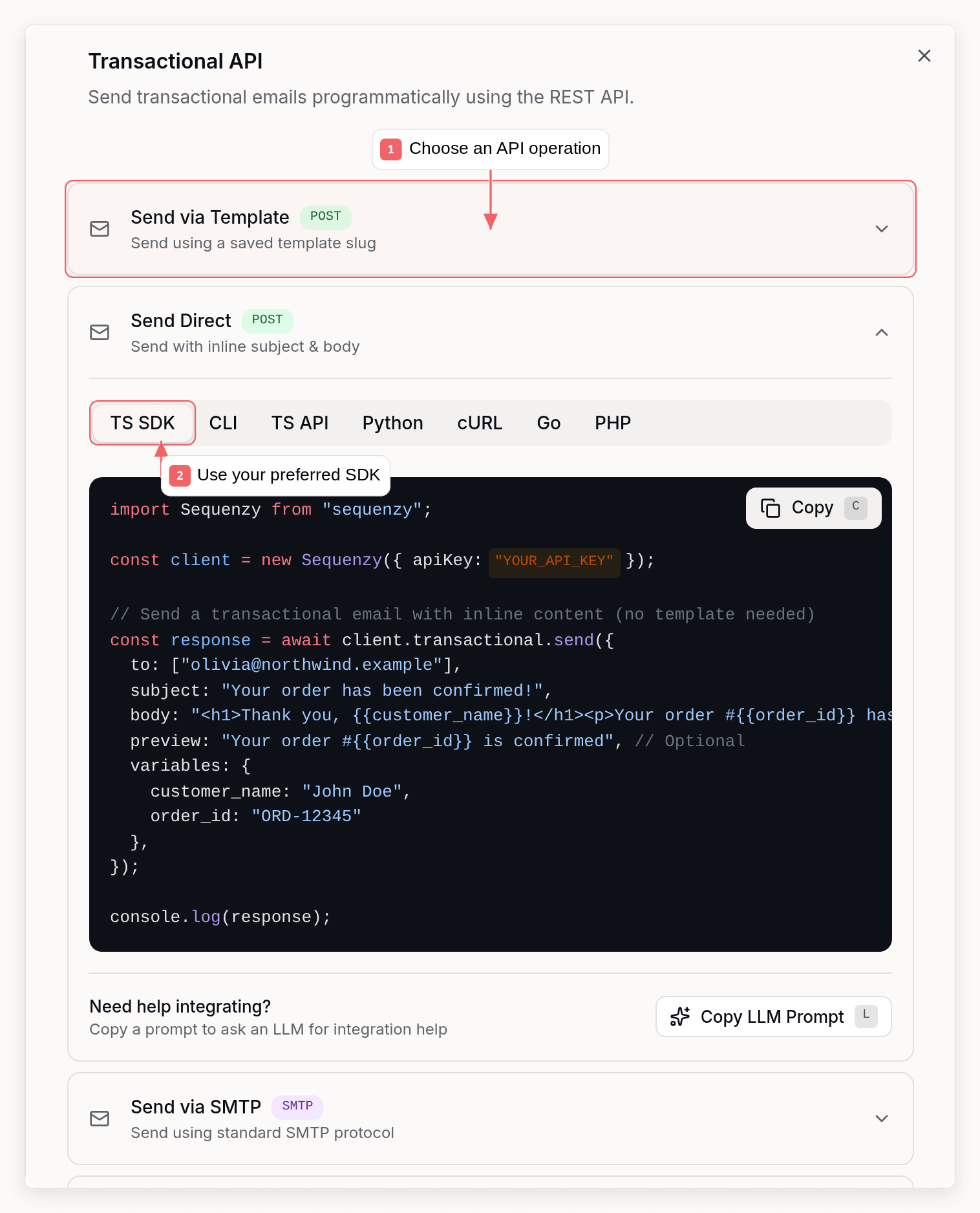
1. Template Mode (Recommended)
Create reusable templates in the dashboard, send via API using the template slug.- Non-developers can edit templates
- Consistent branding
- Analytics per template
- Template blocks can include conditional display rules based on recipient variables
- Repeat blocks can render one child block set per item in an array variable
Dynamic Array Data
Transactional templates can repeat blocks over arrays passed invariables.
For example, a repeat block with source items and item alias item
renders its child blocks once per item. Inside those children, use scoped merge
tags like {{item.title}}, {{item.description}}, and {{item.number}}.
Nested Repeats
Repeat blocks can be nested. Point the inner repeat block’s source at an array inside each parent item using the parent’s item alias - it does not need a separate top-level array. For example, with an outer repeat overorders (alias
order), an inner repeat with source order.lineItems (alias line) renders
once per line item of the current order, and its children can use merge tags
like {{line.title}}.
Conditional Blocks
Conditional (if/else) blocks show one set of blocks when a rule matches and an optional fallback otherwise. In the editor, add a condition and pick the Custom variable field to branch on a value passed in your requestvariables
or an automation event payload - not just stored subscriber data.
The variable name is the same reference you would use in a {{merge tag}}, so
nested paths work too (for example order.total or event.plan). You can match
with equals, contains, numeric comparisons (>=, <=, >, <), or check
whether the variable is present with “is empty” / “is not empty”.
For example, sending with "variables": { "plan": "pro" } will render the IF
branch of a condition like plan equals pro, and the OTHERWISE branch for any
other value.
Conditions can also target stored subscriber data - segment membership, custom
events, tags, lists, status, engagement, and purchases. These rules are checked
against the recipient’s subscriber profile at send time; if the recipient is
not a stored subscriber, they see the OTHERWISE branch.
2. Direct Mode
Send email content directly without a pre-created template.- Dynamic content generated by your app
- One-off emails that don’t need templates
- Testing and development
- React Email templates (see below)
Track direct-mode emails with trackAs
Direct sends are counted in your overall stats but not per email. Add trackAs
to group every send of an email your code renders, such as a weekly summary:
trackAs. Use a stable ASCII name for each email type (letters, digits,
spaces and . _ - : /), not per-recipient values; each company can have up to 100. The CLI flag is --track-as and the MCP
send_email field is trackAs. See
Send Email.
3. React Email Mode
Build type-safe, responsive email templates using React Email components and render them to HTML.- Type-safe templates with TypeScript
- Reusable components
- Responsive design built-in
- Preview emails during development
4. SMTP Template Payloads
If another product can send through SMTP but lets you control the message body, you can point it at Sequenzy SMTP and send a JSON payload that references one of your existing transactional emails. This is useful for products such as Supabase Auth, where Supabase still triggers the email but Sequenzy renders and sends the final template. Requirements:- A Sequenzy API key for SMTP authentication
- At least one sender profile on a verified sending domain
- A transactional email with a sender profile assigned
transactionalId instead of slug. If Sequenzy receives a JSON body in this format over SMTP, it ignores the raw email subject/body and sends the saved transactional template instead.
For the full Supabase setup, including variable mapping, see the Supabase integration guide.
Creating Templates
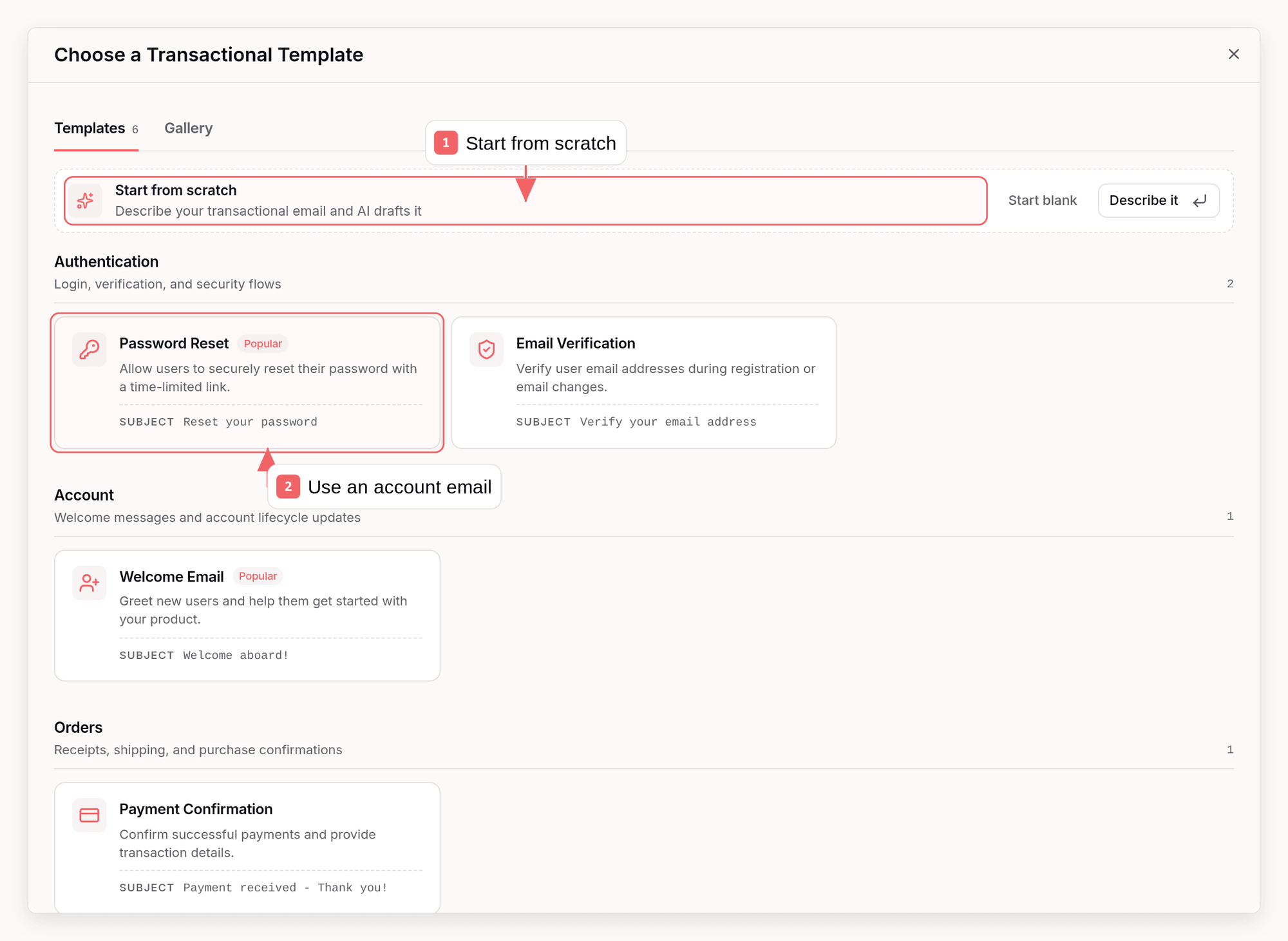
In the Dashboard
- Go to Transactional in your dashboard
- Click Create Template
- Enter a slug (URL-friendly identifier)
- Design your email with the visual editor
- Add variable placeholders where needed
- Save and activate
Template Slugs
Slugs are unique identifiers for your templates:Slugs are auto-generated from the template name but can be customized. They
cannot be changed after creation.
Variables
Variables let you personalize transactional emails.Syntax
With Defaults
Provide fallback values for missing variables:FIRST_NAME or firstName is empty, “Customer” is used.
If a variable has no default and no value is provided, it renders as an empty
string. The transactional email is still sent.
Raw HTML Variables
Variables are always HTML-escaped, so a value like<table>...</table> renders
as visible code. When a variable’s value is trusted HTML that should render as
markup - for example a prerendered order summary passed through the API - add
the html. prefix to the tag:
{{html.prerenderedHtml}} inserts the prerenderedHtml variable unescaped, so
you can keep the template’s branded header and footer while your system
supplies the body HTML per send:
prerenderedHtml in variables, and {{prerenderedHtml}} elsewhere in the
same template stays escaped. html. joins the existing date., urlencode.,
lower. and upper. prefixes, so a variable of your own named html is not
addressable as {{html.something}}. It also composes with them, outermost
first: {{html.upper.orderSummary}} uppercases the value and then inserts it
as HTML.
Keep these rules in mind:
- Only pass HTML you generate or trust. Never forward end-user input through a
raw HTML tag; use a regular
{{variable}}, which stays escaped. - Injected HTML is sanitized the same way as raw HTML content: scripts, inline event handlers, and dangerous URLs are stripped.
- The
html.prefix only applies in HTML text position. Inside attributes such ashreforsrc, values are validated and escaped exactly like ordinary variables. - Send final HTML. A value is never expanded recursively at the moment it is
inserted, but a template send merges the assembled email once more before it
goes out, so any
{{variable}}still present in the injected HTML is substituted on that pass. Resolve your own merge-tag syntax before passing the HTML in. Values substituted from an ordinary{{variable}}into HTML text or into an HTML attribute are not affected: merge-tag syntax inside them is neutralized when the value is escaped, so it cannot become a tag on the later pass. - Links inside the injected HTML still get click tracking and open tracking as usual.
{{html.subscriber.body_html}} renders a stored attribute’s HTML unescaped.
Conditional HTML Sections
Use{{#if variable}}, {{else}}, and {{/if}} to render simple conditional
sections in raw HTML. This is most useful with subscriber custom attributes:
{{#unless variable}}...{{/unless}} is also supported. Conditions check
whether the resolved variable is present and truthy. Nested if/unless
sections are supported, but helpers, comparisons, loops, and arbitrary
Handlebars expressions are not.
System Variables
These variables are resolved at send time:Single-recipient REST API sends match a subscriber by
subscriberExternalId
when provided, then by recipient email. Saved first and last names fill
missing name variables automatically. Explicit request variables remain
authoritative. Multi-recipient sends do not use one subscriber’s name for the
whole message.Custom Attributes
Any subscriber custom attributes are available:Passed Variables
Variables passed in the API request:API Reference
Send Email
slug and body as the canonical fields. For compatibility
with MCP-style callers, templateId is accepted as an alias for the
transactional API slug and html is accepted as an alias for body. If both a
canonical field and its alias are provided, their values must match.
Marketing delivery policy
The endpoint defaults to"emailType": "transactional". For a consented
lifecycle or promotional message, set "emailType": "marketing". Marketing
mode supports one recipient with no CC/BCC, creates or links a minimal
subscriber, honors unsubscribe suppression, adds the standard marketing
footer, and emits RFC 8058 one-click-unsubscribe headers automatically:
Custom headers and your own unsubscribe link
Add extra email headers with theheaders object. On a transactional send you
can keep your own per-email-type unsubscribe by passing your one-click URL:
From, To, Subject and
Reply-To, are never applied. A header that is not applied does not fail the
send; the response lists it in ignoredHeaders with a reason. See
Send Email for the full rules.
The response echoes the accepted emailType. If the email includes
{{viewInBrowserUrl}} (or {{VIEW_IN_BROWSER_URL}}), Sequenzy replaces it
with a hosted copy URL. Without a reply identity override, saved-template sends
prefer the template’s reply profile. Otherwise, sends use the effective sending
domain’s default reply profile, then the company default, then the first company
reply profile. The resolved value is retained with the send record.
Response:
emailSendId with
GET /api/v1/email-sends/{emailSendId} to read one message’s delivery status,
open/click timestamps, and event timeline. For aggregate Send API rates, call
GET /api/v1/metrics?period=30d&emailType=transactional or run
sequenzy stats --email-type transactional --period 30d.
Repeated identical transactional content sent to many distinct recipients can
trigger a junk/list-testing review. Sending continues while that review is pending
or unavailable; a substantiated junk verdict can make later matching deliveries
fail before sending. A rejected delivery is not held for automatic replay, and
retrying it from the dashboard also fails without sending. Check its
details and correct the content or contact support before deliberately sending
again. See rejection and retry behavior.
To discover recent deliveries by subject/title, recipient, or status, call
GET /api/v1/email-sends?search=trial-reminder&status=opened or run
sequenzy email-sends list --search trial-reminder --status opened. For one
saved template’s aggregate rates, call
GET /api/v1/metrics/transactional/{idOrSlug} or run
sequenzy stats --transactional <id-or-slug>. The template-level result also
includes top clicked links, complaints, replies, latest bounce classifications,
and separate human/machine engagement counts.
List Templates
Get Template Details
Update Template
name, enabled, subject, or previewText (use null to clear it) for metadata, and either html or blocks to replace the body.
enabled to false is how you stop a template from sending while keeping it, its slug, and its stats. Sends to a disabled slug are rejected.
From the CLI, this is sequenzy transactional update <slug>, which takes the same fields as flags (--name, --subject, --preview-text/--clear-preview-text, --enabled/--no-enabled, --html/--html-file, --blocks-json/--blocks-file). From MCP, it is update_transactional_email.
Delete Template
transactional:delete scope.
Response:
emailId is what you pass to DELETE /api/v1/templates/{templateId} if you want the content gone too.
Past deliveries are unaffected - send history and stats live on the deliveries themselves - so analytics for a deleted template’s previous sends stay intact. To stop sends without losing the template, update it with enabled set to false instead.
You can also delete from the CLI with sequenzy transactional delete <slug> --yes, from MCP with delete_transactional_email, or from the dashboard.
Auto-Creation
Transactional sends do not require a subscriber. When the recipient matches an existing subscriber, the send is linked to them, so it appears in their activity. Sends withemailType: "marketing" create or link a minimal
subscriber and honor unsubscribes; see
Send Transactional Email.
Error Handling
Common Errors
Response Codes
Best Practices
1. Use Templates
Templates are easier to maintain and update:2. Handle Variables Gracefully
Always provide defaults for optional variables, or guard larger optional sections with conditionals:if, unless, and else. They do not support
comparisons or custom helpers.
3. Log Email Send IDs
Save the returnedemailSendId. It is the durable ID for
delivery status:
4. Use Meaningful Slugs
5. Test in Development
Use test emails before production:Integration Examples
Order Confirmation
Password Reset
Welcome Email
Organize templates with labels
Use Labels in a transactional email’s row menu to assign existing company labels or create new ones. Assigned labels appear below the email subject. Filter the list by labels alongside search and active status. Selecting several labels matches any of them; the filter stays in the URL when you reload or share it. Duplicated transactional emails keep their labels, and deleting a company label removes its assignments. The public API acceptslabels on create
and update. Send [] to clear labels,
or omit the field to keep them unchanged on update. Read labels with
get or list,
and filter with ?label=Billing.
Use sequenzy transactional create or update with --label Billing Receipts,
update --clear-labels to remove assignments, and list --label Billing to filter.
MCP uses labels on create_transactional_email, update_transactional_email,
and list_transactional_emails. Label changes do not send emails.
Related
API Reference
Full API documentation
Subscribers
Auto-creation and attributes
Campaigns
Broadcast marketing emails
Sequences
Automated email workflows