
Sequences (Automations)
Saving in the sequence editor
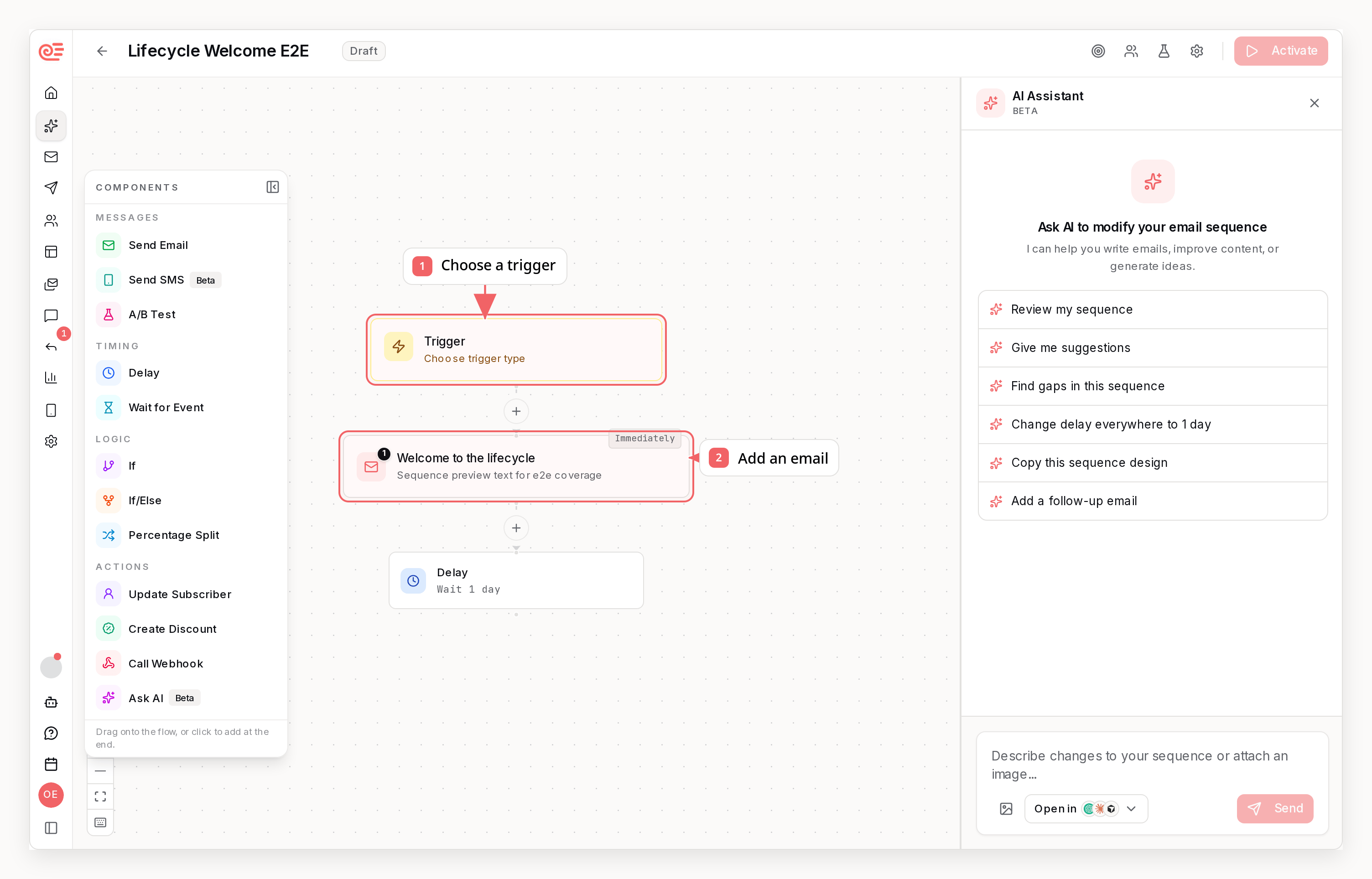
The editor always shows whether your sequence is Draft, Active, or Paused, along with any sending or enrollment restrictions. When you have pending edits, use the save controls to save or discard your sequence changes. Email content is saved separately in the email editor. Step settings stay in your draft until you save the sequence. Done closes a step’s settings without saving the sequence. Saving step changes updates an active sequence. Email content is saved separately in the email editor. A/B test actions save immediately: selecting a winner, adding or deleting variants, and starting another test. Discard does not undo these actions. Selecting a winner changes what future subscribers receive without waiting for you to save the sequence. Before you activate, Review setup lists the remaining blockers. Choose a blocker to open its step, review the canvas, or save your changes. The checklist updates as you fix your draft. When you add a step, the picker names its destination and highlights the target on the canvas. The palette also shows where clicking a step type will add it; dragging lets you choose another position. Use the eye button on a linked email step to preview its saved content without leaving the canvas. The preview uses a sample contact and sends nothing. Choose Edit email to open the email editor. Save new steps or changed email selections before previewing them.What Are Sequences?
Private Welcome Previews
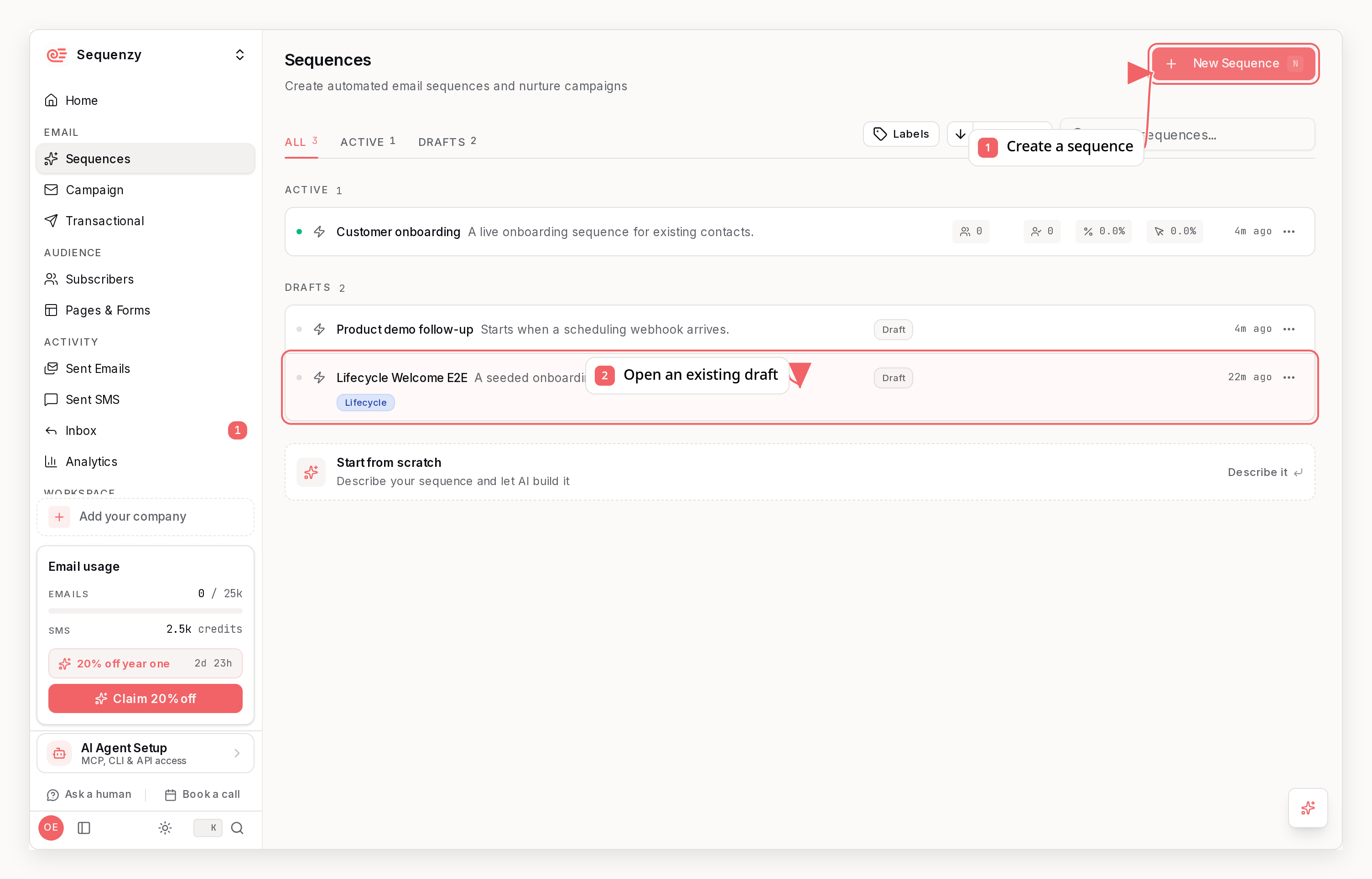
If you receive a private welcome-sequence link, you can review all four emails before creating an account. Claiming the preview creates a new workspace with the saved emails and their design settings as a draft sequence. You then choose the audience and finish setup before activating it. You can edit the imported emails in your workspace. The original preview link keeps showing the saved preview, so later workspace edits are not shared through that link. Each preview can be claimed by one account.Sequence Components
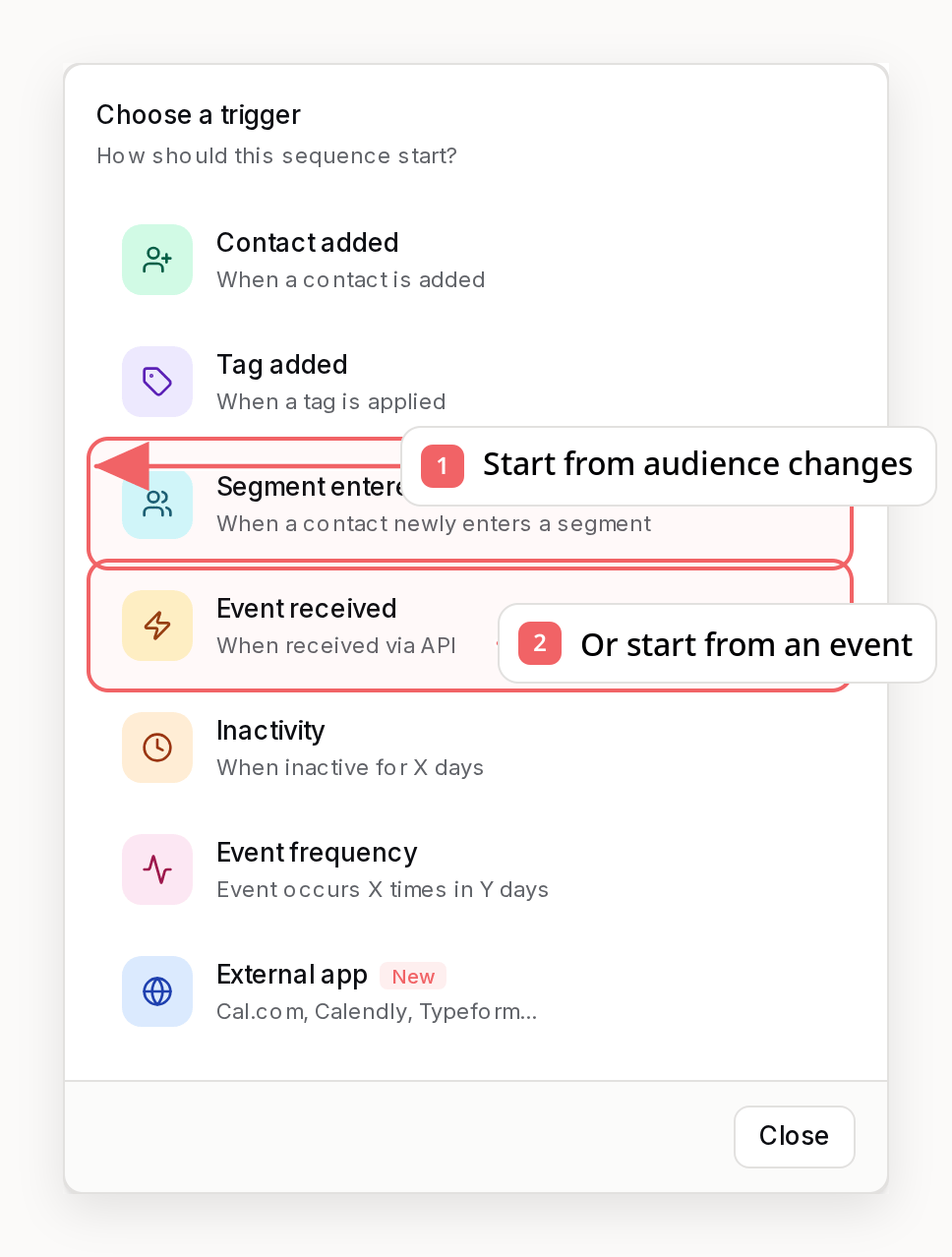
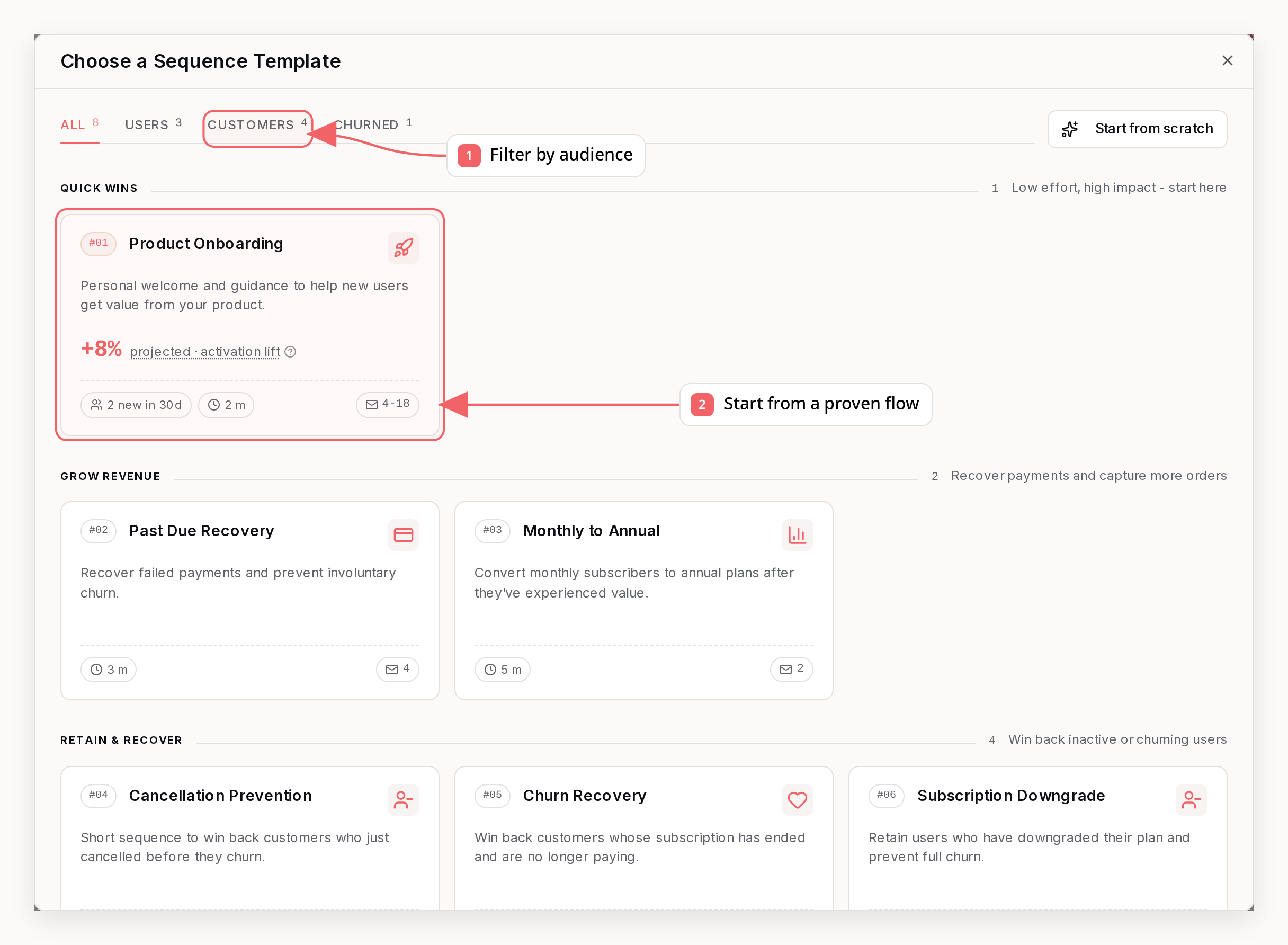
Start from a Saved Audience
In Subscribers, open a saved segment or list and choose Create sequence beside its name, or use the action in its menu. The template picker shows the audience you selected. You can choose a template, start blank, or describe the sequence to AI while keeping that trigger selected. For a segment, the sequence triggers when contacts enter it. For a list, it triggers when contacts join that list. The sequence starts as a draft so you can review its emails and timing before activation.Triggers
Triggering on Several Lists or Tags
Acontact_added trigger can name more than one list, and a tag_added trigger more than one tag. The values are combined with or: a contact who joins any of the listed lists, or receives any of the listed tags, enters the sequence.
To set this up in the dashboard, open the trigger step and choose Specific lists… in the List dropdown (or pick several tags in the Tag picker). Over the API, CLI, and MCP the fields are listIds and tagNames; each accepts up to 25 values.
enteredVia in list enrollments, in sequenzy sequences enrollments, and in the list_sequence_enrollments MCP tool. Each enrollment also stores redacted branch decisions (which if/else path it took, and whether the compared field was missing, empty, nonempty, or equal to the expected graph value). For a completed token recorded before that stamp existed, get enrollment reconstructs the walk from ClickHouse.
Multi-value triggers keep the normal lifecycle stop automatically. For a
multi-tag trigger, tag missing means the tag recorded in Entered via;
for a multi-list trigger, not in list means the list recorded there. A
contact entering through Trial is therefore checked against Trial, while one
entering through Newsletter is checked against Newsletter. You can still
replace this entry-aware default with a specific tag, list, event, or field
condition.
Contact-Added Trigger Scope
When you pick thecontact_added trigger without choosing any list, the List dropdown offers two readings of “no specific list”:
- Any contact (the default) starts the sequence for every contact that is added, whether or not they join a list. Use this when contacts arrive from an integration such as PostHog, Stripe, or Supabase - those contacts join no list unless you configure list targeting, so this is the only scope that reaches them.
- Any list starts the sequence only once the contact actually joins a list. Use this when list membership, not the contact existing, is what the sequence is about.
Segment-Entered Trigger Behavior
Thesegment_entered trigger is designed to avoid surprise sends.
- When you activate a sequence, Sequenzy uses the current segment members as a baseline and does not enroll them automatically.
- Only contacts who enter the segment after that baseline are enrolled.
- Segment triggers are evaluated after relevant subscriber data changes, with a background check at least every 8 minutes as a fallback.
- You can optionally stop active contacts if they later leave the triggering segment.
- If you edit the segment definition or reactivate the sequence later, Sequenzy creates a new baseline instead of backfilling historical matches.
What does not start a sequence
Only the trigger types above start a sequence. In particular, updating a subscriber’s custom attributes never enrolls anyone. Attributes describe a contact, so writing one is not something that happened at a point in time and nothing listens for it. If your system updates an attribute and you want a sequence to run, pick one of these instead:- Send an event for the thing that happened. This is the better option in almost every case: enrollment is immediate, and the event payload stays available to every email in the run as
{{event.*}}merge tags. - Build a segment on the attribute and use a
segment_enteredtrigger. This works, but membership is recomputed after relevant changes rather than at the moment you write the attribute, so it is a poor fit when timing matters.
Actions
Where a step’s email comes from
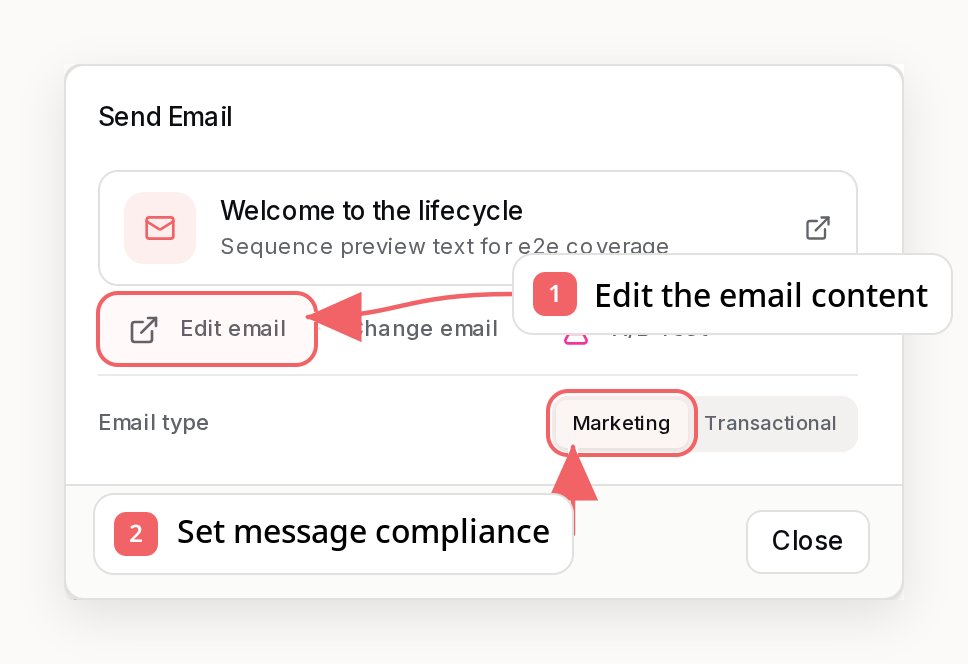
Every Send Email step gets its own email. Describe what the email should say, then pick where its design starts from:- Blank - AI writes a new email from your brand profile, or start with an empty canvas.
- Template gallery - pick a designed template. It is copied into a new email for this step, and with a description AI rewrites only the copy inside it, keeping the layout, images, and links exactly as designed.
- Your templates - emails you marked as templates on the Emails page (or in
the editor header, or with
isTemplatethrough the API, CLI, and MCP). Use one master design across every step: each step gets an independent copy, so editing step 3 never changes step 1 or the master. - One of your emails - any campaign, sequence, or transactional email. It is copied too, so the original stays untouched.
When you add an Update Tags step in the builder, you choose whether that step should add a tag or remove one. You can change that choice later by editing the step.
When you add an Update Lists step, you choose whether the step should add the subscriber to a list or remove them from one. This is useful for routing contacts into new subscription tracks, suppressing them from a list mid-sequence, or chaining list-triggered sequences together.
Call Webhook Steps
A Call Webhook step sends an HTTP request to any HTTPS endpoint when a subscriber reaches it - and, unlike a fire-and-forget ping, it can save the response for the rest of the sequence. This makes fresh, at-send-time data available to your emails: look up the current account state, pricing, usage, or any other data from your own API right before an email goes out.-
Request: choose
GET,POST,PUT,PATCH, orDELETE, plus optional headers and a JSON body template. The URL, header values, and body all support merge tags such as{{email}},{{subscriber.plan}}, and{{event.order_id}}(use{{urlencode.email}}in query strings). In the JSON body, merge tags must sit inside quotes ({"email": "{{email}}"}) so the template is valid JSON as written - values are then escaped for you, and quotes or newlines in the data cannot break the request. A tag in a bare value position ({"amount": {{total}}}) is not accepted; quote it instead. In the builder the step keeps what you typed and shows the problem until you fix it, and the sequence cannot be activated while it is unresolved; over the API, CLI, and MCP the write is rejected outright. If you leave the body empty on aPOST-style request, Sequenzy sends a default payload with the subscriber and sequence context. If a merge tag in the URL path has no value for a subscriber, the request is not sent -https://api.example.com/accounts/{{event.account_id}}would otherwise collapse tohttps://api.example.com/accounts/and hit the wrong resource - and the step follows your failure behavior instead. Empty query-string tags are sent as-is. -
Save the response: set a result key (for example
lookup) and the JSON response is stored for that enrollment. Later email steps can then use merge tags like{{webhooks.lookup.data.status}}or{{webhooks.lookup.status}}. Nested fields and array indexes work:{{webhooks.lookup.data.items.0.title}}. In the email editor, the variable picker (type{{) offers these tags for every webhook step that runs before the email - and once the step has run at least once, it suggests the actual field names seen in recent responses, with sample values. The most recent response also prefills the email preview, so{{webhooks...}}tags render with real data instead of placeholders. -
Failure behavior: pick what happens when the endpoint fails or times out (10 seconds) - continue to the next step, exit the sequence, or stop the enrollment with an error. When a failed call is set to continue,
{{webhooks.KEY.ok}}isfalseand{{webhooks.KEY.status}}holds the HTTP status (0when the request never completed). The response body is still saved, sodatamerge tags can resolve to whatever the endpoint returned with the error - wrap them in{{#if webhooks.KEY.ok}}...{{/if}}before putting those values in an email. Only a request that never completed, such as a timeout, leavesdataempty. -
Seeing what happened: the step’s
N completedbadge in the builder lists each subscriber with the HTTP status and the host and path that was called, and a failed call that was set to continue or exit is flagged there in red - so a500never looks the same as a clean200. Click that line to open the full response: the status, the endpoint, the error if there was one, and the saved JSON body, which you can copy. A test run shows the same status line for the request it really sent. The query string is left out of the displayed URL, since it can carry merge-tag values. The body is only available when the step has a result key - without one it is never read from the response at all.
{{webhooks.KEY.data...}} values.
Webhook URLs must use HTTPS and cannot point to private network addresses. Merge tags belong in the path and query - not in the hostname, credentials, or port, and not inside {{#if}} or {{#each}} blocks - so that subscriber data can never change which server the request reaches. If a merge tag in the URL path resolves to nothing, or to a value that walks the path up (../), the request is not sent and the step follows your failure behavior. Responses are stored per enrollment (up to 32 KB per result).
Ask AI Steps
An Ask AI step writes a short piece of text for each subscriber when they reach it, and stores it for the rest of the sequence. It is not an email writer: you keep writing the email, and the step fills the one part that has to be different for every contact. You describe what that line should say in a prompt, define the named fields the AI must return, and later emails insert them with{{ai.KEY.field}} merge tags.
For example, in a churn-save sequence you can pass the cancellation event and the contact’s attributes, and ask for a single sentence that names why they left, how long they had been a customer, and the one thing worth offering them. The email around it stays the same for everyone; that sentence does not.
- Prompt: written like a merge-tag template, so
{{first_name}},{{event.reason}}, and even{{webhooks.KEY.data.field}}values from an earlier webhook step resolve per contact before the prompt is sent. When you add a fresh Ask AI step, the builder pre-fills a draft prompt, output fields, and context selection from what the sequence already knows - its trigger, the trigger event’s data shape, and the attribute keys your contacts carry. Review the draft, regenerate it, or start blank; the “Draft for me” button reruns the same drafting at any time. To refine your current prompt, enter your goal or requested changes in What do you want to achieve? and choose Rewrite prompt. Review the updated prompt and any output fields before saving the step. You can cancel a rewrite and keep your current text. - Context: you choose exactly which contact data is shared with the model - the trigger event data, the contact’s recent activity (their last 1-50 events, newest first), specific custom attributes, and their tags. Nothing you do not select is sent. Over the API, CLI, and MCP the same selectors are
includeEventProperties,includeRecentEventswithrecentEventLimit,includeAttributes, andincludeTags. - Output fields: the model must return the named fields you define (for example
churn_reason_lineandwinback_angle), each a short fragment capped at a maximum length, with an optional fallback. Output is structured only: free-form model text never lands in an email. Give every field a fallback so a rare model failure degrades to your copy instead of a broken email. - Preview: before activating, run the step against a real contact - recent people who went through the sequence are offered first (their stored trigger event data makes the preview realistic), or search for any contact. The preview uses the exact same generation path the live sequence uses. A step is usually built before the sequence has ever run, so when the contact has no stored trigger event data the preview falls back to the most recent event of that name in your account, and then to the example payload shown in the builder’s Event Payload panel. You can also point the preview at any other event your workspace knows, to see how the line reads for that payload. The preview always says which of the three sources it used, and you can rerun a real-data preview against the example values.
- Tuning: when a previewed line is not quite right, say what should be different (“never mention the price”, “sound like a friend, not a brand”) and the step’s prompt is rewritten to hold for every future contact. The rewrite is an edit, not a restart: it keeps the merge tags and the rest of your wording, lands in the Prompt section where you can read and adjust it, and is rejected if the feedback would turn the step into an email writer or strip out the per-contact data.
- Failure behavior: by default a failed generation continues with the fallback text. You can instead exit the sequence or stop the enrollment with an error.
Ask AI steps are free of charge for the rest of this week while the step is in
beta. Pricing after that is still being decided, and you will be told before
anything is billed.
{{) offers {{ai.KEY.field}} tags for every Ask AI step that runs before the email. Results are stored per enrollment, and each step keeps its own result key, so duplicating a step never overwrites another step’s output.
Discount Codes In Emails
A Create Discount step mints a fresh code for each subscriber who reaches it, using your connected Stripe or Shopify account. Because the code is generated per subscriber, you reference it with merge tags rather than typing it into the email:
These resolve for any recipient who has passed the discount step earlier in their run. The cleanest way to present the code is a Discount Code block, which is pre-filled with
{{discount.code}}, but the tag also works inline in any text block.
If a step can be reached by branches that don’t all pass through the discount
step, the tags stay empty for the recipients who took a branch that skipped
it, and only for those. Preview an email with Render Sequence Step
HTML to check the copy: it fills the tags
with a placeholder
TEST-CODE and reports anything it could not resolve. A
preview has no way to know which branch a recipient took, so it only fills the
tags when every path into the step runs the same discount step - and in the
branchy case it lists them as no_value rather than as unrecognized names,
because they do resolve for the recipients who took the discount path.Logic Nodes
Logic nodes control the flow of the sequence.Delay: fixed duration or “wait until a date”
A Delay step has two modes, toggled by the Wait until a date switch in the step editor:- Fixed duration (default): wait a set number of days, hours, and minutes before continuing.
- Wait until a date: resume on a date pulled from the event that triggered
the sequence. Point the step at a property in the event payload (for example
renews_atorbooking.startsAt). The value must be an ISO date string or a Unix timestamp.
Delay: “wait until a weekday window”
A Delay step can also hold contacts until the next occurrence of a weekday inside a local-time window, for example next Sunday between 09:00 and 12:00 inAmerica/Los_Angeles. Contacts that reach the step while the window is open
continue immediately; everyone else waits for the next occurrence - a Friday
enrollment waits until Sunday morning, and a Sunday-afternoon enrollment waits
a week.
Place this step immediately before the email when the send day matters, such as
a weekly digest sequence that must only ever send on Sundays, including when
contacts hand off from another sequence mid-week. The step controls when the
flow resumes, so any step you put between the wait and the email (another
delay, a wait-for-event) shifts the send off the window again. If the platform
ever misses the window (a rare operational failure), the step rolls to the next
configured day rather than resuming late.
Configure it in the dashboard by opening a Delay step and setting Wait to
“Until a weekday”, then picking the days, the local-time window, and the
timezone. The same step is available through the
API, CLI, and
MCP surfaces.
Branch: condition split or random split
A Branch step routes each subscriber down one of several paths. It has two modes:- Condition split (default): each path carries a condition such as
has_tag,in_segment, orlink_clicked. Paths are evaluated in order and an else path catches everyone who matches nothing. - Random split: each path is a weighted variant. When a subscriber reaches the step they are assigned a path by percentage, so nothing about the subscriber is evaluated. This is how you run a concurrent A/B test inside a sequence - for example sending half of your abandoned-cart contacts a discount offer and half a free-shipping offer at the same time, instead of running two duplicate sequences one after another and comparing across different weeks.
splitMode and randomPercentages on a branch:
To test two versions of a single email step and have a winner picked for
you automatically, use an A/B test on that
step instead (
automationNodeId). A random split is the right tool when the
two variants differ by more than the email itself - different delays,
different follow-ups, or a different number of steps on each path.Sending Windows
Sequences can have an optional local-time sending window, such as weekdays from 08:00 to 20:00. A trigger can still enroll the subscriber immediately, but every email action waits until the next allowed local time before sending. This applies to the first email and later emails after delays, branches, or wait steps. A sending window shifts each email’s send time; it does not reschedule delays or other steps. When the calendar day of a send must be guaranteed at the graph level, combine it with a “wait until a weekday window” Delay step before the email.Realigning contacts after you change the window
Changing the window on a live sequence deliberately leaves contacts who are already waiting on an email-bound delay step alone: they keep the wake-up time their delay produced. So widening a Sunday window from 09:00 to 08:00 does not move the people already queued for 11:13 next Sunday, and narrowing it to end before 11:13 would defer them to the following Sunday instead. Realignment fixes this without cancelling or re-enrolling anyone. It pulls each waiting contact back to the window’s opening on the day they were already scheduled for. A wait only ever moves earlier, never onto a different local day, and never before now - so nobody changes weekly cycle and nothing is sent retroactively. Per-step “wait until a weekday” gates are respected, and running it twice does nothing. A sequence sending window never advances a delay whose next action is SMS, a webhook, a branch, or another non-email step. Preview it first, then apply:realign_sequence_enrollments MCP tool. Applied requests run
as background jobs; poll the returned job ID before continuing with any
nextCursor from the completed result.
BCC Copies
You can set one or more optional BCC addresses in a sequence’s settings (separate multiple addresses with commas, up to 10). Every email the sequence sends then delivers a hidden copy to those addresses, which is useful when a team inbox (like customer support) needs visibility into what subscribers receive. BCC recipients are invisible to the subscriber. Leave the field empty to turn it off.File Attachments
Email steps can carry real file attachments - useful for lead magnets, guides, or any file the subscriber expects after triggering the sequence. Attachments are URL-backed: you provide a public HTTPS URL plus a filename, and Sequenzy fetches the file at send time and attaches it to the email. This keeps the sequence config small and lets you update the file at its source without editing the sequence. In the dashboard, open an email step, click the settings (gear) icon in the top-right corner of the editor, and use the Attachments section to upload a file - it’s stored on Sequenzy’s file hosting and attached from there at send time. Choose From trigger when every enrollment has a different file, such as an eTicket or invoice. The URL and filename can use values from the event that enrolled the subscriber:Building Sequences
The Visual Editor
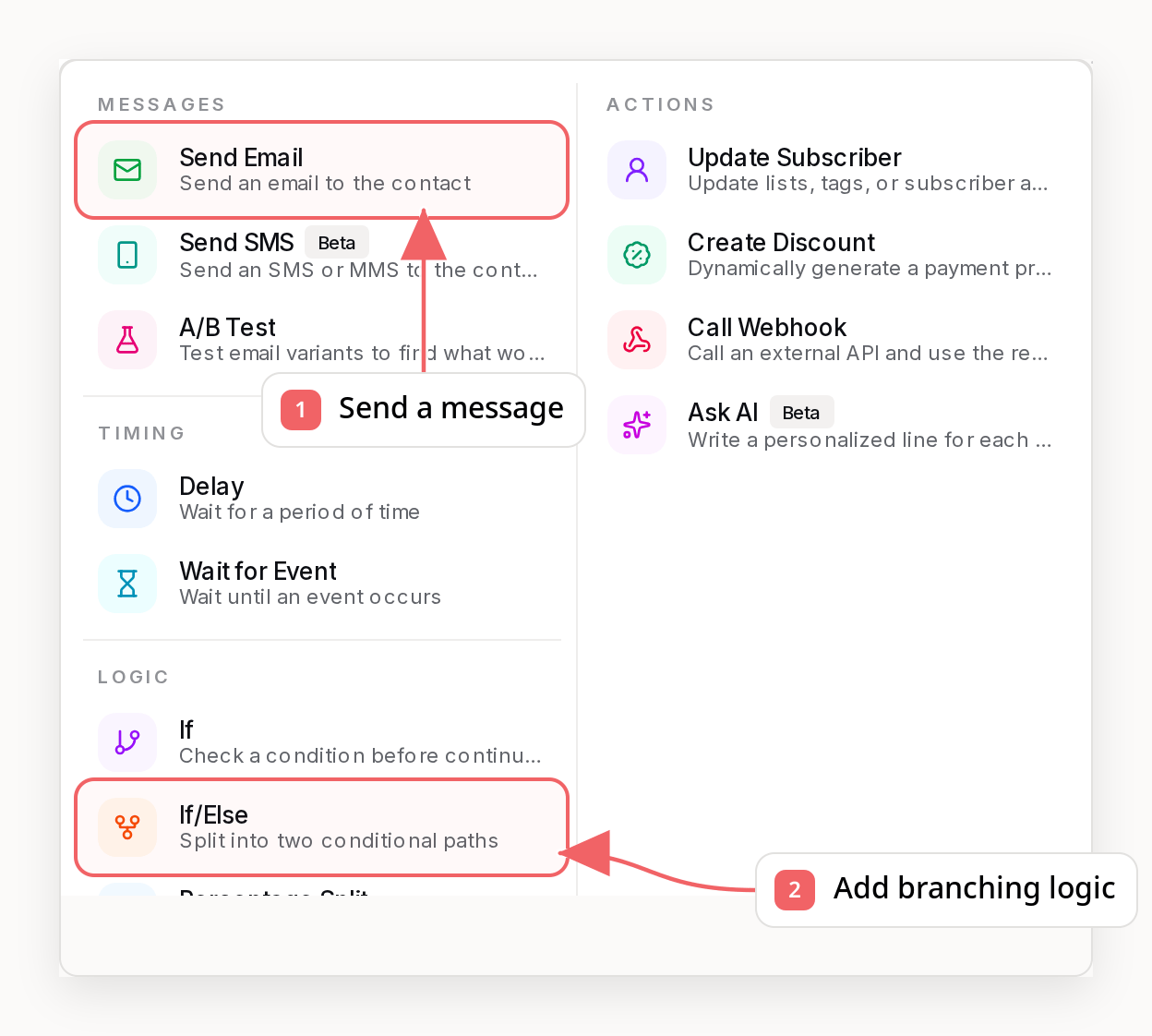
Sequences are built in a visual drag-and-drop editor:- Add a trigger - How does the sequence start?
- Add actions - What should happen?
- Add logic - When and how should it happen?
- Connect nodes - Define the flow between steps
- Activate - Turn on the sequence
Editor Shortcuts and Tools
The editor supports fast, keyboard-friendly workflows:- Undo / redo - Cmd+Z undoes any unsaved canvas edit (add, edit, delete, reorder, and even Discard changes); Cmd+Shift+Z redoes it. History clears once changes are saved.
- Step finder - Cmd+F opens a search across every step by name or subject and jumps the canvas to the selected one.
- Arrow navigation - Arrow keys walk between steps (left/right move across branch paths). Enter opens the focused email step, Delete removes the focused step, Escape clears the focus.
- Duplicate step - Every action and delay step has a Duplicate button in its editor. Duplicating an email step also clones the email itself, so you can save the sequence and then edit the copy without touching the original.
- Collapse branches - Wide branch sections collapse into a compact summary card (hover the branch step for the toggle). The hidden steps stay part of the sequence; this only tidies up the canvas.
- View toggles - M toggles per-step metrics, F toggles the funnel view, G opens goals, T opens a test run, and Comma opens settings.
Deleting Steps While People Are In Them
You can delete an otherwise-deletable action, delay, or logic step while subscribers are inside it. Anyone currently in the deleted step moves to the next step immediately and continues through the sequence - the same path new enrollees take after the edit. If the deleted step was the last one, those subscribers complete the sequence. The editor shows a confirmation with the number of affected people before the delete, and the canvas displays a notice if any subscribers ended up stuck on a step that was removed in the past. Trigger and end steps cannot be deleted. A/B test steps also remain protected while variants are generating or while a test is running or has selected a winner. Recipient migration is refused when people are inside a deleted branch step and multiple outgoing paths survive. There is no single next step to move them to, so reconnect the graph to one continuation first or wait for them to leave the step.Simulate A Subscriber’s Path
Use Simulate path in the toolbar to dry-run a subscriber through the sequence without sending anything. Sequenzy evaluates every condition and branch with the same logic the send path uses, based on the subscriber’s current tags, lists, segments, and attributes, then highlights the resulting path on the canvas with a breakdown of each decision. Conditions that depend on what happens during the run - like “clicked a link in this sequence” or event-payload fields - cannot be known ahead of time. The simulation flags these as assumptions and follows the fallback path, the same default the live run would take if the activity never happened. Wait-for-event steps are shown as pass-through steps in the preview. The preview does not predict whether their event will arrive or whether they will time out; use a live test when that timing-dependent outcome matters. The same dry run is available from the API,sequenzy sequences simulate, and
the simulate_sequence MCP tool. Without a subscriber those surfaces report
who currently matches and whether the sequence is ready. Nobody is
auto-enrolled when you activate.
Funnel View
On an active or paused sequence, press F (or use the funnel toggle in the toolbar) to see where the sequence leaks. The funnel only annotates what matters:- Entry volume - one chip at the top shows how many subscribers ever entered the sequence.
- Losses - a connection only gets a chip when subscribers were actually
lost between the two steps, shown as
-Nwith the continuation percentage. Hover the chip for the breakdown: how many failed, stopped early (stop condition or manual removal), or finished the sequence there. Subscribers still waiting in a delay are not counted as lost. - Branch splits - fan-out connections show how traffic distributes across the paths.
- Engagement decay - each email step shows its open-rate change versus
the previous email (for example
opens -4.2pts vs prev). In a linear sequence almost everyone reaches the next step, so this is usually the real drop-off signal: it tells you which email to rewrite.
Create From A Dashboard Prompt
You can also start a sequence directly from the dashboard landing page or onboarding flow with a prompt.- Try prompts like
Create a welcome sequenceorBuild a re-engagement sequence - During onboarding, the assistant also suggests starter questions like
What do I start with?andHow can I add more about my company? - You can also ask review questions like
Show my top performing sequenceto jump from a performance check into the sequence itself - If Sequenzy recognizes the intent, it opens a matching starter template in the builder
- If your request is more custom, Sequenzy creates a blank draft sequence and takes you straight into editing
- If you keep the conversation going, the assistant opens a follow-up chat so you can ask for more detail without repeating the earlier request
Run A Live Sequence Test
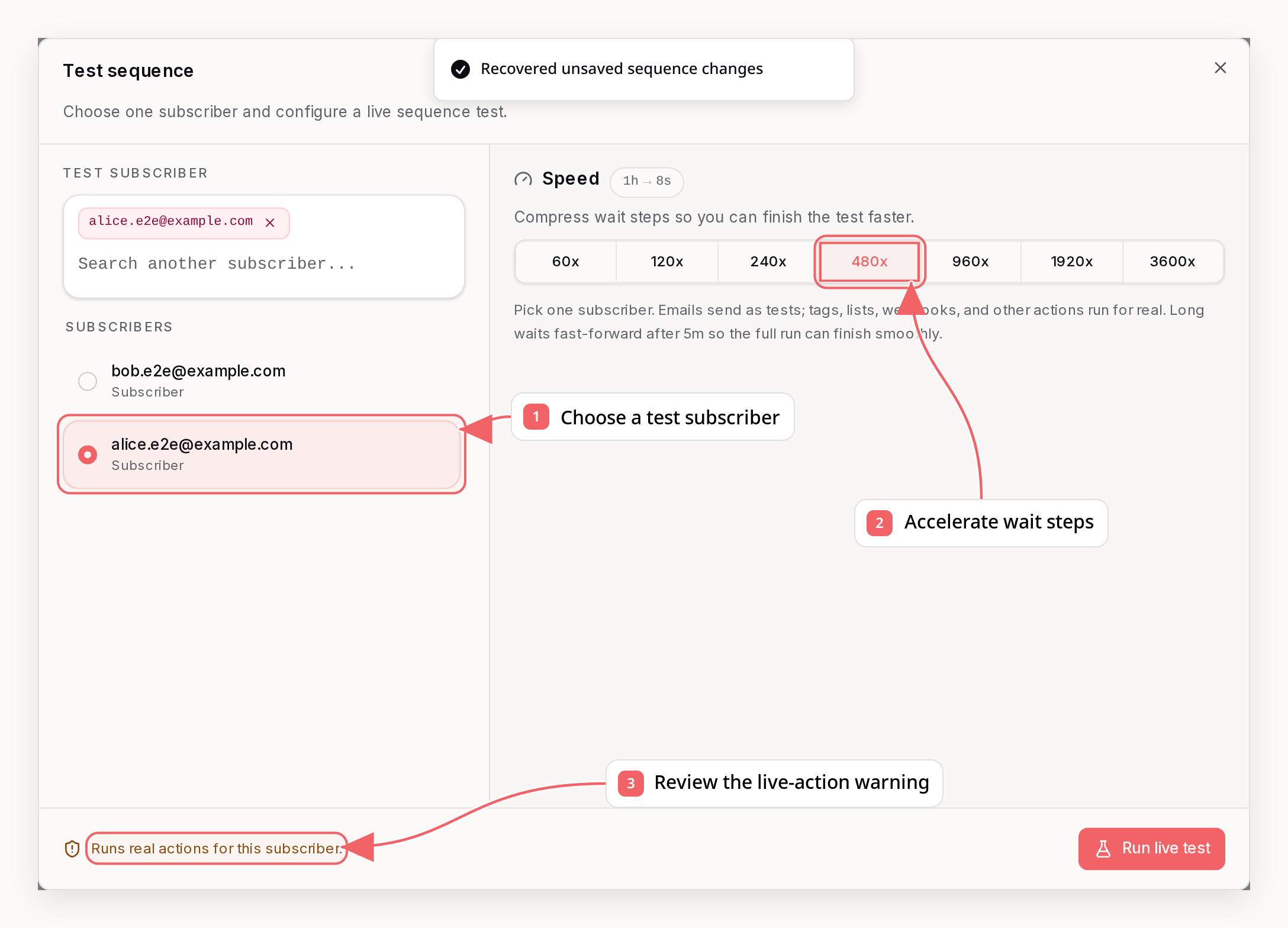
- The run starts from the sequence trigger and follows connected steps in order
- Branches, conditions, event-property merge tags, discounts, tags, lists, subscriber attributes, and webhooks use the selected subscriber’s real data
- Delay and wait steps are compressed with the selected speed multiplier, such as 60x, 120x, 240x, or 480x
- Sequence emails are sent through the test-email path with a
[TEST]subject prefix - Recent test runs show step-by-step logs, accelerated wait timing, sent-email references, and failures
- Save any pending changes in the builder.
- Choose one existing active subscriber. Direct email recipients are not available for live sequence tests because the run needs subscriber state.
- Pick a speed multiplier.
120xturns a 1-hour wait into about 30 seconds. - Confirm the run. Sequenzy prevents another queued or running test for the same sequence and subscriber.
Restrict A Live Trigger To An Allowlist
A sequence test starts from the trigger node, so it does not tell you whether your real event or segment trigger actually fires and matches. When you want the production trigger to run for real but only a chosen set of contacts to receive the sequence - a first pass on the live trigger, a phased rollout, or a pilot group - use a negative stop condition as an allowlist. Stop conditions are re-evaluated before every step, including the first one. Sodoes_not_have_tag cancels the run before anything sends for anyone who does
not carry the tag:
- Tag the contacts you want to receive the sequence, for example
allowlist. - Set the sequence stop condition to
does_not_have_tagwith valueallowlist. - Activate the sequence and fire the real trigger.
removed_from_list works the same way against a list instead
of a tag. Clear the stop condition, or replace it with the real lifecycle stop,
before you open the sequence to everyone.
Guarded-out contacts still enroll and are then cancelled at the trigger node,
so no step runs for them. They show up as cancellations on the trigger node,
not in the active or waiting enrollment counts, and the funnel entry chip
(which counts contacts that reached the first step) does not include them.
Stop On A Later Event With Property Filters
event_received stop conditions only match events received after enrollment.
The enrolling event itself, and any earlier history, never satisfies the stop -
so a sequence can safely trigger on an event and stop on the same event name.
To stop only when a later event carries specific property values, add a
matchConfig with event_property_filter mode. The filters use the same shape
and operators as event trigger propertyFilters (exists, not_exists,
equals, not_equals, one_of, contains, greater_than, less_than), and
the stop fires only when one event received after enrollment matches every
filter.
For example, a quota-nudge sequence that enrolls when a user consumes their
first credit (quota_used = 1) and should stop as soon as they consume another
one:
matchConfig modes are available:
event_property(forevent_receivedwith an event-based trigger): stop only when the stop event’s field equals the same field captured on the enrolling event, for example the sameorderId:{"mode":"event_property","rules":[{"entryFieldPath":"orderId","eventFieldPath":"orderId"}]}field_value(forfield_changed): stop only when the field changes to a matching value:{"mode":"field_value","operator":"equals","value":"pro"}entry_audience(for tag/list defaults): use the tag or list recorded when each contact enrolled. Public responses usevalue: nullwith{"mode":"entry_audience","audience":"tag"}(orlist). This is the same representation stored by the sequence. Tag entry matching requires atag_addedtrigger; list entry matching requires acontact_addedtrigger scoped to at least one specific list.
When A Stop Condition Actually Cancels
A stop condition is re-evaluated when an enrollment next runs a step, not when its event arrives. Sending the stop event does not wake a waiting enrollment. So for a contact parked on a three-day delay:- The stop event arrives. It is recorded, sync rules apply, and any sequence triggered by it enrols - but the waiting enrollment is untouched.
- The enrollment keeps reporting
waitingfor the rest of the delay. - When the delay expires and the enrollment wakes, the stop condition is checked before the next step runs, and the enrollment is cancelled. Nothing sends.
waiting, which looks like the stop condition failed.
This is the opposite of a wait for event step, which is resumed the
moment its event arrives. A step-level wait reacts to the event; a
sequence-level stop condition is checked on the next step.
stopConditionMatches: true means the condition matches at the time of the
read. The worker re-checks before a future step, but this annotation is not a
cancellation lock: the condition can change, and a step already past its stop
check may still finish. The same annotation appears on the subscriber’s page in
the dashboard, in list sequence
enrollments via
stopConditionMatch=true, and in the list_sequence_enrollments MCP tool. A
null value means the match was not determined, never “does not match”. The
listing’s stopCondition.matchConfig shows any event-property filters, field
comparison, or per-enrollment entry audience that also has to match.
If you need the enrollment to read as cancelled straight away rather than at
its next step - a lifecycle test, or an external system that polls enrollment
status - cancel it directly instead:
- A sequence has exactly one stop condition. A stop event with any other name never applies, however plausible it looks. The enrollment listing echoes the configured one.
- Only events received after enrollment count. Backdated events (more than an hour in the past) are recorded as history and never satisfy a stop.
- A
matchConfigadds payload requirements. Withevent_propertyorevent_property_filter, the stop event must carry the matching fields, not just the right name. Duplicating a sequence copies itsmatchConfigtoo, so a test copy inherits whatever the live sequence required.
Example: Welcome Sequence
Example: Post-Purchase Sequence
Personalizing Sequence Emails With Event Properties
When a sequence starts from an event trigger, Sequenzy stores that event’s properties on the sequence run. You can use those values in any later email in the same sequence withevent. merge tags.
Examples:
{{event.city}}{{event.windMaxSpeed}}{{event.alert.maxSpeed}}
How It Works
- The event snapshot is stored on the automation run when the subscriber enters the sequence
- Every later email in that same sequence reads from the same stored snapshot
- A later event for the same subscriber does not overwrite earlier sequence runs
Example
If your app sends:- Subject:
Wind alert for {{event.city}} - Body:
Winds may reach {{event.windMaxSpeed}} km/h for {{event.duration.hours}} hours.
Defaults
You can use fallback values if a property may be missing:{{event.city|your area}}{{event.duration.hours|a few}}
Using Event Properties in Update Subscriber Steps
The same merge tags work in Update Subscriber step values, so a sequence can copy event data onto the subscriber record:- Set a
planattribute to{{event.plan}} - Set an
mrrnumber attribute to{{event.amount}}(the resolved value is stored as a number) - Set first name to
{{event.firstName}}
{{ in a value field to autocomplete properties from the trigger event’s recent payloads, plus subscriber attributes and built-in fields. If a referenced property is missing from the event and the tag has no fallback, that field is skipped rather than being set to an empty value.
API, CLI, and MCP callers can create the same step explicitly:
subscriberUpdateSteps with the node ID to replace an existing Update Subscriber step’s config through the API, CLI, or MCP.
Enrollment Modes
Enrollment mode controls whether the same subscriber can enter a sequence again. It defaults tounlimited, so a tag-triggered drip sends again if the tag is ever re-applied - set one_time unless repeat runs are what you want. Back-in-stock and replenishment sequences are the exception: they default to matching_field so each product is tracked separately.
You can change the mode at any time, on a draft or a live sequence: in the dashboard under the sequence’s enrollment settings, or by passing enrollmentMode to Update Sequence, sequenzy sequences update, or the update_sequence MCP tool. Changing it affects future enrollments only; runs already in flight continue.
matching_field is only available when the sequence starts from an event. Use it when the same subscriber may legitimately have multiple active runs, but each run belongs to a different event-scoped object.
Examples:
order.id- one active run per orderproduct.providerVariantId- one active run per product variantsubscription.id- one active run per subscription
enrollmentMode to matching_field and pass enrollmentFieldPath.
The path must resolve to one scalar value. Array traversal such as lineItems[].providerProductId is not supported for enrollment keys; use propertyFilters to filter on array items, then choose a scalar order, product, variant, or subscription identifier for enrollmentFieldPath.
enrollmentFieldPath empty. Sequenzy uses built-in product and variant matching defaults for those events.
Unsubscribed and Bounced Contacts
Unsubscribed and bounced contacts still enroll when a trigger matches. This keeps sequences useful beyond marketing email: tag changes, attribute updates, webhooks, and emails marked as transactional (for example an order-shipped notification) all still run for them. Marketing email steps are skipped automatically for these contacts. If a contact unsubscribes while already moving through a sequence, the remaining enrollment is cancelled instead - the sequence’s own emails were the most likely cause, so continuing would only produce more skipped sends.Commerce Sequence Stop Behavior
Commerce event triggers get product-aware defaults so subscribers do not keep receiving product sequences after the sequence is no longer relevant.Replenishment Due
Sequences triggered byecommerce.replenishment_due default to stopping when the same product is purchased again.
Sequenzy matches purchases by:
providerproviderProductIdproviderVariantIdwhen the replenishment setting uses variant-level matchinglineItems[].providerProductIdandlineItems[].providerVariantIdon laterecommerce.order_placedevents
Back In Stock
Sequences triggered byecommerce.back_in_stock default to stopping when either of these happens:
- The subscriber buys the same item
- The same item goes out of stock again
providerproviderProductIdorproduct.providerIdproviderVariantIdorproduct.providerVariantIdlineItems[].providerProductIdandlineItems[].providerVariantIdon later purchase eventsecommerce.back_in_stock_out_of_stockevents for the same product and variant
Condition Types
Conditions let you control the sequence based on subscriber data:- If continues only when the condition matches. Otherwise, the subscriber exits the sequence.
- If/Else takes the first matching path, or the Else path if none match.
Tag Conditions
List Conditions
Segment Conditions
Event Conditions
activityScope: this_sequence checks events
received since the contact entered this sequence, previous_email checks events
tied to the last sequence email, and ever checks the contact’s full event
history.
Clicked Link Conditions
activityScope values:
this_sequence, previous_email, and ever.
Field Conditions
Available Operators
Wait for Event
The “Wait for Event” node pauses execution until a named event is recorded for the contact.What you can wait for
Choose any built-in or custom event name:
The node matches on the event name only. Unlike a trigger, it cannot be narrowed with property filters, so any occurrence of that event name resolves the wait - a contact waiting on
ecommerce.order_placed after buying one product is released by an order for any other product too.
If you need the run to be about one specific product, order, or variant, scope the whole sequence with matching_field enrollment rather than trying to narrow the wait. That gives each contact a separate run per event field value, so each run’s wait is already about the right object.
Timeout behavior
Every wait has a timeout measured in days. A wait has a single outgoing path - the timeout does not create a second branch. When the timeout expires, the contact takes one of two actions you choose:
Because “continue” reuses the same path, a step placed after the wait runs both for contacts whose event arrived and for contacts who timed out. To treat those two groups differently, put a Condition after the wait:
Branching
Simple Condition (2 paths)
Multi-Branch (3+ paths)
Empty paths
A path does not have to contain a step. Subscribers who take an empty path pass straight through to whatever comes after the branch, so you can save and activate a sequence with empty paths. The editor shows where each empty path leads and highlights empty paths while the sequence is live. When an empty path continues into a step that only it feeds, you can also remove the empty path tile without changing where its subscribers go.Sequence States
Paused sequences do not execute nodes. Subscribers already in the sequence stay
at their current step, and new subscribers who match the trigger are not
enrolled while the sequence is paused. When the sequence resumes, due
subscribers continue gradually from the step where they were held.
You can also stop new enrollments without pausing the sequence. In that mode,
current subscribers keep moving until completion, but new trigger matches are
not enrolled.
Waits are wall-clock based. If a subscriber is waiting three days and the wait
expires while the sequence is paused, the subscriber becomes due but does not
continue until the sequence resumes.
Sending Paused
Company sending pauses and real account bans are parent locks, not manual sequence pauses. An active sequence remains active, still captures new entrants, and keeps tokens at their current step while email sending is blocked. The dashboard shows this as Sending paused so you can distinguish it from a sequence you paused yourself. When sending is restored, due sequence work wakes automatically. If you do not want a specific sequence to continue after sending is restored, pause that sequence manually; the manual pause remains until you resume it.Tokens (Subscriber Journeys)
When a subscriber enters a sequence, a “token” tracks their progress:Token States
Real-World Sequence Examples
SaaS Trial to Paid
E-commerce Abandoned Cart
Re-engagement Campaign
Best Practices
1. Start Simple
Begin with 3-5 step sequences before building complex flows:2. Use Tags for State
Track sequence progress with tags:3. Set Reasonable Delays
- Welcome emails: immediate to 30 minutes
- Follow-ups: 2-4 days
- Re-engagement: 1-2 weeks
4. Always Have Exit Conditions
Check if the goal is achieved before sending more emails:5. Personalize with Conditions
Different paths for different subscribers:Private welcome previews
Admin welcome previews need only a company website URL. Sequenzy discovers the brand details in the background and builds a private four-email preview using the same business-specific strategy as landing previews, with an additional education email. Ecommerce previews focus on product discovery and purchase confidence rather than software onboarding. Recipients can explore every email before creating an account to save and edit the sequence.Related
Tags
Use tags to trigger sequences
Events
Trigger sequences with events
Campaigns
One-time broadcasts vs sequences
Transactional
Immediate emails via API
Test with event properties
In Test sequence, choose Live test and enter optional Test event properties as a JSON object, for example{"cart_id":"cart_123","event_ids":["event_1","event_2"]}. Your steps can use {{event.cart_id}}; arrays and nested values keep their types. Leave the field blank for no event data. This does not record a trigger event, but live tests perform real sequence actions for the selected subscriber. Emails are marked as tests. Closing the dialog clears the input. Start and inspect live tests through the API, CLI or MCP as well.
Reuse received event data for sequence tests
Usesequenzy events sample <eventName> --company <companyId> --json, MCP get_event_sample, or GET /api/v1/events/sample?eventName=<eventName> to read the latest retained payload in your workspace. Requires subscribers:read. This includes older and custom events across all subscribers; sample: null means none exists. Copy sample.properties into the test run’s customVariables (CLI --event-properties) and edit as needed. The dashboard’s Use latest received event button replaces the JSON field. Copying data does not change the selected recipient or fire an event. Clear the field, omit the properties, or pass {} to test without overrides. Lookup errors are safe to retry; starting a real test still has delivery side effects.