
Overview
Custom webhooks allow you to trigger events in Sequenzy by sending HTTP POST requests from any service that supports webhooks. When an event is triggered, it can start sequences, apply sync rules, and more. Each webhook gets a unique secret URL — no API keys or special headers needed. Just paste the URL into your external service. Common use cases:- Trigger a sequence when someone books a call via Cal.com
- Start onboarding emails when a form is submitted on Typeform
- Add subscribers when they schedule a meeting on Calendly
Getting Started
1. Get Your Webhook URL
- Open your sequence in the editor
- Select a trigger node with an Event trigger (e.g., “When
call-bookedevent received”) - Find the Webhook URL section in the trigger configuration
- Copy the unique URL
2. Send a Test Webhook
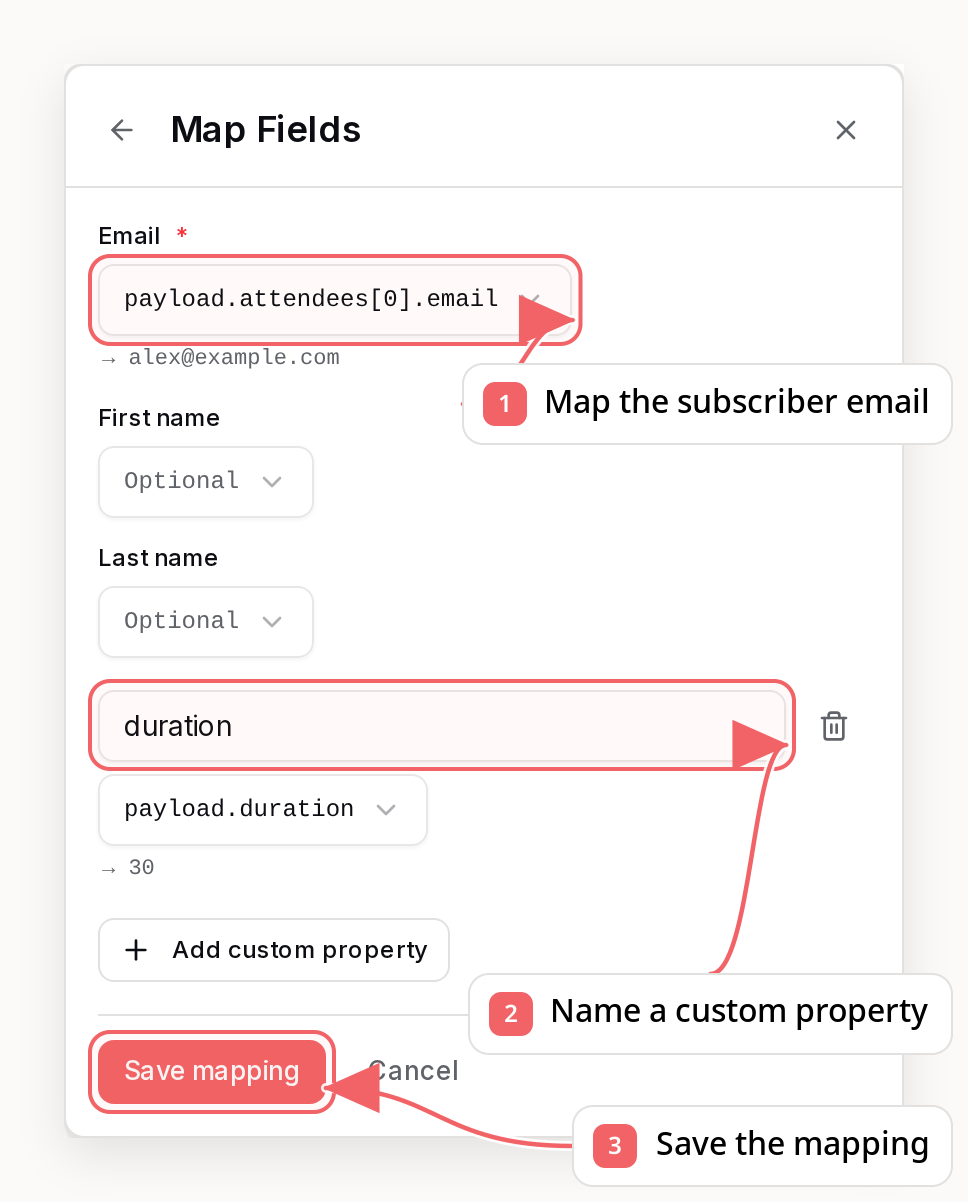
Paste the URL into your external service and send a test request. Sequenzy will capture the raw payload. Alternatively, you can paste an example payload directly in the Sequenzy UI.3. Map Fields
Once a payload is captured, Sequenzy shows you the raw JSON and lets you map fields:- Email (required) — e.g.,
payload.attendees[0].email - First name — e.g.,
payload.attendees[0].name - Last name — optional
- Custom properties — e.g.,
payload.duration→duration
payload.attendees[0].email. Email is required; the profile fields and custom event properties are optional.
4. Save and Activate
Save the mapping. Future webhooks will automatically extract the fields and trigger the event.How It Works
The webhook has three states:- Waiting for payload — URL is generated, waiting for the first request
- Payload captured — Raw payload stored, ready for field mapping
- Active — Mapping configured, future requests trigger events automatically
- Fields are extracted from the payload using dot-notation paths (supports array indexing like
payload.items[0].email) - The subscriber is created if they don’t exist
- The event is triggered, which can start sequences
Service-Specific Setup
Cal.com
- In Cal.com, go to your event type > Webhooks
- Click New Webhook and paste your Sequenzy webhook URL in the Subscriber URL field
- Leave the Secret field empty (it’s for HMAC signature verification, not needed here — your URL already contains a unique secret)
- Select the events you want to trigger (e.g.,
BOOKING_CREATED) - Send a test — Sequenzy captures the payload
- Map fields:
payload.attendees[0].email→ Email,payload.attendees[0].name→ First Name
Typeform
- In Typeform, go to Connect > Webhooks
- Add your Sequenzy webhook URL
- Submit a test response
- Map fields from the captured payload (e.g.,
form_response.answers[0].email→ Email)
Calendly
- In Calendly, go to Integrations > Webhooks
- Add a webhook with your Sequenzy URL
- Book a test meeting
- Map fields:
payload.invitee.email→ Email,payload.invitee.name→ First Name
Generic Webhook Sources
For any service that supports webhooks:- Find the webhook configuration in the service
- Paste the Sequenzy webhook URL as the destination
- Send a test request
- Map the fields in Sequenzy
Event Properties
You can map custom properties from the payload to event properties. These are stored with the event and can be used for:- Filtering in sync rules
- Personalization in emails (for example,
Thanks for booking a {{duration}}-minute call!)
Managing Webhooks
Edit Mapping
Click “Edit mapping” on an active webhook to change the field mapping.Reset
Click “Reset” to clear the mapping and captured payload, returning to the “waiting for payload” state.Regenerate URL
If your webhook URL is compromised, click “Regenerate URL” to create a new secret. The old URL will stop working immediately.Best Practices
- Send a real test request from your external service before going live. This captures the actual payload format.
-
Use descriptive event names like
call-booked,form-submitted, ordemo-scheduledrather than generic names. - Map all relevant properties that you might want to use for personalization or filtering later.
- Handle errors gracefully — the webhook returns 200 even for processing errors to prevent external services from retrying unnecessarily.
Troubleshooting
Event Not Triggering Sequence
- Verify the webhook status is “Active” (green badge)
- Check that the email mapping extracts a valid email from the payload
- Ensure the sequence is published and active
- Verify the subscriber meets any conditions on the sequence
Mapping Not Working
- Check that the field paths are correct (use dot notation, e.g.,
payload.attendees[0].email) - Verify the payload structure matches what you mapped — send another test webhook to update the sample
- Ensure the email field extracts a valid email address (must contain
@)
Webhook URL Not Working
- Verify you’re using the correct URL (it should start with
https://api.sequenzy.com/api/inbound-webhooks/) - If you regenerated the URL, update it in your external service
- Ensure the request uses POST method with a JSON, form-encoded, or multipart body
FAQ
Do I need Zapier to use webhooks?
Do I need Zapier to use webhooks?
No! Custom webhooks let you connect directly to Sequenzy without any
middleman service.
Do I need an API key?
Do I need an API key?
No. The webhook URL contains a unique secret that acts as authentication. No
headers needed.
What payload format do I need to send?
What payload format do I need to send?
Any JSON object or array, a form-encoded body
(
application/x-www-form-urlencoded), or a multipart form. Sequenzy
captures whatever your external service sends and lets you map the fields to
subscriber data. Payloads are limited to 1 MB, and file uploads in multipart
forms are ignored.What happens if I send the same event twice?
What happens if I send the same event twice?
Each webhook call creates a new event. If your sequence is set to enroll
subscribers only once, they won’t re-enter the sequence.
Can I use webhooks with the free plan?
Can I use webhooks with the free plan?
Yes, webhooks are available on all plans.
Is there a rate limit?
Is there a rate limit?
Standard API rate limits apply. For high-volume scenarios, consider using
our bulk API endpoints.
Can the AI assistant help me set this up?
Can the AI assistant help me set this up?
Yes! In the sequence editor, ask the AI chat to help you connect external
services like Cal.com or Typeform. It will guide you through the webhook
configuration.