
Connect Shopify
Open Settings → Integrations, search for Shopify, and choose Install from Shopify. Complete the Shopify authorization flow, then return to Sequenzy to configure subscriber sync and store automations.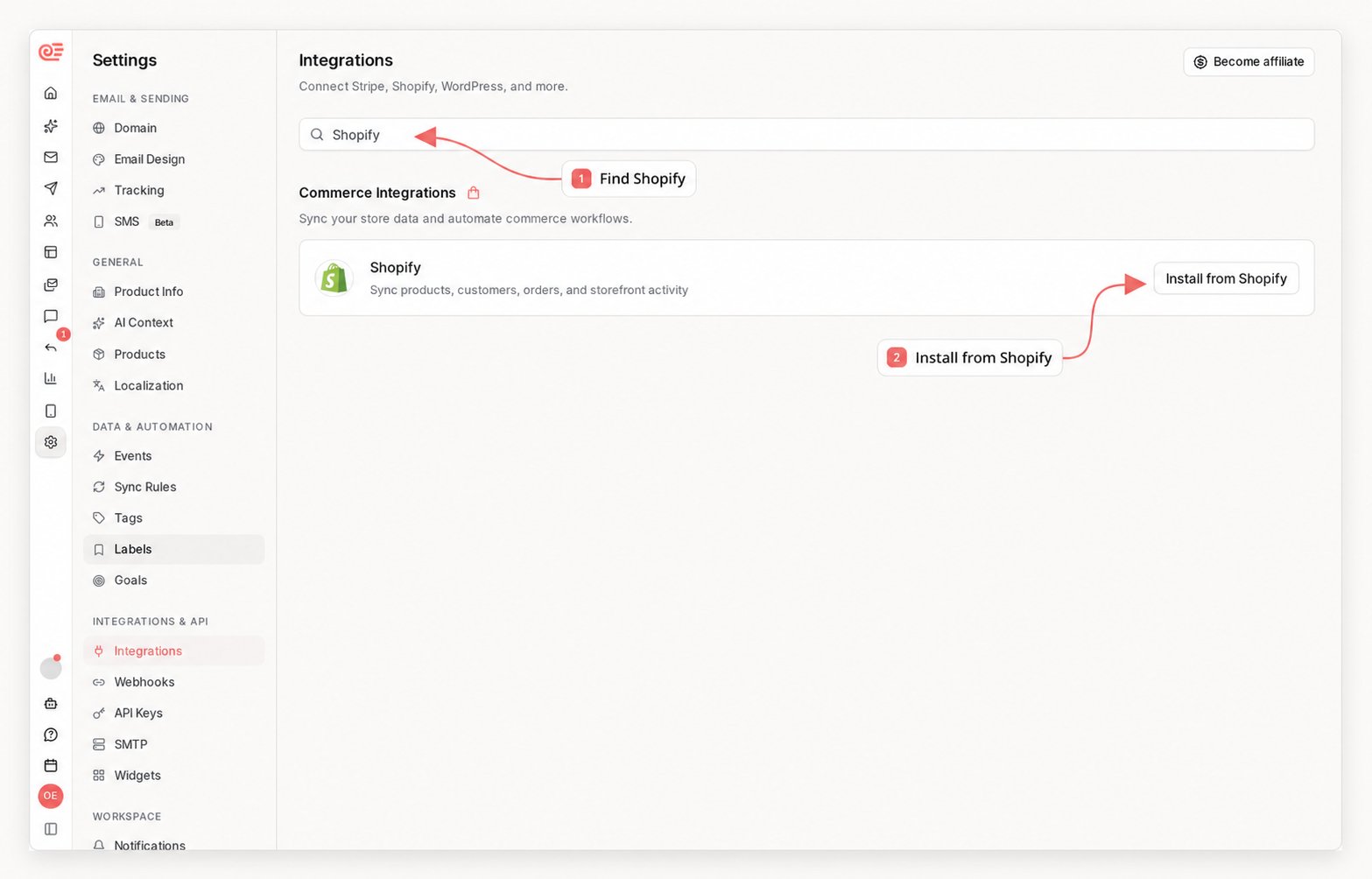
What It Does
- Sync products, variants, prices, images, stock state, and product URLs
- Keep the catalog fresh in real time through product create/update/delete webhooks
- Sync Shopify customers and order revenue onto subscriber profiles
- Track order, checkout, customer, refund, fulfillment, and stock events
- Track shipment stages (shipped, out for delivery, delivered, delivery failed) with tracking data
- Reverse subscriber revenue and campaign attribution when orders are refunded or cancelled
- Track known-customer product views, add-to-cart, collection views, and searches through the Shopify Web Pixels API
- Trigger browse abandonment events when a viewer doesn’t buy within the browse window
- Trigger price drop events for recent viewers when a product’s price decreases
- Capture back-in-stock requests from the Shopify storefront block
- Trigger replenishment reminder events after a product-specific delay
- Create dynamic Shopify discount codes from sequence discount actions
- Expose
recommendedProductsmerge variables for product recommendation blocks - Show purchased products on subscriber profiles alongside Stripe products
Required Scopes
Sequenzy requires these Shopify OAuth scopes:
When you reconnect Shopify, Sequenzy checks the scopes Shopify actually granted to the saved token. If any required scope is missing, reconnect the store from Settings so Shopify can grant the latest permissions.
Storefront Browse Tracking
Sequenzy includes a Shopify web pixel extension that subscribes to Shopify’sproduct_viewed, product_added_to_cart, product_removed_from_cart, cart_viewed, collection, and search standard events. A known shopper’s cart_viewed event is normalized to ecommerce.cart_started with the complete cart lines, quantities, product metadata, images, and prices required by recovery emails. Product removals update the tracked cart snapshot; removing the final line emits ecommerce.cart_cleared. The pixel is one adapter for the generic commerce customer event ingestion endpoint. During Shopify post-connect sync, Sequenzy creates or updates the store’s app pixel settings with this endpoint:
/api/webhooks/shopify/{companyId}/customer-events, remains available as a compatibility alias. The managed Shopify pixel includes a signed verification token in each request; the endpoint validates the token, connected company, and shop, queues the event, and returns immediately. A worker records browse events for known subscribers with an email in the pixel event context.
Checking and Activating the Pixel
Everything in this section depends on the pixel being installed on the store. When it is not, none of these events arrive, and a sequence triggered by one of them enrolls nobody without reporting an error - so check the pixel before trusting browse abandonment, cart recovery, product views, collection views, or storefront search. Pixel state is not stored by Sequenzy: a merchant can remove the pixel from the Shopify admin at any time, so it is always read from the store.sequenzy integrations pixel <id> and sequenzy integrations enable-pixel <id> on the CLI, and as get_integration_pixel and activate_integration_pixel over MCP. See Get Storefront Pixel and Activate Storefront Pixel.
Activation is idempotent, and events start arriving on the next storefront visit - nothing is backfilled for the period the pixel was off, so turn it on before building the sequence that depends on it. If the store granted an older permission set, activation fails with a message naming the reconnect step rather than silently doing nothing; reconnect Shopify from Settings to grant write_pixels, then retry.
Anonymous Visitor Backfill
When a shopper browses without an identity, the pixel buffers their events (product views, add-to-carts, cart views, collection views, and searches) in the browser for up to 14 days. The moment the shopper identifies - entering their email at checkout, or visiting while signed in to a customer account - the buffered events are replayed to Sequenzy withbackfill: true and recorded on the contact’s activity timeline at their original timestamps. Backfilled events never trigger event-received sequences, never resume a sequence the contact is already waiting in, and never schedule cart- or browse-abandonment checks; they exist to complete the contact’s history, segments, and product-interest data. They do count toward segment membership, so a contact can still enter a segment-triggered sequence when the backfilled activity makes them match that segment - scope such segments to a recent time window (for example “viewed a product in the last 3 days”) if you do not want replayed history to enroll them. The identified email is also remembered in that browser for 30 days, so subsequent visits are tracked live and do power abandonment automations. Buffering runs inside Shopify’s consent-gated pixel sandbox, so it honors the store’s customer privacy settings, and events replayed before the contact record exists are retried for up to 15 minutes while the checkout webhook lands.
Custom storefront adapters can post the same shape to:
{provider} (shopify, woocommerce, manual, api, or stripe). Shopify and WooCommerce payloads must include a valid signed verificationToken for the active integration. Generic adapters such as api, manual, or stripe must include a Sequenzy API key in Authorization: Bearer ... or x-api-key; the key must belong to the route company. Generic api adapters can send events without Shopify-specific fields.
Browse events trigger these internal events:
Product events include product matching fields for automations:
cartId, itemCount, totalQuantity, totalPriceCents,
currency, productNames, and normalized lineItems. Each line item contains
the product and variant IDs, title, quantity, formatted price, image URL, and
product URL used by dynamic recovery-email blocks.
Personalized Recommendations
Campaign, test-email, sequence, and A/B test sends receive a generatedrecommendedProducts merge variable. The MVP ranks products across commerce providers in this order:
- Recent products the subscriber viewed or added to cart
- Products browsed by similar customers who viewed the same products
- Popular recently browsed products from the same connected catalog
- Recent in-stock catalog products
{{variables.recommendedProducts.0.title}}.
Synced Data
Products
The product catalog includes:- Product title, description, handle, image, URL, and stock state
- Lowest product price and compare-at price when available
- Variant IDs, titles, SKUs, option values, prices, images, and inventory state
- Replenishment settings stored per product
Subscribers
Shopify customer and order data is stored as subscriber attributes:
Older subscribers may still have
totalRevenue or averageOrderValue. Sequenzy treats those as legacy fallbacks for ltv and aov instead of showing duplicate fields in subscriber views.
Phone and SMS consent
Customer sync and customer webhooks also carry each customer’s phone number and SMS marketing consent. A customer who opted into SMS marketing on your store (for example at checkout) becomes SMS-subscribed in Sequenzy with consent sourceshopify and Shopify’s consent timestamp; an opt-out on
Shopify unsubscribes them. A phone number without an explicit opt-in is
stored but never treated as consent. This requires approved phone field
access for protected customer data on your store - without it, the sync
skips phone and consent and everything else still works. See
SMS consent for details.
Order Events
Shopify order webhooks triggerecommerce.order_placed with product line item data:
lineItems[].providerProductId and, when variant-level matching is enabled, lineItems[].providerVariantId to match follow-up automation against the exact product that was purchased.
Checkout webhooks trigger ecommerce.checkout_started once per checkout, as soon as the buyer’s email is known. The event carries the line items at that moment plus abandonedCheckoutUrl so recovery emails can link straight back to the checkout. Completed checkouts never trigger the event - the order webhook takes over.
Shipment Events
Fulfillment webhooks track each shipment through its delivery lifecycle. Every stage triggers exactly once per fulfillment:
Events include
trackingNumber, trackingUrl, trackingCompany, shipmentStatus, and the fulfilled lineItems, so shipping confirmation emails can render tracking links and review requests can wait for the actual delivery date. Carrier stage updates (out_for_delivery, delivered) require a Shopify-supported tracking carrier; untracked fulfillments still trigger ecommerce.order_shipped. Existing stores must reconnect once so Sequenzy can request the read_fulfillments scope.
Refunds and Cancellations
Refund and cancellation webhooks keep revenue honest:refunds/createsubtracts the refunded amount from the subscriber’stotalSpent,ltv, andaovattributesorders/cancelledalso decrementsordersCount, for orders Sequenzy previously counted- Attributed campaign and sequence revenue is adjusted with a matching negative conversion, so dashboards net out refunded orders instead of overstating
Browse Abandonment
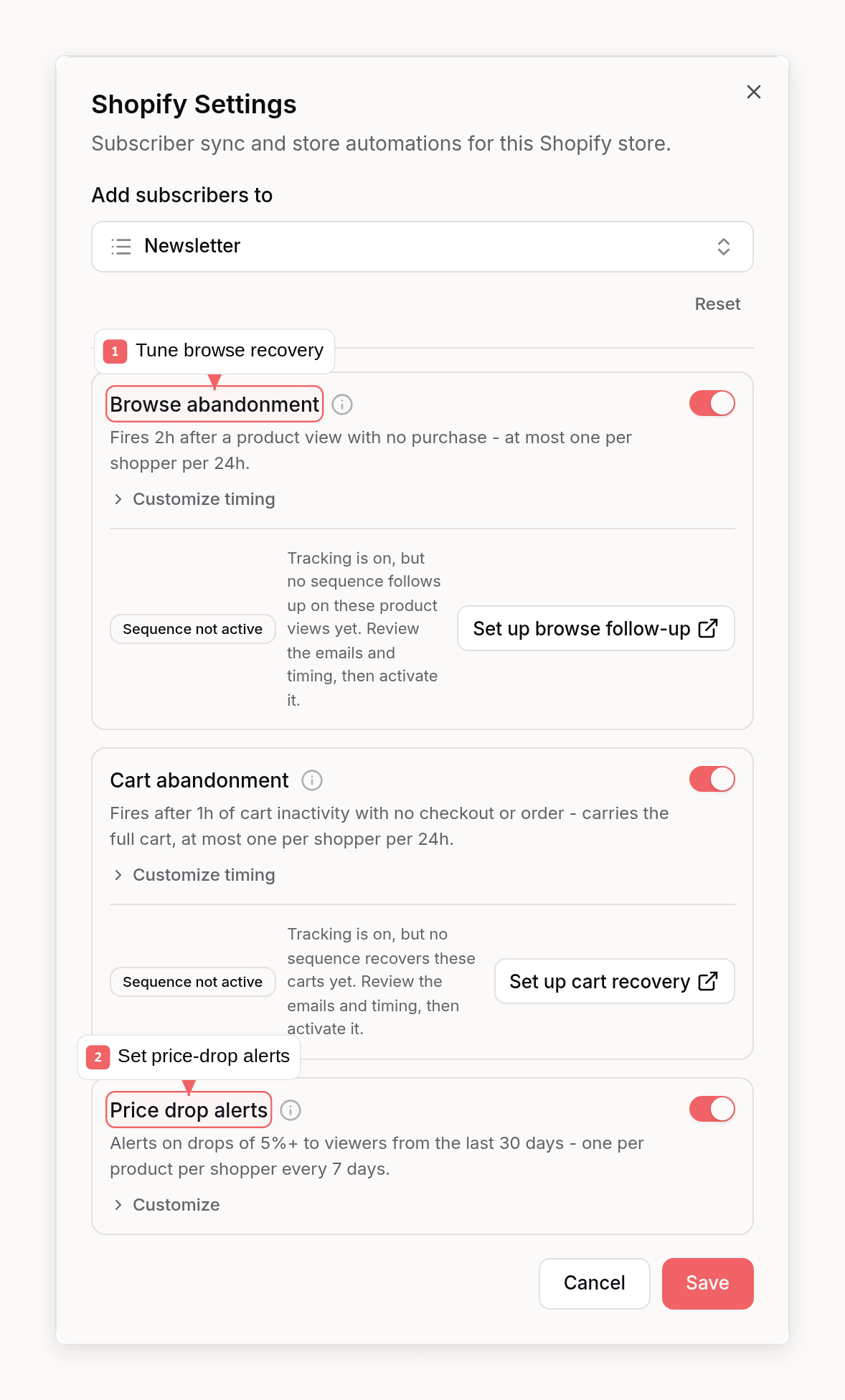
When a known subscriber views a product through the browse pixel and then goes quiet, Sequenzy triggersecommerce.browse_abandoned after a configurable delay (default 2 hours). The check is skipped when the subscriber placed any order, started a checkout, or added the viewed product to their cart since the view, and at most one browse abandonment event fires per subscriber per cooldown window (default 24 hours). The event carries the viewed product so recovery emails can show exactly what caught their eye.
Price Drop Alerts
When a product update lowers a variant’s price by at least 5% (configurable), Sequenzy triggersecommerce.price_drop for subscribers who viewed the product or added it to their cart in the last 30 days. Events include oldPriceCents, newPriceCents, percentOff, and the product payload for rendering. Each subscriber receives at most one price drop event per product per 7 days.
If no sequence is set up for ecommerce.price_drop, Sequenzy sends a default price-drop email automatically - a product card with the old price struck through, the new price, the discount percent, and a link to the product. Active subscribers only; unsubscribed contacts never receive it. Create a sequence triggered by ecommerce.price_drop to replace the default email with your own.
Automation Settings
Browse abandonment and price drop are on by default with sensible timing. Adjust or disable them per store:- Dashboard: Settings → Integrations → Shopify → Settings
- CLI:
sequenzy shopify settings get/sequenzy shopify settings update - MCP:
get_shopify_automation_settings/update_shopify_automation_settings - API:
GET/PUT /api/v1/shopify/automation-settings
Replenishment Reminders
Replenishment reminders start from synced products:- Open Settings → Products.
- Choose a Shopify product.
- Turn on replenishment.
- Pick how many days after purchase the product usually runs out.
- Choose whether matching should use any variant of the product or the exact purchased variant.
ecommerce.replenishment_due.
The event includes the same product matching fields:
ecommerce.replenishment_due get a default stop condition: they stop when the same product is purchased again.
Enable the Back in stock theme block
After installing the Shopify app, add the Sequenzy theme app block to a product template:- In Sequenzy, open Settings → Integrations → E-Commerce → Shopify.
- Click Add Back in stock block. This opens Shopify’s theme editor on the product template with the app block ready to add.
- In the Shopify theme editor, add Back in stock from Apps or Sequenzy Notify Me.
- Place it near the product form, click Save, and preview an out-of-stock product or unavailable variant.
Online Store -> Themes -> Customize -> Products -> Default product -> Add block -> Apps -> Back in stock
The deep link format is:
Back-In-Stock Requests
The Shopify storefront block captures customer email, product ID, variant ID, product title, and variant title for out-of-stock items. Sequenzy records the request and triggersecommerce.back_in_stock_requested.
When a synced product variant returns to stock, Sequenzy marks active waitlist entries as notified and triggers ecommerce.back_in_stock.
ecommerce.back_in_stock get a default stop condition: they stop if the same item is purchased or if the same item goes out of stock again.
Subscriber Profiles
Subscriber profiles show commerce context from Shopify:- Purchased products from order line items, including product image, variant, quantity, price, and last purchase time
- Pending replenishment reminders
- Active back-in-stock waitlist entries
- Revenue metrics such as
ltvandaov
read_all_orders.
Pending replenishment rows link to the subscriber profile when the subscriber is known.