
Enabling The Add-on
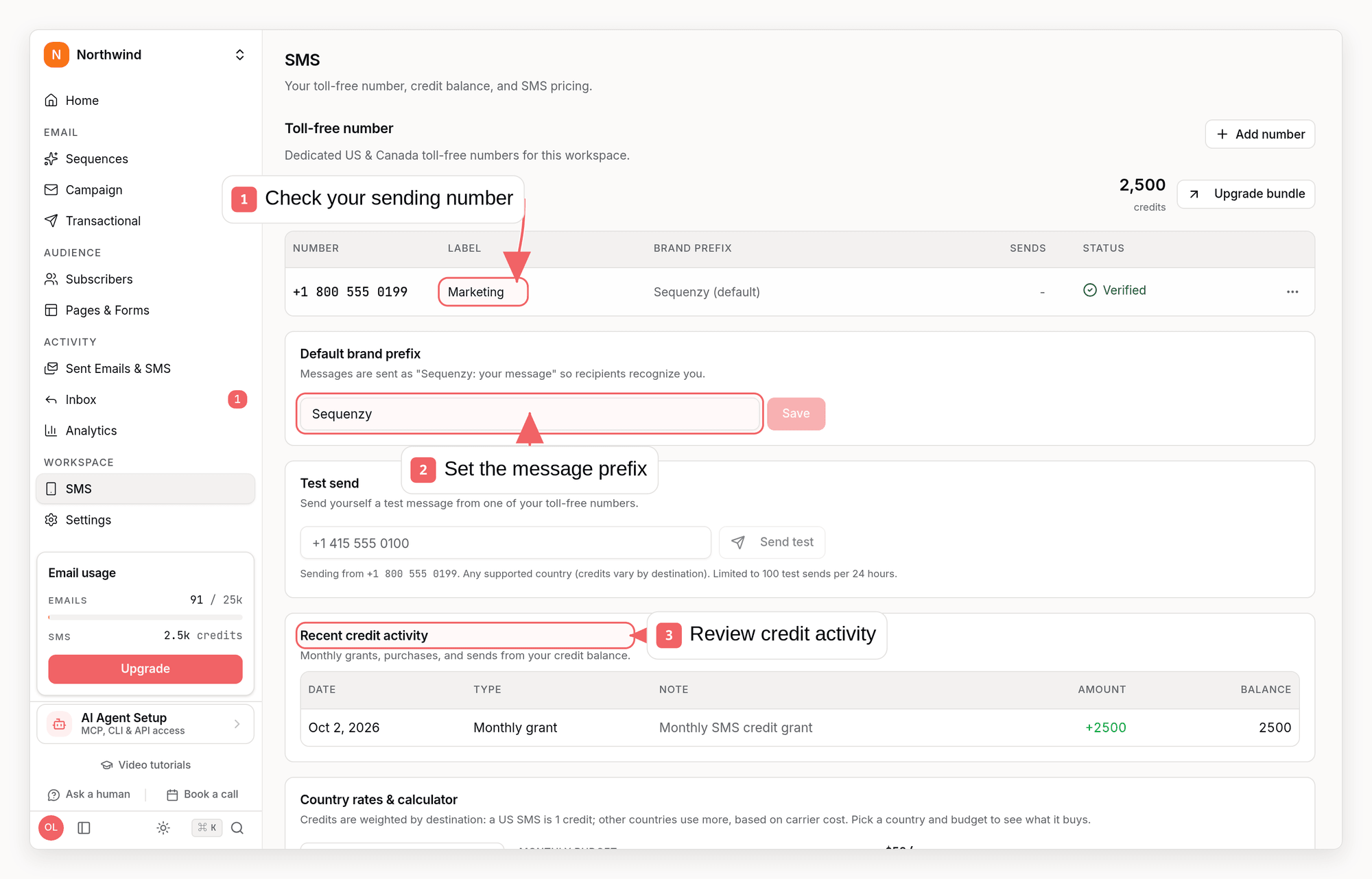
Go to Settings → SMS and subscribe to the add-on. If you are upgrading your plan, you can also add SMS in the same step: the plan upgrade dialog lists it under Add-ons with a volume slider, so you can pick a monthly credit bundle (from 1,000 credits at $16/mo up to 500,000) and buy it together with the plan. SMS is billed monthly even alongside an annual plan. Once payment completes, Sequenzy automatically:- Purchases a dedicated toll-free number for your workspace (no number picker needed - it just works)
- Opens the toll-free verification wizard so you can register the number with carriers
Adding more numbers
Workspaces can hold up to 100 toll-free numbers, added from Settings → SMS. Each number is verified with the carrier separately and can carry its own label (shown in campaign sender pickers) and its own brand prefix. Campaigns pick their sending number in the Message step; sequences, one-off sends, and standalone test sends use your default (oldest verified) number. A number stuck in carrier review never blocks adding another, so a second brand can start its registration while the first is still being reviewed.One business, several brands
If you trade under more than one name - say a design studio and a financial services arm under the same LLC - give each brand its own number. The carrier registers each number as its own messaging program, so the brand customers opted in to has to match the number they hear from. Your legal business details (registered name, EIN, address, entity type) are stored once for the workspace and reused by every number. Each number then carries its own brand: the DBA name, that brand’s website, its verification contact, its consent flow and screenshot, its sample messages, and its use case. Nothing is inherited from another number, because registering a brand against a sister brand’s website is a rejection.Toll-Free Verification
US and Canadian carriers require every toll-free number to be verified before it can send marketing messages. The verification form asks for:- Your legal business name, address, and registration number (shared by every number in the workspace)
- The brand or DBA name this number sends under, and that brand’s website
- A contact the carrier can reach about this brand
- A description of how subscribers opt in to SMS, with proof
- Sample messages you plan to send
- An estimated monthly volume
* are what the carrier requires, including your legal
entity type and a screenshot of your opt-in flow. The rest - opt-in keywords
and your privacy and terms URLs - are optional and only improve your odds of a
fast approval, so they never block a submission.
Save keeps your details without contacting the carrier, so you can stop and
come back when you have the EIN or the opt-in screenshot. It saves both halves:
the legal business details for the workspace and the brand details for this
number. A resubmission after a rejection starts from what that number last
sent, and the verification page has its own URL so you can send it to whoever
has the missing answer.
The most common rejection is “Business Name Must Match Official Records”:
the business name must be your registered legal entity exactly as it appears on
your EIN or state registration - not a DBA or brand name - and the address must
be the one on that registration.
If your messages go out under a brand that is not your legal name, put it in
Brand / DBA name and point Brand website at that brand’s site. Carriers
check the name people opted in to against the registration, so a brand that
appears in your messages but nowhere in the application is the other half of
that rejection - and a brand whose website belongs to a different business is
the same problem again. Sequenzy warns you when the prefix on your sample
message matches neither name.
Review typically takes 1-5 business days. The SMS settings tab shows a
setup checklist. Every number shows its own state - Action needed (you
still have to submit the form), In carrier review, Verified, or
Changes required with the carrier’s reason - so one number can be sending
while another is still under review. If a submission is rejected, open that
number and resubmit.
Until the number is verified, the composer and settings are fully available,
but sending is blocked.
The Number Detail Page
Opening a number from Settings → SMS takes you to that number’s own detail page, with everything scoped to it:- Status - Action needed, In carrier review, Verified, or Changes required, matching the state shown in the settings list
- Submitted verification data - the toll-free verification form you submitted for this number (business details, brand/DBA name, opt-in description, sample messages, estimated volume), shown read-only. Visible to workspace admins only
- Usage - sends, delivered, failed, credits spent, and the timestamp of the last message sent from this specific number, so you can see what a number actually costs and how healthy its delivery is on its own
- Label and brand prefix - edit the number’s display label and its per-number brand prefix override from the same page
- Test send - send a test message from this specific number (see Test Sends)
Removing A Number
A number’s detail page (and its row menu in the SMS settings list) has a Remove number action. Removing a number:- Releases it back to the carrier. This is irreversible, the number cannot be reclaimed once released
- Frees its slot under the workspace’s 100-number cap, so you can provision a replacement
- Causes campaigns, sequence steps, and automations still pointed at that number to skip their SMS sends until you repoint them at another verified number - an explicit “send from” choice is never silently swapped for a different number. Sends without a specific number keep using your workspace default (oldest verified) number
sequenzy sms release CLI
command, and the release_sms_number MCP tool.
SMS Consent
SMS consent is completely separate from email status. A subscriber can be active for email but not subscribed to SMS, and vice versa. Every subscriber has:- A phone field (stored in E.164 format, country derived automatically)
- An SMS status:
not_subscribed(default),subscribed, orunsubscribed - A consent source and timestamp when subscribed:
import,api,manual,form,checkout, orshopify
- Consent is never inferred from a phone number. Adding a phone via the UI, CSV import, or API does not subscribe anyone to SMS - you must set consent explicitly, and only when you have express written consent.
- STOP applies per phone number. When someone replies STOP, every subscriber in your workspace who shares that phone number is unsubscribed from SMS, and the number is suppressed from future sends.
- START re-subscribes. If a subscriber who opted out via STOP replies START, the suppression is removed and they are subscribed again.
smsConsent
field, or manually on a subscriber’s profile.
Shopify SMS consent sync
If you use the Shopify integration, phone numbers and SMS marketing consent your store collects (for example at checkout) sync automatically:- The initial customer sync imports each customer’s phone number and SMS
marketing state. Customers who opted in at your store arrive as
subscribedwith consent sourceshopifyand Shopify’s consent timestamp. - Customer webhooks keep consent current: when a customer opts in or out on Shopify, the change is applied to the matching subscriber within seconds.
- Consent stays TCPA-safe: a customer is only subscribed on an explicit
Shopify opt-in, an explicit opt-out unsubscribes them, and a phone number
without consent is stored as
not_subscribed.
Sending Rules
The Send SMS sequence step sends only when all of these are true:- Your workspace is on a paid plan or has SMS credits available
- The add-on is enabled and your number is verified
- The subscriber has a phone number in a supported country (see International destinations)
- The subscriber’s SMS status is
subscribed - The phone number is not suppressed (for example by a prior STOP)
Phone Number and SMS Status fields in segments.
Quiet Hours
For US and Canadian numbers, the window is evaluated in the recipient’s own local timezone, inferred from the phone number’s area code. US numbers are delivered between 8:00am and 8:00pm local time, every day. This keeps every send inside the TCPA window (8:00am to 9:00pm local) and the stricter Florida and Washington 8:00pm cutoff, while letting sends start as early as legally allowed instead of waiting for a single nationwide window. Texas numbers open at noon local time on Sundays (Texas Sunday law). Canadian numbers follow the CRTC’s Unsolicited Telecommunications Rules instead, since the TCPA does not apply there: 9:00am to 8:00pm local time on weekdays, and 10:00am to 6:00pm local time on Saturdays and Sundays. Area codes that straddle two timezones are evaluated conservatively so recipients on either side stay inside their legal window. When the recipient’s local timezone can’t be determined from the area code, or for destinations outside the US and Canada, messages fall back to a conservative window of 11:00am to 8:00pm in the destination country’s reference timezone (Eastern Time for the US and Canada, London time for the UK, and so on), opening at 2:00pm on Sundays. If a send fires outside the window, the message is deferred until the window opens - it is never dropped.Message Format
Every message is sent with your brand name as a prefix (for exampleAcme: Your order shipped!) so recipients always know who is texting them.
The very first message a subscriber receives also includes a compliance
footer: Msg&data rates may apply. STOP to end, HELP for help.
The Composer
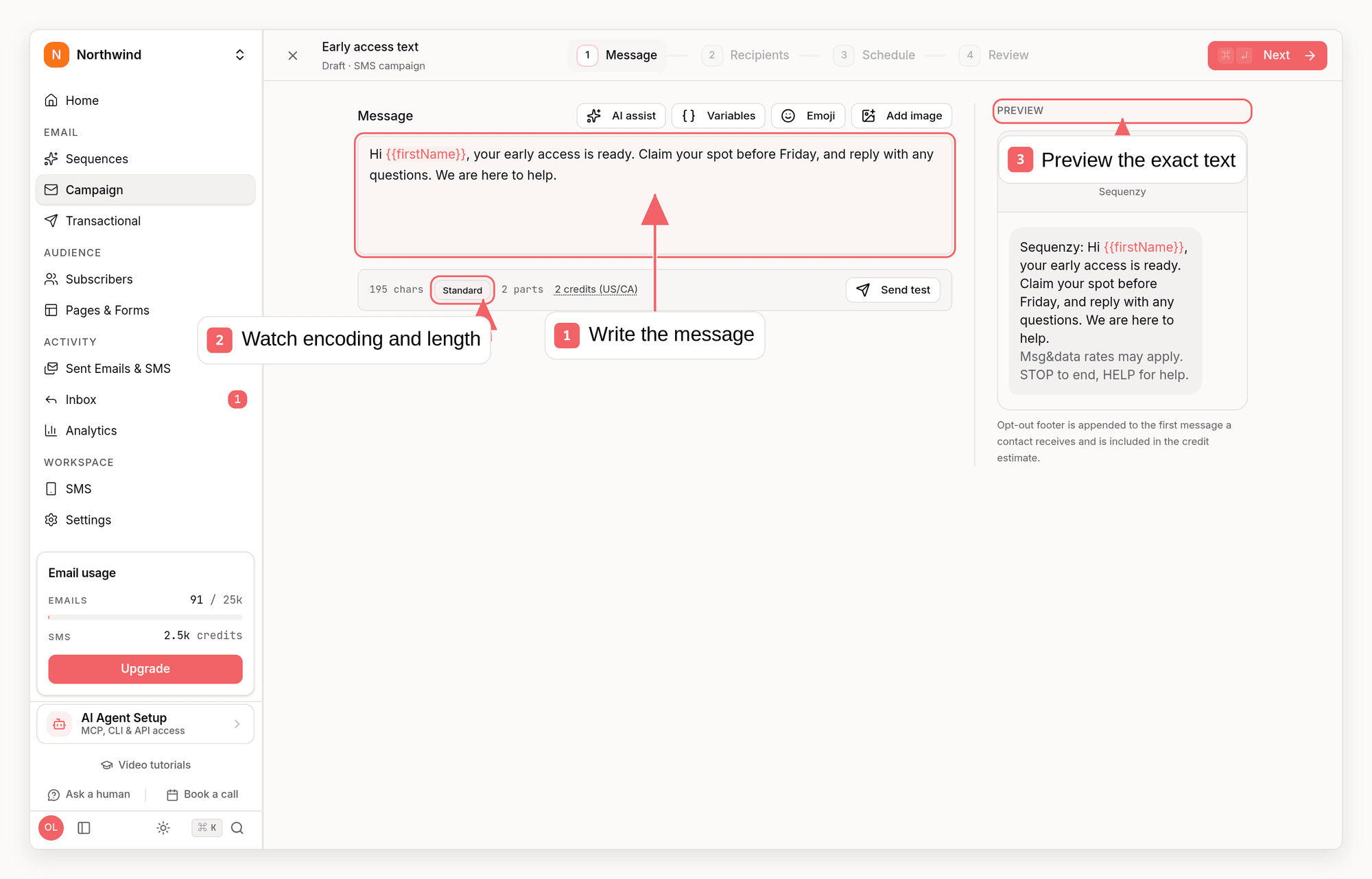
The Send SMS step opens a lightweight composer designed for texting:- Text with merge tags for personalization (like
{{firstName}}) - type{{to pick a merge tag inline - Emoji via an inline searcher - type
:and a few letters (like:fire) to search and insert an emoji without leaving the keyboard - Images - up to 2 per message, JPEG/PNG/GIF, 1MB max each. Attaching an image turns the message into an MMS
- A live counter showing character count, encoding, segment count, and the credit cost of the message
- A phone-frame preview showing the message exactly as recipients will see it, including the brand prefix and footer
Segments And Encoding
SMS messages are billed in segments, and the segment size depends on the characters you use:
A single emoji switches the whole message to Unicode encoding, so a 150
character message with one emoji costs 3 segments instead of 1. The composer’s
counter shows the encoding and segment count live so there are no surprises.
Sequenzy automatically normalizes typographic characters (smart quotes,
dashes, ellipses) to their standard equivalents so pasted text doesn’t
accidentally trigger Unicode pricing.
MMS (any message with an image) costs a flat 3 credits regardless of
text length.
International Destinations
Sending is not limited to the US and Canada: the UK, Ireland, most of Western and Northern Europe, Poland, Czechia, Ukraine, Australia, and New Zealand are supported out of the box. A few things to know:- Credits are cost-weighted by country. A US or Canadian SMS segment is always 1 credit; international segments consume a per-country multiplier that reflects what carriers in that country charge (for example a UK segment costs several credits, and Ukraine more still).
- **Settings → SMS includes a calculator.** Pick a destination country and a monthly budget to see how many messages it buys, the effective per-SMS rate, and the credit multiplier. A “View all country rates” table lists every supported destination.
- International marketing is one-way. Outside the US and Canada, messages are delivered from a sender that can’t receive replies, so keyword STOP is unavailable; opt-outs run through unsubscribe links instead.
- MMS is US/Canada only. Steps with images are skipped for international
recipients with an
mms_not_supportedreason. - Unsupported countries are blocked, never silently billed. If a
subscriber’s phone country has no published rate, the step is skipped with
an
unsupported_countryreason and the subscriber continues the sequence. - Rates are estimates and international carrier costs can change; some routes may require sender approval before going live.
Credits And Billing
SMS is prepaid:- The add-on costs $16/month and includes 1,000 credits each month, and the per-credit price scales down gradually with larger monthly bundles
- Included credits renew at the start of each billing period and don’t roll over - your balance resets to your bundle amount on renewal. This applies to everything on the balance, including credits granted by support
- Need more credits? Upgrade your monthly bundle any time with the Upgrade bundle button next to your balance on the SMS page - your billing cycle restarts that day, the full new bundle price is charged, and your balance resets to the new bundle amount
- 1 credit = 1 US/CA SMS segment; US/CA MMS = 3 credits; international segments use the per-country multiplier shown in the rate table
- When your balance runs low, you receive an email alert so you can upgrade before sends start skipping
- If a message can’t be sent because your balance is empty, the step is
skipped with a
no_creditsreason and the subscriber continues the sequence. Sending resumes once credits are available again
SMS Campaigns
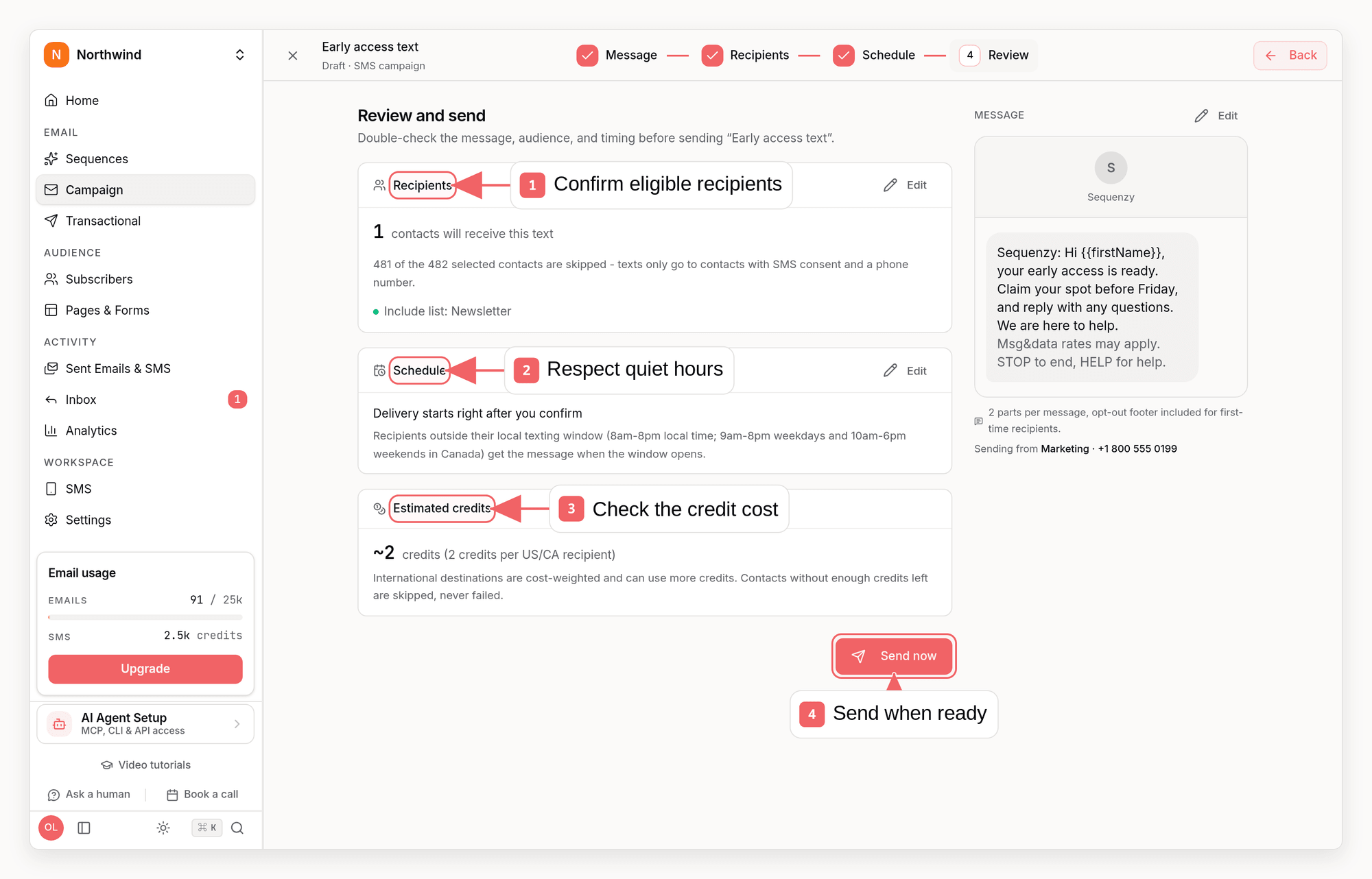
With the add-on enabled, the Campaigns screen gains a channel switch at the top so you can move between email and SMS campaigns. An SMS campaign uses the same familiar steps as an email campaign - message, recipients, schedule, review - with a phone-style preview alongside every step.- Message: write the text and, if your workspace has more than one active number, pick which number the campaign sends from. The default is your workspace’s original number; you can tag each number with a label (for example “Marketing” or “Support”) and give it its own brand prefix override in Settings → SMS so each number keeps its own sender voice. A test sent from the campaign composer uses the campaign’s current selection; sequences, one-off sends, and standalone test sends use the default number
- Recipients: you pick lists, segments, or custom filters exactly like an email campaign. Sequenzy then narrows the selection to contacts who can actually receive SMS - subscribed to SMS marketing, phone number on file, and not suppressed - and shows both numbers so nothing is surprising at send time. Email and SMS consent are tracked separately, so a contact who unsubscribed from email still receives your texts if they opted in to SMS
- Schedule: send immediately or at a scheduled time. Quiet hours are always respected per recipient: messages that would land outside the delivery window are held until it opens, never dropped
- Review: shows the SMS-ready recipient count, an estimated credit cost based on your message’s segments, and the final message preview including the opt-out footer first-time recipients receive
- While sending: delivery is throttled to a steady carrier-safe rate. The campaign page shows live progress and you can stop the campaign at any point - unsent messages are skipped and marked accordingly
- Stats: sent, delivered, clicked (via short links), failed, skipped, and credits used, per campaign and on the campaign list
no_credits reason and show up in the campaign’s
skipped count.
SMS campaigns are created and managed from the dashboard; the API, CLI, and MCP
do not create them. They still appear in the campaign list and detail
reads, where a type of sms tells them apart - their subject and blocks
are always empty because they have no email behind them. The email campaign
endpoints (update, schedule, pause, resume, duplicate, resend to non-openers)
reject SMS campaigns with a clear error rather than running them through the
email pipeline. Campaign stats and campaign events reject them too, because
both read email engagement and would otherwise report a fully zeroed send for a
campaign whose texts were delivered - read SMS campaign stats in the dashboard
instead.
One-Off Sends
You can text a single contact directly from their subscriber page: when the contact is subscribed to SMS marketing, a Send SMS button appears next to Send email. It opens the same composer used in sequences, shows the estimated credit cost for the contact’s destination country, and queues the message immediately. One-off sends follow all the sending rules above, including quiet hours - a message composed outside the delivery window is deferred until it opens.Test Sends
You can send a test message to any phone number from the composer, the SMS settings tab, or a specific number’s detail page. Test sends:- Are limited to 100 per company in a rolling 24-hour window
- Are exempt from quiet hours so you can test any time
- Charge credits like a real send
- Are excluded from step stats
Short Links And Click Tracking
By default, links in your messages are automatically shortened tohttps://sqzy.io/... (about 24 characters). When a recipient taps
a link, the click is recorded and feeds into the same
revenue attribution as email clicks, so SMS-driven
purchases show up in your reporting.
Link shortening is set per number. To send your own tracking links from a
number, open it from Settings > SMS and turn off Shorten links. Links
in messages from that number then go out exactly as you wrote them. Clicks on
them are not recorded, so SMS click stats, SMS click segments and SMS revenue
attribution do not include them, and long links can add segments, which uses
more credits. The change applies to messages prepared after it, including the
unsent part of a campaign that is already sending. You can also change it with
Update an SMS number,
sequenzy sms update <number-id> --link-shortening off or the
update_sms_number_label MCP tool.
Replies
When a subscriber texts your number:- STOP (and variants) - handled automatically: the carrier-grade auto-responder confirms the opt-out, and Sequenzy unsubscribes every subscriber with that phone number
- HELP - answered automatically with your help message
- Anything else - forwarded to your account email as a notification, so you never miss a reply
Step Stats
Each Send SMS step shows its own stats in the sequence builder: sent, delivered, clicked, opted out, and credits spent. Test sends are excluded.Sent SMS Page
The Sent SMS tab (sidebar, Activity → Sent Emails & SMS) lists every text your workspace has sent with its delivery status, segment count, and credits charged. Search by phone number or contact email, filter by status or campaign, and open any message to see the full body, delivery timeline, failure reason, and exact credit charge. Header totals sum the messages and credits for whatever filter you have applied, which makes it the fastest way to audit what a campaign actually cost. SMS activity also appears on each subscriber’s timeline (sends, deliveries, failures, clicks, and opt-outs), alongside their email history.AI Assistant
The sequence builder’s AI assistant can add and edit SMS steps natively. Ask it things like “add a shipping confirmation text after the order email” and it proposes anaction_sms step with drafted copy. SMS additions always require
your explicit approval before they are applied, because they text real
subscribers and spend credits.
API, CLI, And MCP
SMS is a first-class citizen on every agent surface:- API - create sequences with SMS steps (
type: "sms"withtextin Create Sequence steps, branch paths, andinsertSteps), edit existing SMS steps withsmsStepsin Update Sequence, draft copy with Generate SMS, check readiness with Get SMS Settings, set a number’s label, brand prefix or link shortening with Update an SMS number, verify end to end with Send Test SMS, pull the same per-number send breakdown shown on the detail page with Get SMS Usage, and release a number you no longer need with Remove SMS Number - CLI -
sequenzy sms settingsshows add-on status, credits, and numbers (with their labels and prefix overrides),sequenzy sms labelsets or clears a label, andsequenzy sms updateedits a number’s label, brand prefix override and link shortening (--link-shortening on|off) in one call;sequenzy sms send-testsends a real test message (pass--from-numberto test a specific number),sequenzy sms usageshows the per-number send breakdown, andsequenzy sms releaseremoves a number you no longer need;sequenzy generate sms "<prompt>"drafts message variants; SMS steps work insequenzy sequences create --steps-*,update --insert-steps-*, andupdate --sms-steps-* - MCP - the
generate_sms,get_sms_settings,update_sms_number_label,send_test_sms, andrelease_sms_numbertools plus SMS steps increate_sequence,insert_sequence_step, andupdate_sequence.smsStepslet AI agents build and maintain SMS journeys end to end - Outbound webhooks - subscribe to
sms.sent,sms.delivered,sms.failed, andsms.opted_outevents (included in the default event set for new webhooks) to track SMS delivery from your own systems; see Outbound Webhooks
Related
- Subscribers
- Sequences
- Create subscriber API - set
phoneandsmsConsentprogrammatically - Generate SMS API
- SMS settings API