
Installation
Install the official Sequenzy plugin for Better Auth:Quick Setup
1. Get Your API Key
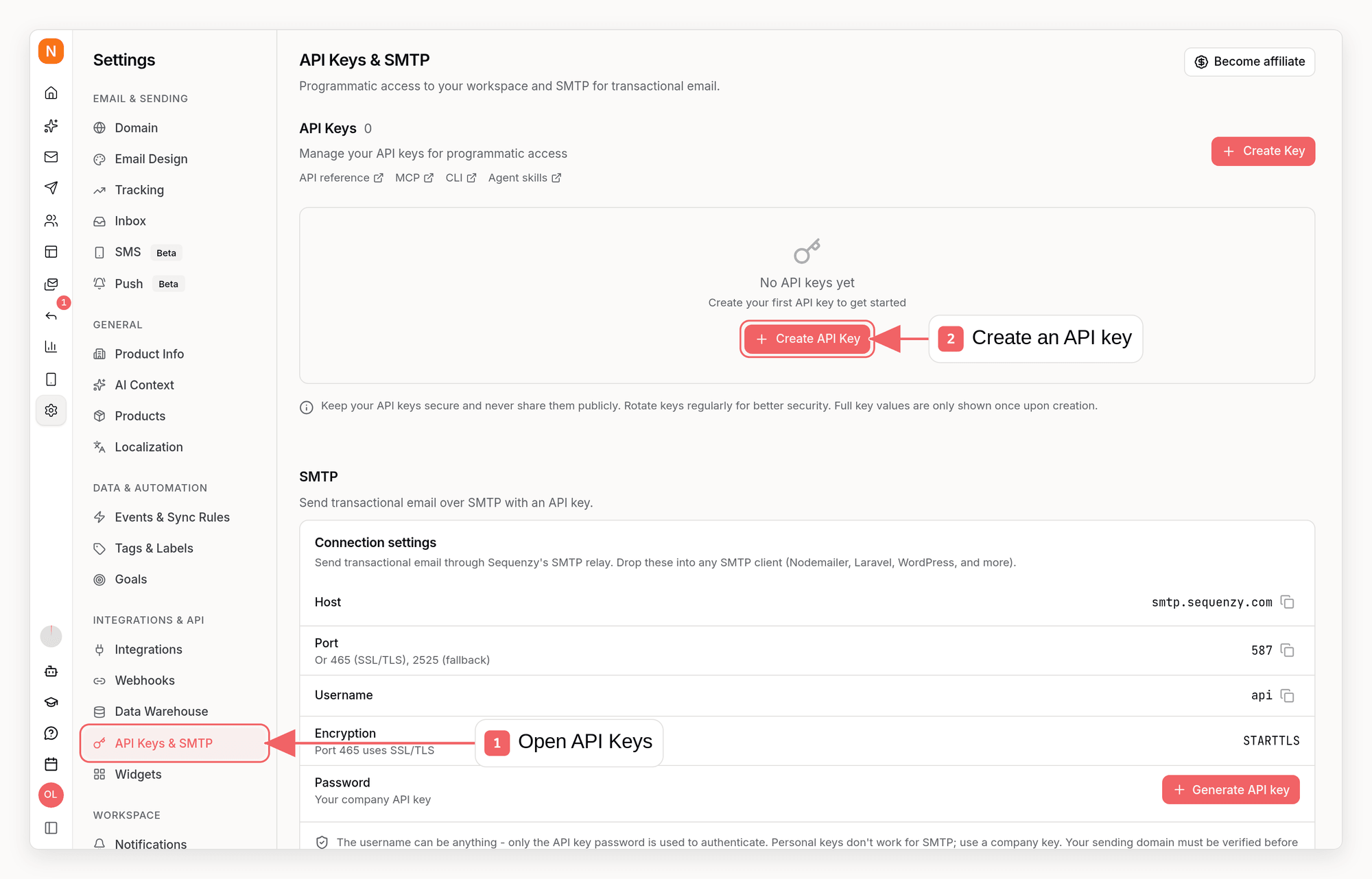
- Go to Settings → API Keys & SMTP in Sequenzy
- Click Create API Key
- Copy the key and add it to your environment variables:
2. Add the Plugin
Add the Sequenzy plugin to your Better Auth configuration:auth.ts
3. Add Client Plugin (Optional)
For TypeScript type inference, add the client plugin:auth-client.ts
Configuration Options
What Gets Synced
When a user signs up through Better Auth, Sequenzy automatically:- Creates a new subscriber with their email
- Syncs profile data (name parsed into first/last)
- Adds to specified lists (or your workspace default lists if not specified)
- Triggers any matching automations
Synced Attributes
List Assignment
Use Workspace Default Lists
By default, new subscribers use the default lists you choose in workspace settings:Add to Specific Lists
To add subscribers to specific lists only:Add to No Lists
To create subscribers without list assignment:Supported Auth Methods
The plugin hooks into these Better Auth flows:
Both new registrations and new OAuth sign-ups are synced. Returning OAuth users (already have an account) are not re-synced.
Using with Automations
Welcome Sequence
Create an automation to welcome every new user:- Go to Automations → Create New
- Set trigger to Contact Added
- Add your welcome email sequence
- Activate the automation
Personalization
Use synced attributes in your emails:Error Handling
The plugin is non-blocking by design. If Sequenzy is unavailable:- Authentication succeeds normally
- User account is created
- Error is logged (if
onErroris set)
Custom Attributes
Add any data you want to track:- Subscriber profiles
- Email personalization
- Segment filters
- Automation conditions
Tagging Signups
Tag new subscribers for organization or automation triggers:- Filter subscribers by tag
- Trigger automations on tag assignment
- Create segments based on tags
FAQ
Does this sync existing users?
Does this sync existing users?
No, only new sign-ups after adding the plugin are synced. Existing users need to be imported separately via the API or CSV upload.
What if a user already exists in Sequenzy?
What if a user already exists in Sequenzy?
The plugin uses Sequenzy’s upsert API: existing subscribers get their
attributes merged, not duplicated.
Can I disable automation enrollment?
Can I disable automation enrollment?
Yes, set
enrollInSequences: false to create subscribers without triggering
automations.Is the plugin blocking?
Is the plugin blocking?
No. The plugin runs asynchronously after authentication succeeds. Auth flow is
never delayed or blocked.
What if Sequenzy is down?
What if Sequenzy is down?
Authentication succeeds normally. The sync failure is logged via
onError if
provided.Is this included in my plan?
Is this included in my plan?
Yes, the Better Auth integration is included at no extra cost.
Source Code
The plugin is open source:GitHub Repository
View source, report issues, or contribute