
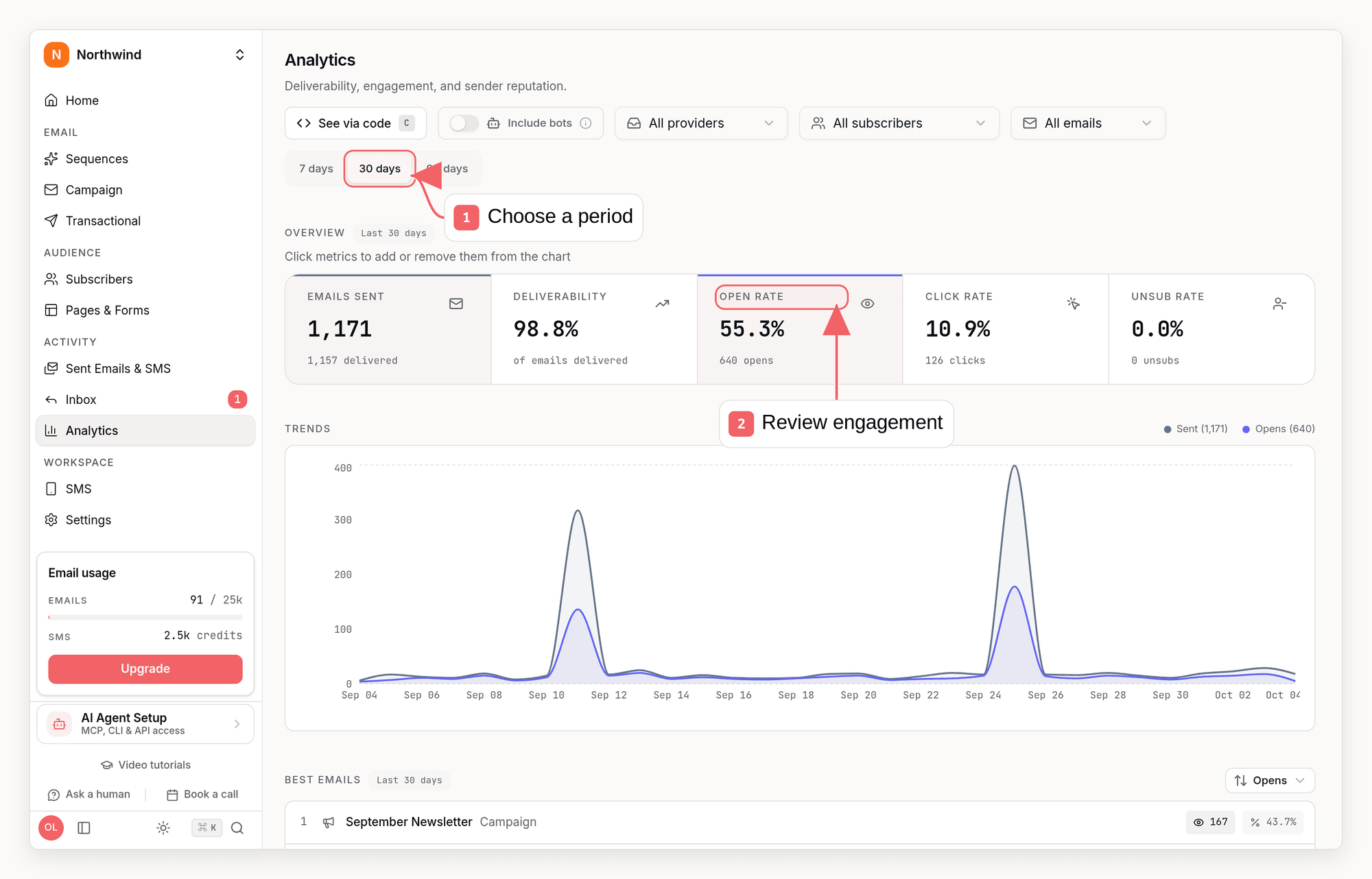
Available Metrics
Core Email Metrics
Open and click metrics exclude detected email-security scanners, link-preview clients, and tracked brand assets by default. This also covers link detonation, where an appliance fetches several of an email’s links at once: three or more distinct links fetched in the same instant, or four or more within a few seconds, are treated as one machine sweep rather than as clicks. Turn on “Include bots” in the dashboard, or pass
includeMachineEngagement=true to analytics API endpoints, when you need raw scanner-inclusive counts for debugging.
If your audience sits behind aggressive email-security appliances (common with cold outreach and B2B lists), you can enable Strict bot filtering in Settings → Tracking, under Advanced in the Email Tracking section. It additionally filters opens and clicks from datacenter IPs (including Exchange Online Protection and Microsoft Azure, where Microsoft Defender Safe Links checks originate), scripted HTTP clients, and single IPs sweeping links across many recipients. It also treats a campaign or sequence click as a link check when it arrives within 60 seconds of delivery from an IP that also clicked another recipient’s email in the same minute, since scanners fetch each email’s link the moment it lands. A quick click on its own is still counted, so people clicking straight from a notification are kept, and transactional emails are exempt. It is off by default because it can also discard some real engagement, which lowers your reported open and click rates: a recipient who browses from Azure (for example Azure Virtual Desktop or Windows 365) is not counted, and neither are two recipients on one office network who both click within a minute of delivery. With strict filtering off, none of this changes your metrics.
Test sends are excluded from dashboard and API performance metrics, attributed revenue, recipient engagement, subscriber timelines, and sent-email history by default so previews do not skew results. They still count toward send usage and quota.
The same “Include bots” toggle is available when you drill into a metric’s recipient list and on a subscriber’s activity timeline. When bots are shown, automated opens and clicks are marked with a bot icon and their detected source (for example an email-security scanner or link-preview bot) so you can tell them apart from real engagement.
Mailbox privacy features are a separate thing from bots and are deliberately not filtered. Apple Mail Privacy Protection and Gmail’s image proxy fetch your tracking pixel on behalf of a real recipient, usually within seconds of delivery, so a fresh send’s opens climb fast and land high. Those are real people, so removing them would understate your reach - but it does mean early open counts say more about delivery than about reading. Clicks are the sturdier signal.
Which link was clicked
Click events record their destination, so you never have to guess whether a click was the main button or a footer icon:- Clicked Links on a sent campaign ranks every destination by clicks, labelled with the button, image, or footer link it belongs to
- Link clicks on the Metrics page ranks destinations across every email for the selected period, email type, audience and mailbox provider by unique clicks: each subscriber counts once per link, however often they clicked it, so double taps and a footer link clicked in several emails do not inflate the ranking. Total clicks and each link’s share are shown too. Query strings, fragments and trailing slashes are ignored, so the same page linked with different UTM tags counts as one link. Links that differ only by query parameters, such as video or product IDs, are combined too; a campaign’s own link stats keep the exact URLs. The same breakdown is available from Get Link Click Breakdown,
sequenzy stats --links, and the MCPget_link_click_statstool; the audience filter applies in the dashboard only - The Sent emails list shows the destination beneath each recipient whose latest status is “Clicked”
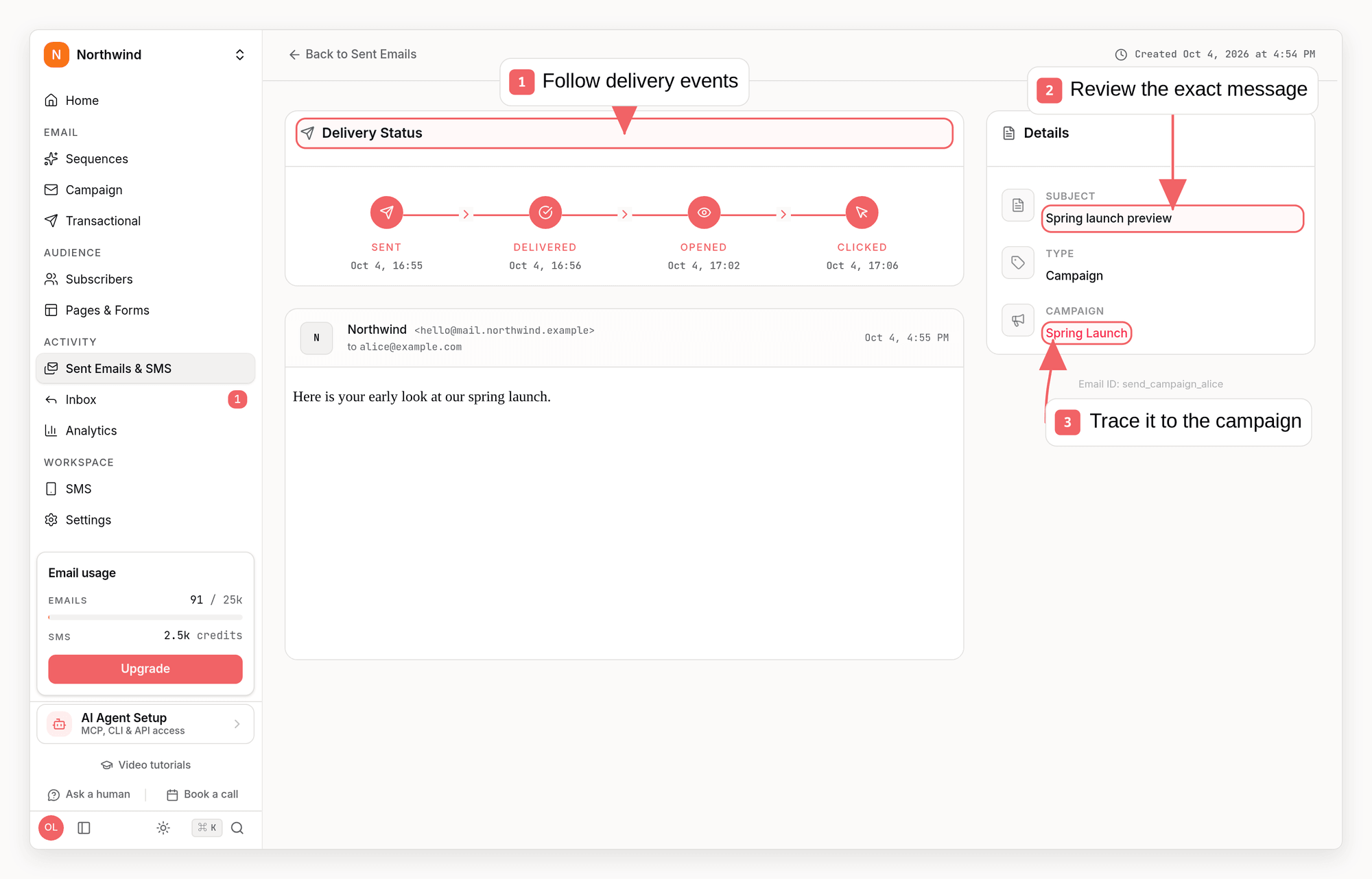
- A single send’s detail page lists every link that recipient clicked, with repeat clicks counted
GET /api/v1/email-sends/{id}returns the full event timeline withclickedUrlon each click event, whichsequenzy email-sends get <id>renders and theget_email_sendMCP tool returns
Which email clients opened
Email clients on a sent campaign, and on the Metrics page for the selected period, shows which mail clients (Apple Mail, Gmail, Outlook, Yahoo Mail, Thunderbird, Android mail apps, web browser) and devices (desktop, mobile, tablet) opened your emails, as shares of unique opens. Each send counts once, by the client of its first open. Use it to decide which clients to check your designs in. Gmail, Yahoo and Apple Mail Privacy Protection load images through their own proxies, so those opens show the client but an unknown device. Recipients who never open, or who block images, are not represented, so read the shares as “of the people who opened”. A few clients look alike from the tracking pixel: the new Outlook for Windows and Outlook.com count as web browser, and some apps built on Apple’s WebKit, such as Outlook for Mac, count as Apple Mail. The list or segment filter on the Metrics page applies in the dashboard only, as with the other metrics. The same breakdown is available from Get Email Client Breakdown, Get Campaign Email Client Breakdown,sequenzy stats --clients, and the MCP get_email_client_stats tool.
Revenue Metrics
If you have goals configured with tracked value, the Metrics page can show attributed revenue in the overview. Revenue appears only when Sequenzy has attributed tracked value for the selected time period, audience, and email type.Calculated Rates
Grouping by Email Type
Sequenzy allows you to filter and group metrics by email type, giving you insights into how different types of emails perform.Email Types
Why Group by Type?
Different email types have different benchmarks and purposes:Filtering by Audience
You can scope dashboard metrics to the audience you want to analyze:
Audience filters can be combined with date range and email type filters. For example, you can review campaign performance for a newsletter list over the last 30 days, or sequence engagement for a saved trial-user segment over the last 7 days.
Filtering to Bounces or Complaints
Each bounce and complaint card under Sender Quality has a filter icon in its bottom-right corner. It limits the whole Metrics page to the sends with that outcome: permanent bounces, temporary bounces, blocked sends or spam complaints. Then set Break down by to Email, Mailbox provider or Recipient domain to see where they came from, for example which emails drew your complaints. Remove the filter from the chip at the top of the page, or click the card’s filter icon again. Clicking the card itself still opens the send history for those emails. The same filter isoutcome on Get Metrics and Get Metrics Breakdown, sequenzy stats --outcome, and the outcome argument of the MCP get_stats and get_stats_breakdown tools.
Viewing Metrics
Dashboard Overview
Your dashboard shows high-level metrics across all emails or your selected audience and email type:- Total emails sent (last 30 days)
- Overall open and click rates
- Trend charts showing performance over time
- Quick comparison to previous period
- Attributed revenue when revenue-driving goals have tracked value
Ask From The Dashboard
The dashboard landing page also includes an expandable AI workspace for quick metric checks.- Ask questions like
What are my metrics for last 30d? - Ask review-style prompts like
Tell me what happened last week - Ask scoped performance prompts like
Show my top performing sequenceorWhat is my best campaign? - Sequenzy fetches a live company-level snapshot and shows the latest sends, deliveries, open rate, and click rate
- For sequence and campaign performance questions, Sequenzy can point to the specific sequence or campaign instead of only showing the company aggregate
- You can keep asking follow-up questions from the floating chat, so prompts like
Why did opens dip?orWhat should I improve next?keep the earlier context - You can jump from that summary straight into the full Metrics page if you want charts and deeper filters
Detailed Analytics
On the Analytics page, you can:- Select date range: View metrics for any time period
- Filter by audience: Scope metrics to all subscribers, a list, or a saved segment
- Group by email type: Filter to see all emails, transactional emails, campaigns, or sequences
- View trends: See how metrics change over time. Click any Overview metric (Emails sent, Deliverability, Open rate, Click rate, Unsub rate, Reply rate, or Revenue) to add or remove its line from the trend chart and compare several at once - Emails sent and Open rate are shown by default, and Revenue uses its own currency axis
Understanding Your Metrics
Open Rates
Open rates can be inflated or deflated due to email client behavior. Apple
Mail Privacy Protection pre-fetches images, inflating rates. Some clients
block images entirely, deflating rates. Focus on trends rather than absolute
numbers.
Click Rates
Bounce Rates
Delivery Failures vs Bounces
These look similar in a list of sends, but they mean opposite things and only one of them is about your list. A bounce is the receiving server rejecting the message. There are three kinds:- Permanent bounce: the address doesn’t exist or can’t receive mail. It is suppressed so you stop sending to it.
- Temporary bounce: a problem that may clear, such as a full inbox. The address is suppressed only after 5 temporary bounces in a row spanning at least 14 days. A delivery in between starts the count over. Failed forwards and sends your provider skipped because of its own suppression list never count.
- Blocked: the server refused this email over its content, a policy or sender reputation. The address is fine and is never suppressed. Many blocks point to your content or sending, not your list.
- the contact stays subscribed and is included in your next send;
- it does not count toward your bounce rate;
- it does not count toward the automatic sending pause that protects your sender reputation;
- webhooks receive
email.failed, notemail.bounced.
Unsubscribe Rates
Using Metrics for Optimization
1. A/B Test Subject Lines
Compare open rates between campaigns to identify what resonates:2. Optimize Send Times
Review when your emails get the highest engagement:- Look at open rates by day of week
- Identify peak engagement hours
- Adjust your send schedule accordingly
3. Improve Click-Through
If opens are high but clicks are low:- Review your call-to-action placement
- Make buttons more prominent
- Ensure content matches subject line promise
4. Reduce Unsubscribes
High unsubscribe rates indicate:- Email frequency too high
- Content not matching expectations
- Wrong audience targeting
5. Clean Your List
High bounce rates hurt deliverability:- Remove hard bounces automatically
- Re-engage inactive subscribers
- Use double opt-in for new signups
Metrics by Email Type Examples
Transactional Metrics
Best for tracking:- Delivery success for critical emails
- Whether users are receiving receipts/confirmations
- Any deliverability issues with transactional sends
Campaign Metrics
Best for tracking:- Subject line performance
- Content engagement
- Audience growth and retention
- A/B test results
Sequence Metrics
Best for tracking:- Automation effectiveness
- Conversion through the funnel
- Drop-off points in sequences
- Which emails drive the most action
Per-Email Metrics
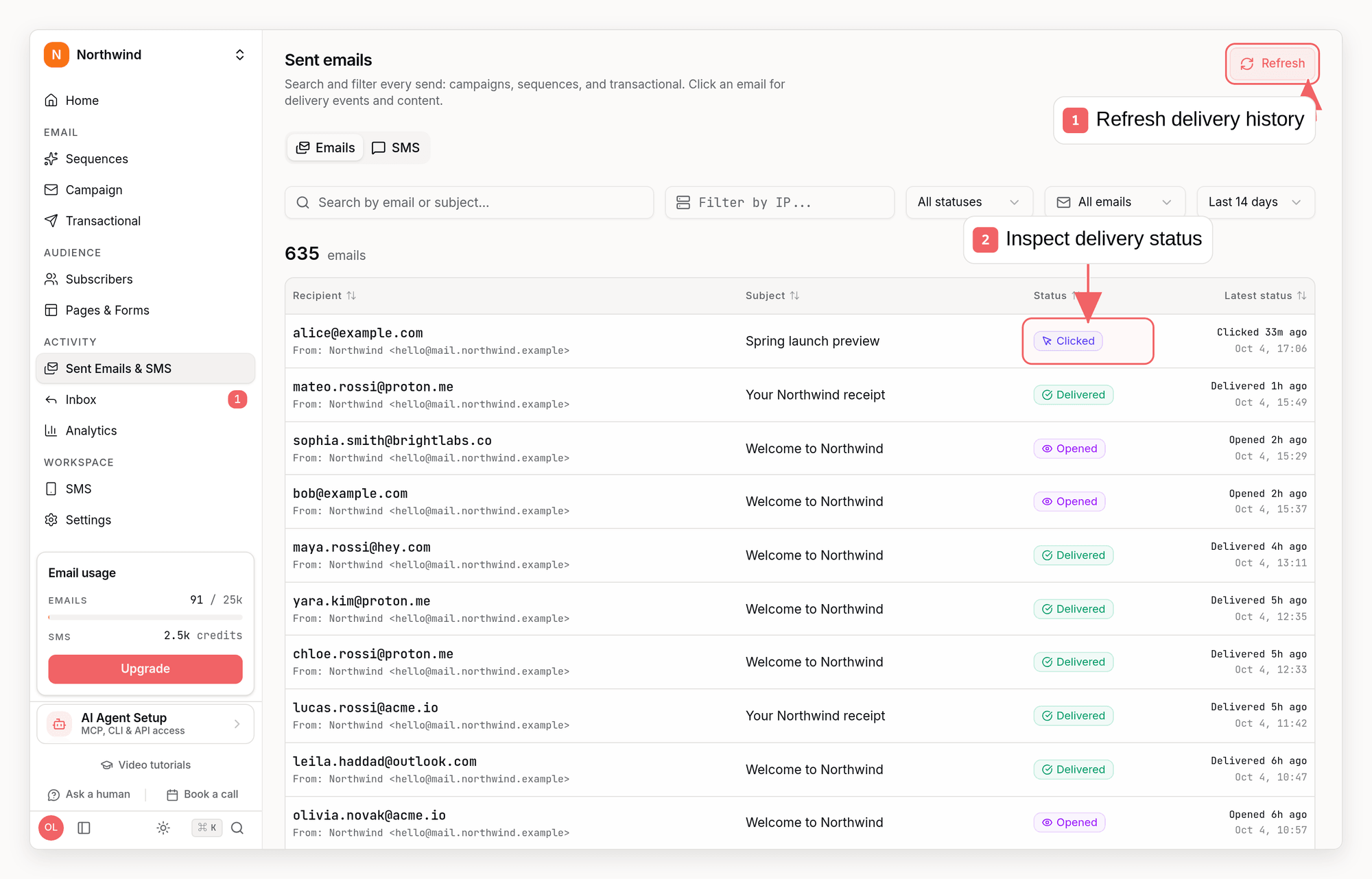
Inspect One Delivery
list_email_metrics MCP tool.
These counts come from retained event storage, which keeps events until the
workspace is deleted - not the 14-day delivery history used by the sent-emails
list. Omit the time
window for all-time totals. To go from a row to the actual recipients, take its
automationNodeId and pass it to sequence events or the sent-emails list.
Best Practices
1. Review Metrics Regularly
Set a weekly or bi-weekly schedule to review:- Overall performance trends
- Any sudden drops in engagement
- Bounce and complaint rates
2. Benchmark Against Yourself
Industry benchmarks vary widely. Track your own metrics over time to establish your baseline, then work to improve it.3. Segment Your Analysis
Don’t just look at aggregate numbers. Break down by:- Email type (transactional, campaigns, sequences)
- Subscriber lists
- Saved subscriber segments
- Individual campaigns or sequences
4. Act on Insights
Metrics are only valuable if you use them:- Low open rates → Test new subject lines
- Low click rates → Improve content and CTAs
- High bounces → Clean your list
- High unsubscribes → Reduce frequency or improve targeting
Common Queries via API
You can fetch metrics programmatically using the Analytics API. Below are common questions mapped to the right API call.How many emails did we send in the last 7 days?
stats.sent in the response.
What’s the open rate for a specific campaign?
stats.openRate in the response.
Which step in my sequence has the highest drop-off?
steps[].stats.sent across steps: a large drop between consecutive steps indicates where subscribers disengage.
Who opened or clicked my campaign?
opened, clicked, and unsubscribed fields. See Get Recipients.
Did a specific user engage with any of my emails?
How do I sync engagement data to my database on a schedule?
Call/metrics/recipients with a time window matching your cron interval:
page and store each recipient’s opened, clicked, and unsubscribed data locally.
Test email history
Your Sent emails history includes pending, successful and failed test sends for the same 14-day retention window as live sends. The API, CLI and MCP expose these records withisTestEmail: true. Test sends remain excluded from campaign performance metrics.
Related
Tracking
Learn how email engagement is tracked
Campaigns
Create and send broadcast campaigns
Sequences
Build automated email workflows
Transactional Emails
Send triggered transactional emails