
Enroll Existing Subscribers
When you create a sequence with a trigger (tag, list, or event), it only starts for new matches going forward. But what about subscribers who already match the criteria?The Problem
Imagine this scenario:- You have 500 subscribers with the tag
past-due - You create a new “Past Due Recovery” sequence triggered by that tag
- The sequence only runs for future subscribers who get the tag
The Solution
Use the Enroll Existing Subscribers feature to retroactively add matching subscribers to your sequence.How to Use It
- Open your sequence in the editor
- Click the people icon in the header toolbar
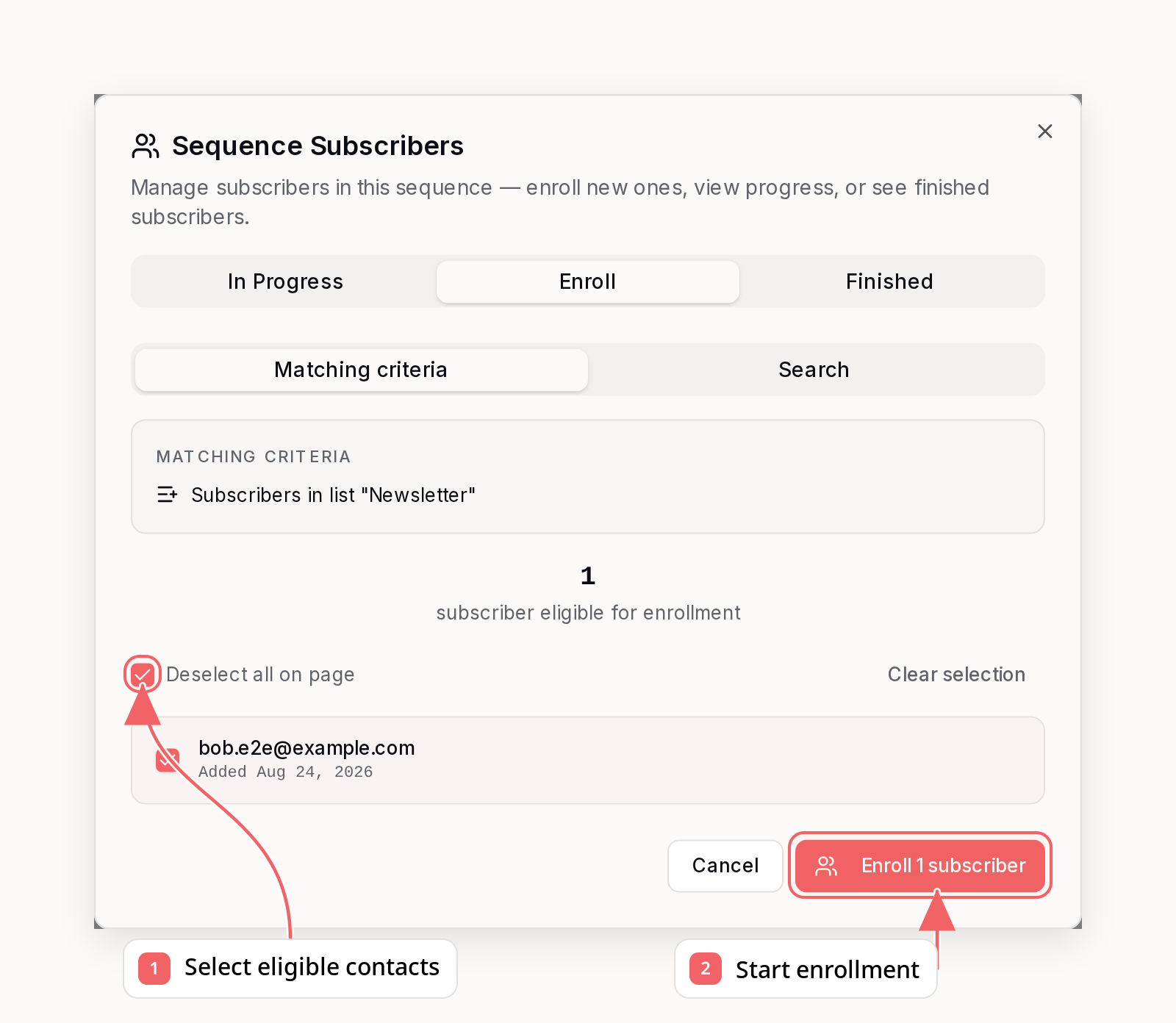
- Review the count of matching subscribers
- Optionally exclude specific subscribers from enrollment
- Click Enroll to add them to the sequence
What You’ll See
The enrollment modal shows:- Matching criteria - The trigger condition being matched
- Subscriber count - How many subscribers are eligible
- Subscriber list - Paginated list of matching subscribers
- Exclusion controls - Remove specific subscribers before enrolling
Choosing Subscribers
Use the checkboxes to choose who should enter the sequence:- Select individual eligible subscribers, or use the page-level checkbox
- Clear the checkbox for anyone you want to leave out
- Review the selected count in the Enroll button
Enrolling by Search
The Enroll tab has two flows: Matching criteria (described above) and Search. Use the Search flow when the subscribers you want don’t match the trigger criteria - for example, someone who received the event more than 30 days ago, or a hand-picked group you want to run through the sequence:- Switch to the Search flow inside the Enroll tab
- Search for subscribers by email
- Select them individually, or use Select all not enrolled to select every match
- Click Enroll - they start from the first step of the sequence
one_time vs unlimited), like enrolling at a specific step does.
Trigger-Specific Behavior
Tag Added (tag_added)
Matches all active subscribers who currently have the specified tag.
Contact Added (contact_added)
- With specific list: Matches subscribers in that list
- Any list: Matches subscribers in any list
Event Received (event_received)
Matches subscribers who received the event in the last 30 days.
Events older than 30 days are not included. This prevents accidentally
enrolling subscribers based on very old activity.
Enrollment Mode
The enrollment respects your sequence’s enrollment mode setting:Sequence Status
Manual enrollment is available when the sequence is active and accepting enrollments. Activate a draft or paused sequence before adding subscribers.Common Use Cases
New Sequence for Existing Tags
You’ve been tagging customers aschurned for months. Now you want to create a win-back sequence:
- Create the sequence with trigger:
tag_added: churned - Use Enroll Existing Subscribers to add all currently churned customers
- New churned customers will automatically enter going forward
Onboarding Sequence Launch
You’re launching a new onboarding sequence for your product:- Create the sequence with trigger:
tag_added: signed-up - Enroll existing signed-up users who haven’t completed onboarding
- Exclude users who are already paying customers
Re-engagement Campaign
Starting a re-engagement sequence for inactive users:- Create the sequence with trigger:
event_received: session_started(inverted logic via tag) - Or use:
tag_added: inactive-30d - Enroll all currently inactive subscribers
Enroll at a Specific Step
Sometimes subscribers finish a sequence, and you later add new steps. You can re-enroll those subscribers starting at a specific step — skipping the steps they’ve already completed.Open The Step
- Open your sequence in the editor
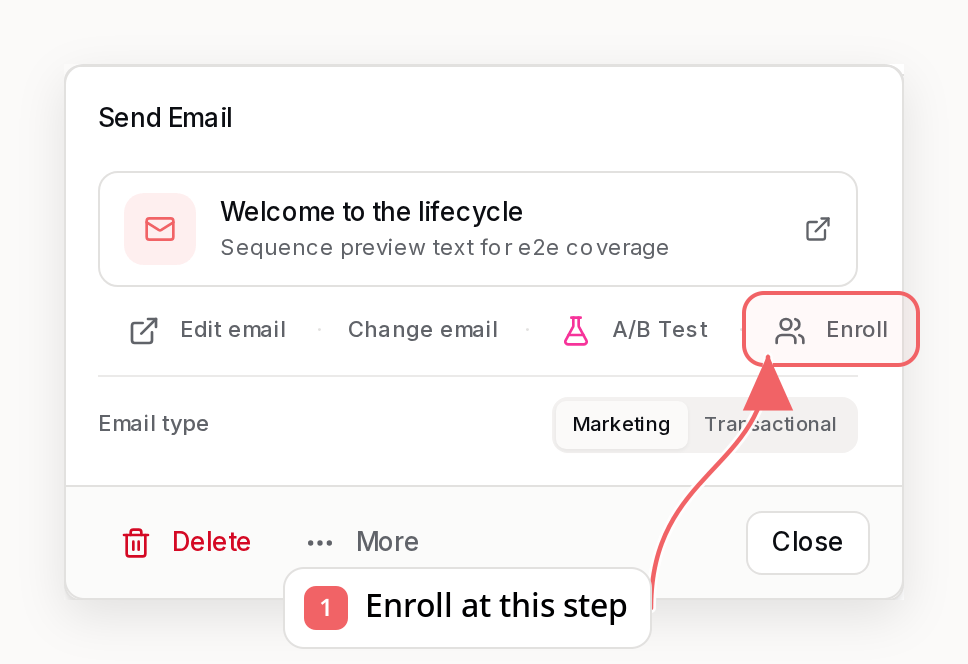
- Click the email step where subscribers should resume
- Click Enroll in the step popover
Choose Subscribers
Choose from Finished subscribers who already completed the sequence, or use Search to find another subscriber. Select the contacts and click Enroll to start them at this step.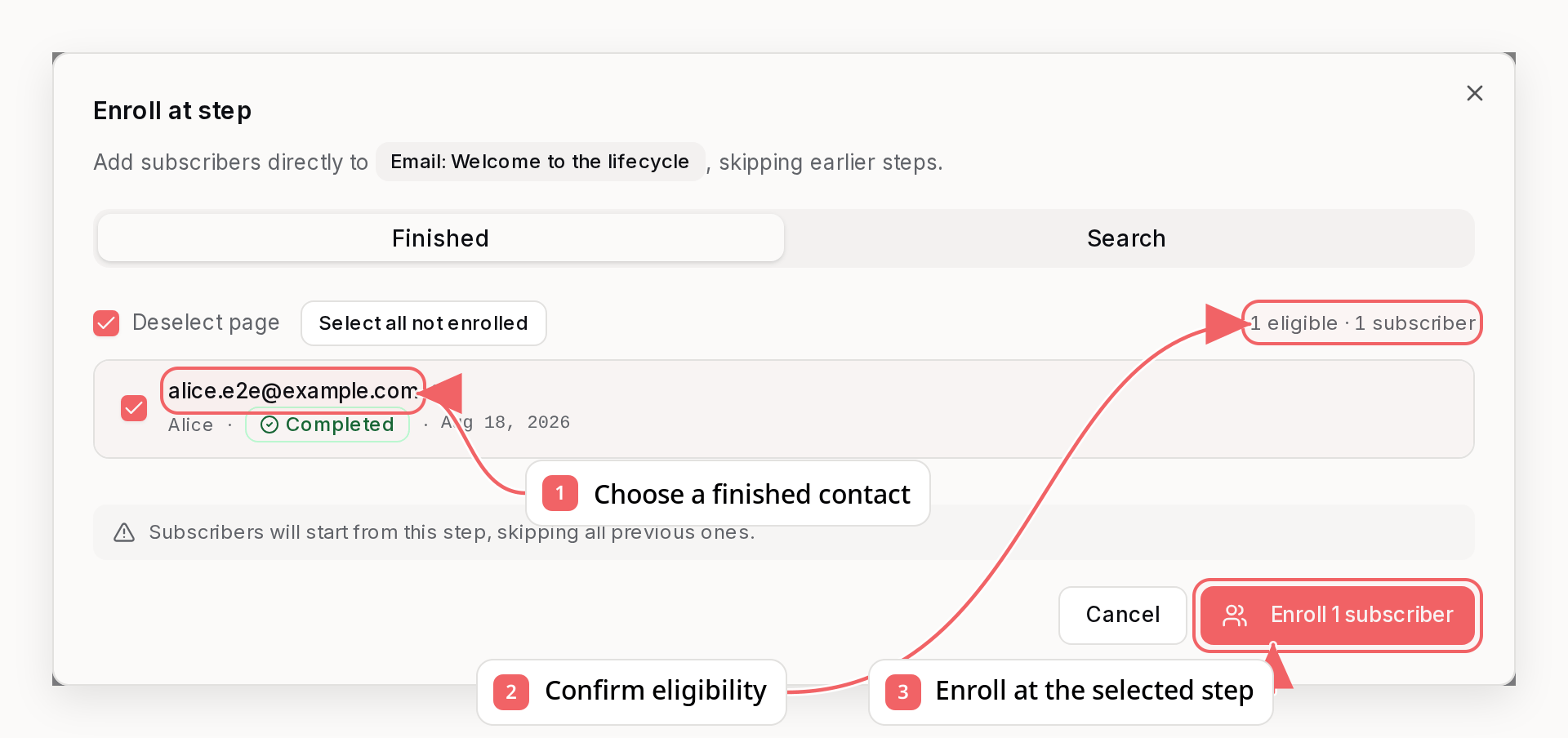
How Filtering Works
The “Finished” tab automatically filters subscribers based on their progress:- Only subscribers who haven’t already passed the selected step are shown
- Subscribers with an active enrollment in the sequence are excluded (shown as “Already active”)
- This prevents accidentally re-running steps a subscriber has already completed
Example
You have a 3-step welcome sequence. 15 subscribers completed it. You add steps 4 and 5:Notes
- This bypasses the enrollment mode (
one_timevsunlimited) — it’s an explicit manual action - The sequence must be active and accepting enrollments
- You cannot enroll subscribers at the trigger node
Best Practices
- Review before enrolling - Check the subscriber list to ensure you’re targeting the right people
- Finish in draft mode - Configure and review the sequence fully, then activate it before enrolling
- Use exclusions wisely - Exclude VIP customers or special cases that need manual handling
- Check enrollment mode - Decide if subscribers should be able to re-enter the sequence
- Use step-specific enrollment for additions - When adding new steps to an existing sequence, enroll finished subscribers at the new step rather than restarting from the beginning