
What is Polar?
Polar is a modern payment platform designed for developers, open source maintainers, and digital product creators. It offers subscriptions, one-time payments, and benefits management with a developer-friendly API.Connecting Polar
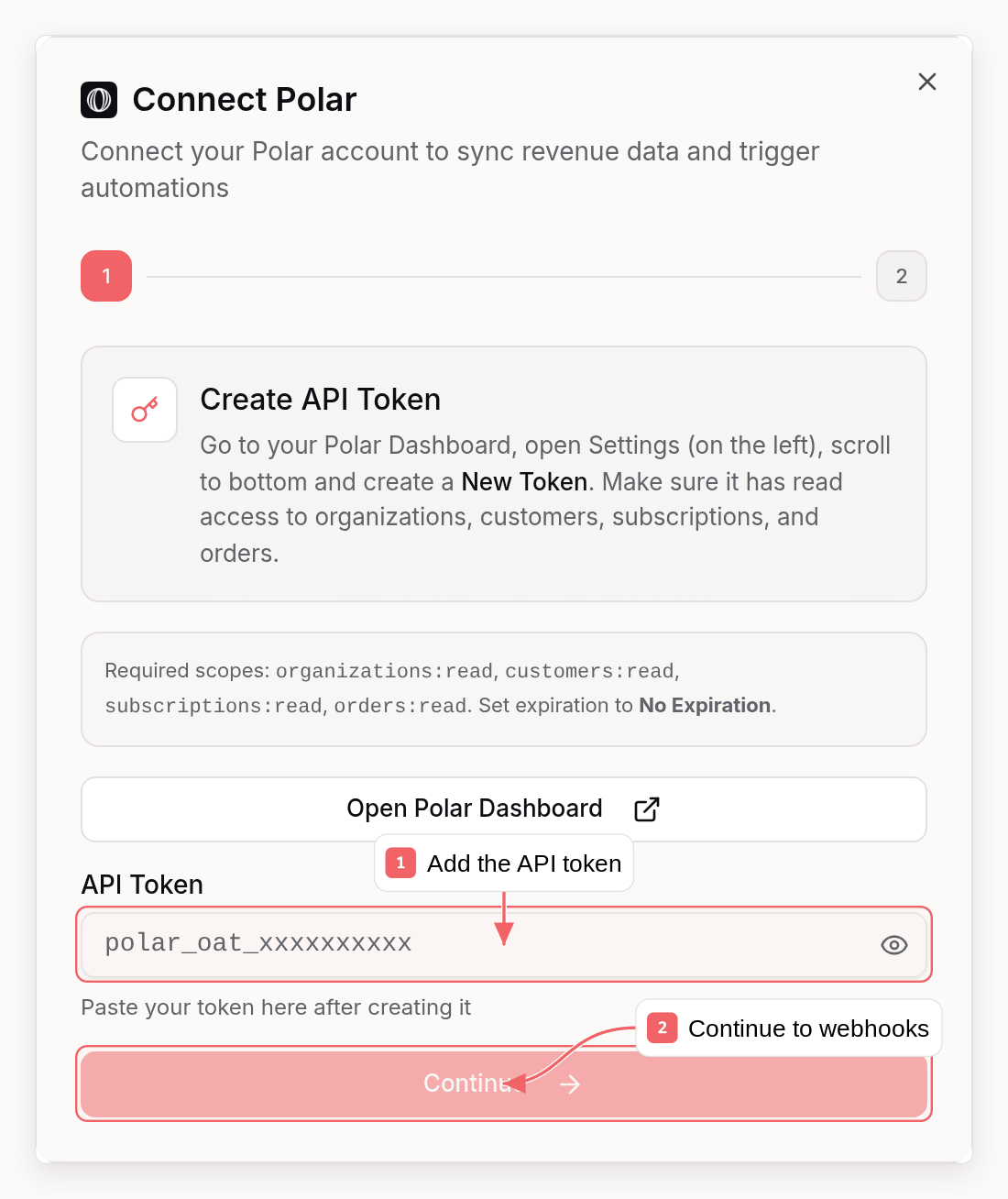
Polar connects with an API token and a webhook you create in Polar.Step 1: Get Your Polar API Key
- Go to your Polar Dashboard
- Navigate to Settings in your organization
- Scroll to the bottom and create a new token with these scopes:
organizations:read,customers:read,subscriptions:read, andorders:read - Set the expiration to No Expiration
- Copy the token (format:
polar_oat_xxxxxxxxx)
Step 2: Set Up Webhooks in Polar
- In Polar, go to Settings → Webhooks
- Click Create Webhook Endpoint
- Enter your Sequenzy webhook URL:
You can find this URL in Sequenzy when connecting Polar. It’s automatically shown in the connection modal.
- Select these events to listen for:
subscription.createdsubscription.activesubscription.updatedsubscription.canceledsubscription.uncanceledsubscription.revokedorder.createdorder.paidorder.refundedcheckout.expiredcustomer.createdcustomer.state_changed
- Click Create to save the webhook
- Copy the Webhook Secret (format:
polar_whs_xxxxxxxxx)
Already connected? Polar only delivers the events selected on your existing
webhook endpoint. Edit it in Polar → Settings → Webhooks and make sure
checkout.expired and subscription.uncanceled are checked - otherwise
abandoned-checkout tracking and trial-reactivation handling will not receive
their events.Step 3: Connect in Sequenzy
- Go to Settings → Integrations in Sequenzy
- Click Connect next to Polar
- Enter your:
- API Token (from Step 1)
- Webhook Secret (from Step 2)
- Click Connect Polar
Synced Attributes
When connected, Sequenzy adds these attributes to each subscriber matched by email:MRR Calculation
MRR is normalized from any billing interval:- Monthly: Used as-is
- Yearly: Divided by 12
- Weekly: Multiplied by 52, then divided by 12
- Daily: Multiplied by 365, then divided by 12
active subscriptions count toward MRR.
LTV Calculation
LTV sums all successful orders for a customer, minus any refunds. This gives you the true lifetime value accounting for partial refunds.Automatic Tags
Sequenzy automatically applies tags to subscribers based on their Polar subscription status:
These tags update automatically whenever subscription status changes - both from live webhooks and from Sync Revenue runs, which apply the same rules.
Tracked Events
When you connect Polar, these events are automatically tracked for use in automations:Polar does not send a trial-ending webhook, so Sequenzy schedules
saas.trial_will_end itself when a trial starts - about 3 days before the
trial’s end, matching Stripe’s timing. The reminder is cancelled automatically
if the trial converts, is cancelled, or churns first, so automations built on
this event never reach someone who already decided.Using Revenue Data
Building Segments
With MRR and LTV synced as numeric attributes, you can create sophisticated segments: Revenue-based segments:mrr >= 100: High MRR customersltv > 1000: Lifetime high-value customersmrr >= 50 AND mrr < 200: Mid-tier customers
tag = churned AND ltv > 500: High-value churned customers (win-back targets)tag = cancelled AND mrr >= 100: At-risk high-value customers needing attentiontag = saas.yearly AND mrr >= 100: Yearly enterprise customers
Automations
Trigger automations when revenue attributes change:- Send a thank-you email when
ltvexceeds a threshold - Trigger a win-back sequence when a subscriber gets the
churnedtag - Notify your team when a high-value customer cancels
Manual Sync
To re-sync revenue data at any time:- Go to Settings → Integrations
- Find your connected Polar account
- Click Sync Revenue
How Matching Works
Subscribers are matched by email address (case-insensitive). A Polar customer with emailUser@Example.com will match a subscriber with email user@example.com.
If a Polar customer doesn’t have an email or doesn’t match any subscriber, they’re skipped during sync.
Troubleshooting
Webhooks Not Arriving
- Verify your webhook URL is correct in Polar settings
- Check that you’ve selected the correct events
- Check that the webhook endpoint is enabled in Polar
- Check Polar’s webhook delivery logs for failed attempts
Customers Not Syncing
- Ensure the customer email in Polar matches a subscriber in Sequenzy
- Try clicking Sync Revenue to force a re-sync
- Check that your API token has the required scopes:
organizations:readcustomers:readsubscriptions:readorders:read
Invalid Webhook Signature
If webhooks are failing with signature errors:- Verify you copied the complete webhook secret from Polar
- Re-create the webhook in Polar and update the secret in Sequenzy
- Ensure the secret starts with
polar_whs_