
WooCommerce Integration
You can connect a WooCommerce store to Sequenzy with the Sequenzy WooCommerce plugin. Once connected, Sequenzy can sync store data, track customer activity, and power WooCommerce recovery flows. The plugin is available on WordPress.org: Sequenzy for WooCommerce. The Integrations page lists WooCommerce under Commerce Integrations. Open that row to install, reconnect, or inspect the plugin connection.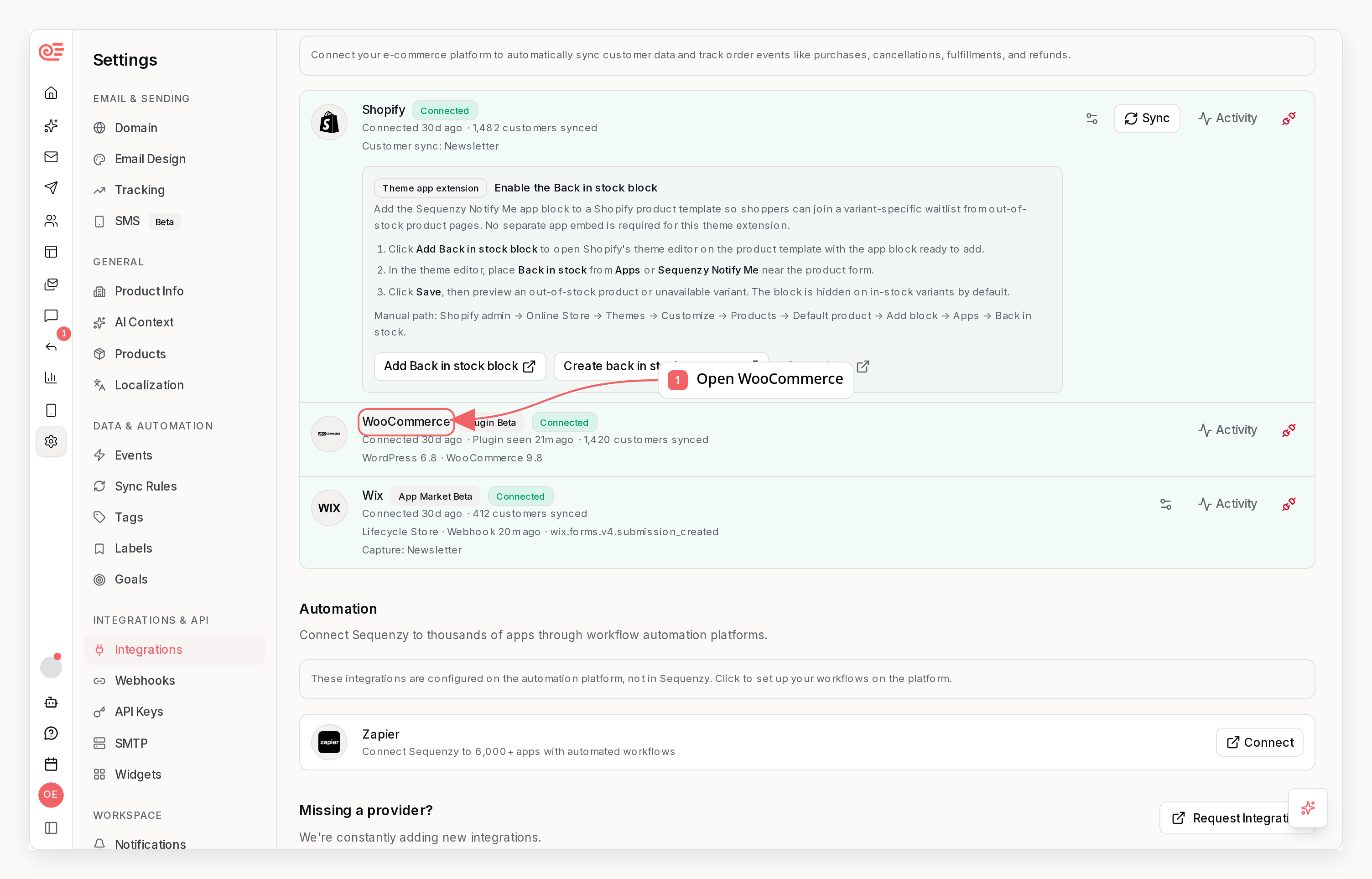
What It Does
- Sync products, customers, guest buyers, and orders
- Deliver cart and checkout activity to Sequenzy
- Capture product back-in-stock requests from your storefront
- Trigger replenishment reminders after WooCommerce purchases
- Let you run a manual store sync from
Settings -> Products - Show plugin connection health in Sequenzy
How To Connect
- Open
Settings -> Integrationsin Sequenzy. - Find
WooCommerceand clickInstall Plugin. - Open the WordPress.org plugin page for Sequenzy for WooCommerce.
- In WordPress, go to
Plugins -> Add Plugin, search forSequenzy for WooCommerce, install it, and activate it. - Open
WooCommerce -> Sequenzyin WordPress. - Click
Connect to Sequenzy. - Sign in to Sequenzy, choose the company, and approve the connection.
- Return to WordPress and finish the connection if the plugin asks you to confirm.
What Syncs
Store Data
- Products
- Registered customers
- Guest buyers
- Orders
Recovery Events
ecommerce.cart_startedecommerce.cart_clearedecommerce.checkout_started
Order Events
WooCommerce orders triggerecommerce.order_placed with product line items:
lineItems[].providerProductId and lineItems[].providerVariantId for product-aware automation matching.
Replenishment Reminders
WooCommerce products can use the same replenishment flow as Shopify products:- Sync your store products.
- Open
Settings -> Products. - Choose a product.
- Enable replenishment and set how many days after purchase the product usually runs out.
- Choose whether matching should use the product or exact variant.
ecommerce.replenishment_due.
Sequences started by ecommerce.replenishment_due default to stopping when the same product is purchased again.
Back-In-Stock Requests
WooCommerce can use the same back-in-stock waitlist model as Shopify. When a shopper asks to be notified, send the request to Sequenzy:providerVariantId and variantTitle. Variation stock webhooks should include the parent product ID as parent_id and the variation ID as id.
When a WooCommerce product update reports the product as in stock, Sequenzy marks matching active waitlist entries as notified and triggers ecommerce.back_in_stock.
ecommerce.back_in_stock_out_of_stock so matching back-in-stock sequences can stop safely.
Which Lists Store Customers Join
WooCommerce does not have per-integration list targeting, so the customers it creates - including the full backfill when you first connect the store - follow your workspace Default Lists setting. Check that setting before connecting the store. If the default is a lead-magnet, webinar, or event list, the backfill drops every past store customer into it, and a later campaign aimed at that list reaches far more people than opted in. Set the default to specific lists (or to no lists) first:sequenzy lists remove-subscribers or
remove subscribers from a list.
Subscriber Profiles
WooCommerce data appears on subscriber profiles:- Purchased products from order line items
- Product images and URLs when the synced catalog has them
- Pending replenishment reminders
- Active back-in-stock waitlist entries
- Revenue attributes such as
ordersCount,totalSpent,ltv, andaovwhen available
Addresses That Cannot Receive Email
A store with years of history almost always carries a few email addresses on domains that no longer exist - typically an old guest checkout at a company or school that has since shut down. These do not stop the import. Sequenzy still creates the profile so the customer’s orders have something to attach to, but marks it as bounced: it joins no lists, matches no sends, and triggers no automations. Its revenue still counts toward your store’s history and toward segments built onordersCount, totalSpent, or ltv.
You can review which addresses were affected after a sync:
- In
Settings -> Integrations, on the WooCommerce integration - With
sequenzy integrations, underUnusable records - In the
lastSyncSkippedfield returned by the list integrations endpoint and thelist_integrationsMCP tool
suppressed
(imported, but sends are blocked) or skipped (not imported at all). Nothing
needs to be fixed on your side - editing historical orders is not required, and
Sequenzy never emails a suppressed address.
Orders and customers that carry no email address at all, or an address that is
not a valid email, are reported the same way with the reason missing_email.
These are usually phone or point-of-sale orders. Sequenzy has no way to contact
them, so they are counted but not imported - which is what explains a store
ending up with fewer contacts than orders.
Manual Sync
You can clickSync Store in Settings -> Products to request a fresh WooCommerce sync from Sequenzy.
Managing The Integration
- The initial sync starts automatically after approval
- You can reconnect or disconnect the integration from
Settings -> Integrations - Sequenzy shows whether the plugin is connected and when it was last seen
- Manual sync requests are supported for plugin-connected stores
Current Beta Scope
- Product, customer, guest buyer, and order sync
- Cart and checkout event delivery
- Product-level back-in-stock waitlists
- Product-level and variant-level replenishment matching from order line items
- Manual sync from Sequenzy
- Connection health and diagnostics
Current Limitations
ecommerce.cart_startedonly works when WooCommerce already knows the shopper email- Truly anonymous guest carts cannot be recovered until the shopper identifies themselves
- Built-in back-in-stock capture UI is not packaged in the plugin yet; use the subscribe endpoint from your product page or custom block
- No per-integration list targeting: synced customers follow the workspace Default Lists setting rather than a list you pick for WooCommerce alone