
What is Supabase?
Supabase is an open-source Firebase alternative that provides a PostgreSQL database, authentication, real-time subscriptions, and more. Many SaaS applications use Supabase as their backend.Connecting Supabase
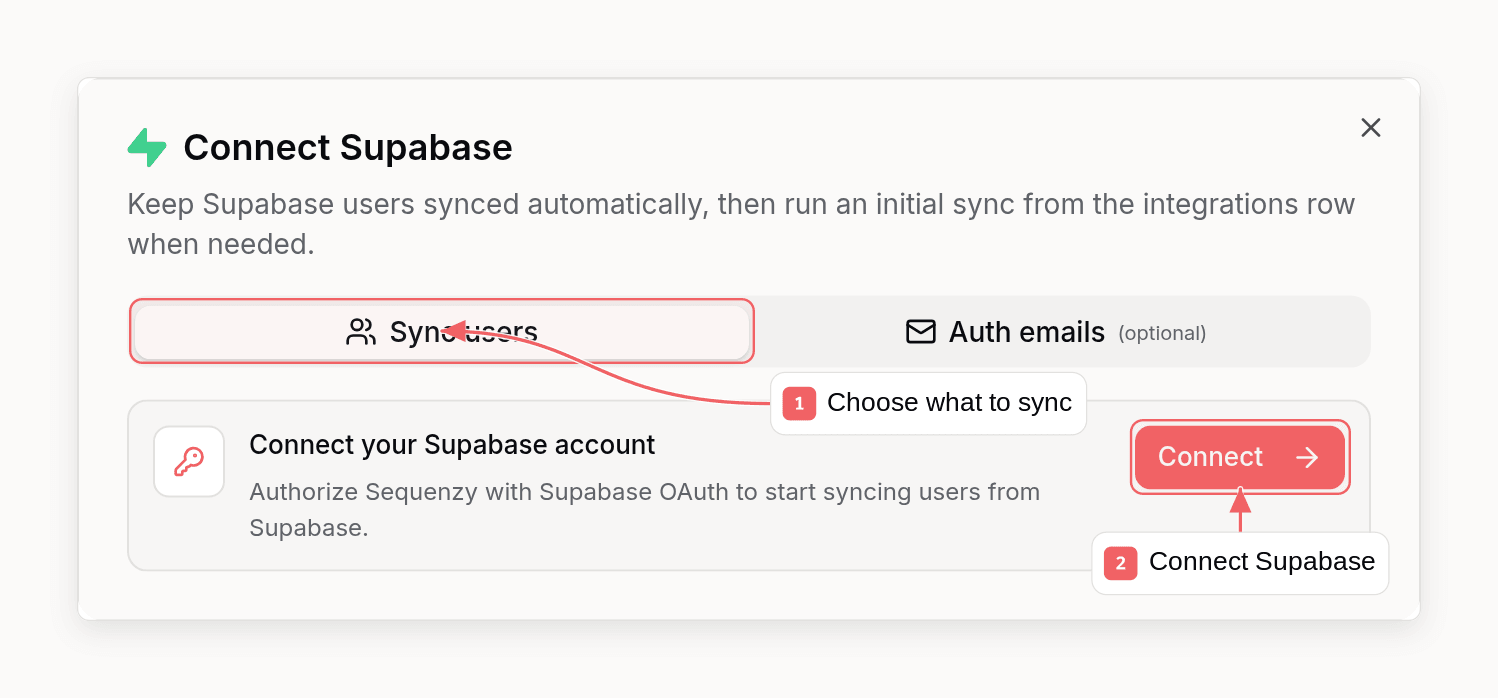
Step 1: Authorize Supabase
- Go to Settings → Integrations in Sequenzy
- Click Connect next to Supabase
- Click Connect in the Supabase account access panel
- Approve access in Supabase
organizations:readprojects:readdatabase:readdatabase:writeauth:write
Step 2: Configure User Sync
- Go to Settings → Integrations in Sequenzy
- Open the Supabase integration
- Choose the Supabase project
- Enter the schema and table to sync, usually
public.profiles - Choose whether synced users should use your workspace default lists, selected lists, or no lists
- If you want a Supabase column to become the subscriber’s external ID, enter the column name in External ID column. For example, use
idif your row ID is also your application user ID. - If your table has a marketing consent flag, enter it in Subscribed column. For example,
is_subscribed. - If some subscribed rows require confirmation before marketing email, enter your boolean confirmation column in Double opt-in column. For example,
requires_double_opt_in. - Click Save
Step 3: Enable Automatic Webhooks
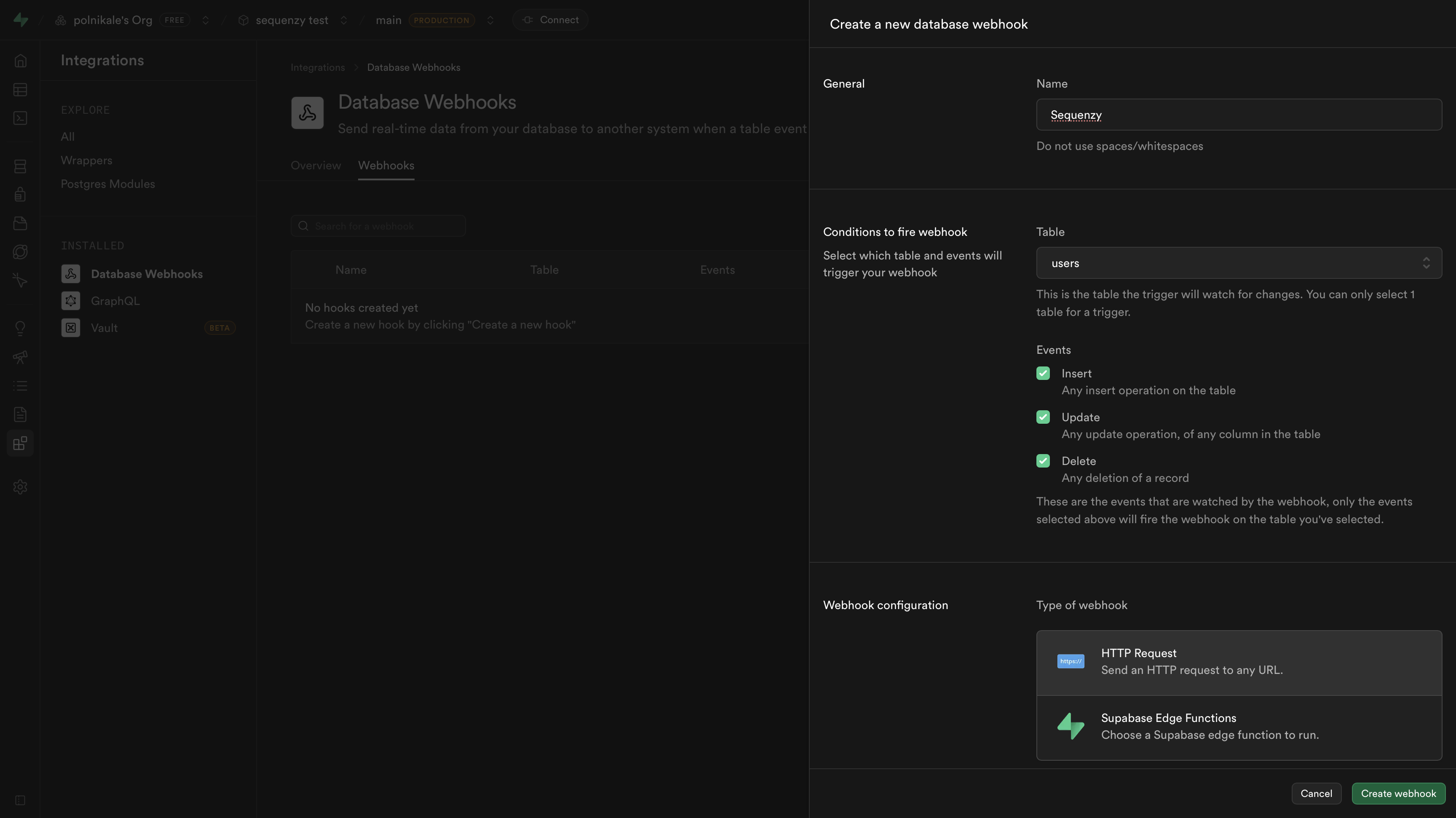
Automatic webhooks keep future inserts, updates, and deletes in sync without pressing Sync users.- Confirm the project, schema, table, lists, and external ID column
- Click Save
- If a webhook already exists, saving refreshes the trigger for the selected table
pg_net trigger through Supabase OAuth, generates a webhook secret, and stores the encrypted secret in your workspace. Supabase Database Webhooks use this same trigger mechanism under the hood.
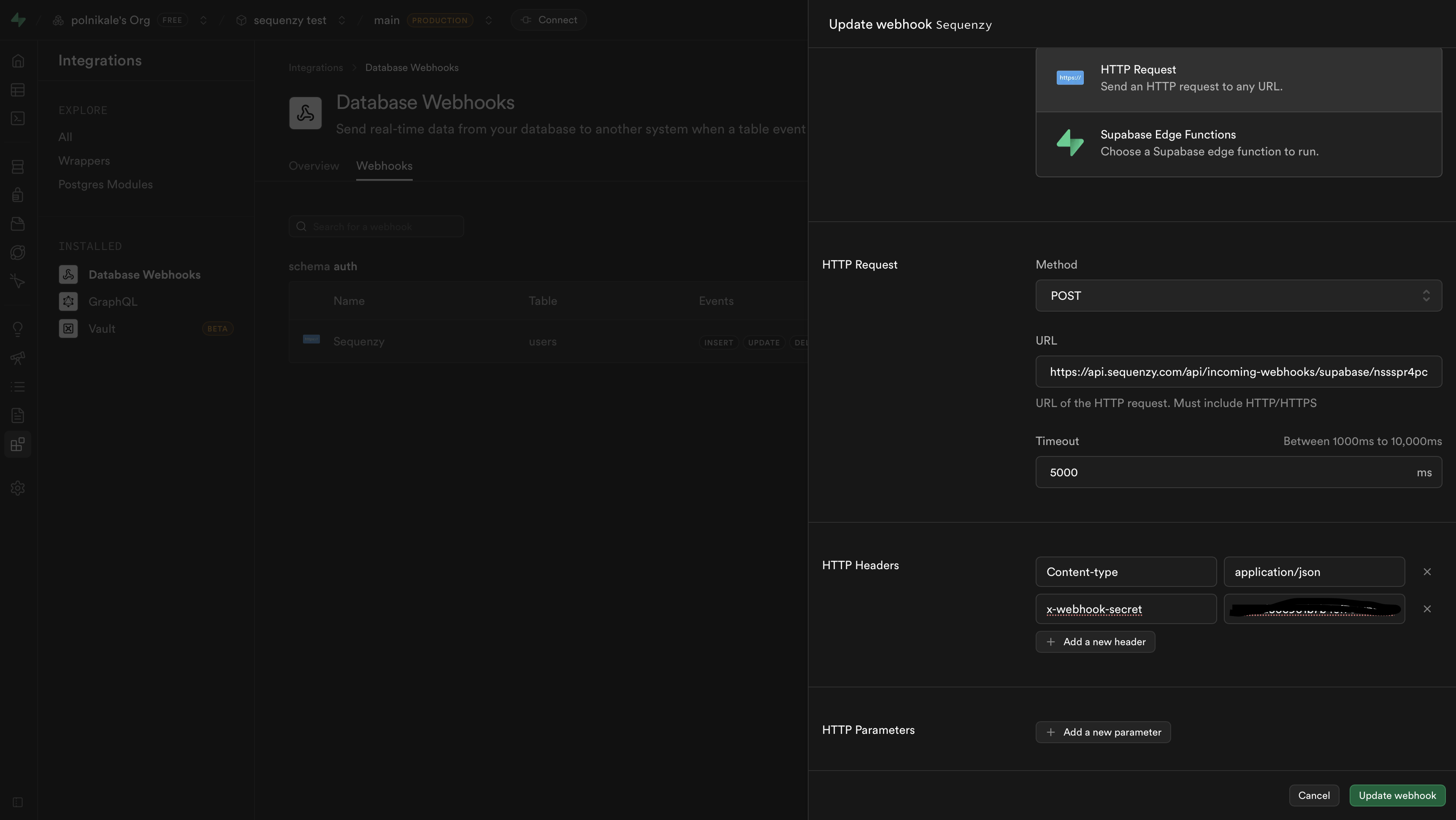
If Supabase denies webhook creation, reconnect Supabase after confirming the
OAuth app has
database:write access.Step 4: Run Manual Sync
Manual sync is separate from webhooks. Use it to import existing rows, backfill users after changing list settings, or refresh subscribers from the selected table.- Open the Supabase integration modal
- Confirm the project, schema, table, lists, and external ID column
- Click Save if you changed the settings
- Close the modal and click Sync users on the Supabase integration row
- Confirm the sync
sync_integration does the same thing. All three read the project, schema, and table already saved on the integration, so choosing the table stays a one-time dashboard step.
Retarget Which Lists Synced Users Join
If the trigger is adding users to lists it should not, change the targeting without reconfiguring the integration:PATCH /api/v1/integrations/{id} as listIds, and on the set_integration_list_targeting MCP tool. Both need a key with integrations:manage. It is the same setting as the lists picker in the Supabase modal, so the dashboard and the API cannot disagree.
Targeting applies from the next trigger firing onwards and is never applied retroactively, and no subscriber is ever removed from a list. It is not creation-only, though: a row going from unsubscribed back to subscribed re-runs the subscribe path, so that existing contact joins the newly targeted lists. A plain row update goes through profile sync and leaves list membership alone.
Pausing bulk sync (disable-sync) does not affect any of this either - the database trigger keeps firing regardless. To stop Supabase feeding the workspace entirely, disconnect it from Settings → Integrations, which also drops the trigger.
Route Supabase Auth and Security Emails Through Sequenzy SMTP
The database webhook above handles subscriber sync. Supabase Auth emails are a separate path. If you want Supabase invites, magic links, password resets, and security notifications to send through Sequenzy too, Sequenzy can configure Supabase SMTP and the Supabase Auth email templates through OAuth.Step 5: Configure Auth Emails Automatically
- Open the Supabase integration modal
- Go to Auth emails
- Choose the Supabase project
- Click Configure Auth emails
If Supabase denies the update, reconnect Supabase after adding
auth:write to
the OAuth app scopes.Manual Fallback: Configure Supabase SMTP
If automatic Auth setup is unavailable, create a Sequenzy API key in Settings → API Keys & SMTP and configure custom SMTP in Supabase under Authentication → Emails → SMTP Settings:
Use a sender address that belongs to a verified Sequenzy sending domain. Supabase still needs a sender configured, even when Sequenzy renders the final template.
Manual Fallback: Point Supabase Email Templates at Sequenzy Transactionals
If your workspace does not have a verified sender profile yet, Sequenzy automatically provisions a shared-domain sender and assigns it to the default Supabase templates. In Sequenzy, open the Supabase integration modal and click Create default Supabase auth templates. This provisions the standard transactional emails for:supabase-confirm-signupsupabase-invitesupabase-magic-linksupabase-password-resetsupabase-email-change-confirmationsupabase-email-changesupabase-reauthenticationsupabase-password-changedsupabase-phone-changedsupabase-identity-linkedsupabase-identity-unlinkedsupabase-mfa-enrolledsupabase-mfa-removed
slug or transactionalId. variables and dataVariables are both supported.
Example for a Magic Link template:
Suggested Variable Mapping
Recommended Setup
- Keep the database webhook integration enabled for subscriber sync
- Use Sequenzy SMTP for Supabase Auth email delivery
- Create one Sequenzy transactional email per Supabase template type
- Use clear slugs like
supabase-invite,supabase-magic-link, andsupabase-password-reset
What Gets Synced
Sequenzy automatically maps common database columns to subscriber attributes:Email Detection
Sequenzy looks for email in these columns (in order):emailemail_addressuser_emailcontact_email
User ID Detection
User ID is extracted from:iduser_iduiduuid
supabaseUserId subscriber attribute. If you set External ID column in the Supabase integration settings, that column is also written to the subscriber’s external ID and used to merge future webhook updates into the same subscriber.
Synced Attributes
Sensitive columns like
password, password_hash, and encrypted_password
are automatically excluded.Consent Mapping
Supabase sync can use a top-level row column to decide whether someone is currently subscribed. Configure it in Settings → Integrations → Supabase → Advanced options → Subscribed column. When the configured subscribed column is truthy (true, 1, yes, or subscribed), Sequenzy syncs the row through the normal subscribed path. When it is falsey (false, 0, no, or unsubscribed), Sequenzy keeps the subscriber unsubscribed and out of lists. If the column is missing or empty, Sequenzy falls back to the normal sync behavior.
If your table uses custom status values, add Truthy values for the exact values that should count as subscribed. For example, if your source column is named status and the value unsubscribed means “sync this row”, add unsubscribed as the subscribed truthy value.
Double Opt-In Mapping
Supabase sync can use a top-level row column to decide consent per subscriber. Configure the column in Settings → Integrations → Supabase → Advanced options → Double opt-in column. When the configured column is truthy (true, 1, yes, or required), Sequenzy creates or updates the subscriber as unconfirmed, sends your workspace double opt-in email, and waits to add the subscriber to lists until they click the confirmation link.
When the configured column is falsey (false, 0, no, or confirmed), Sequenzy treats the row as already confirmed consent and syncs it as an active subscriber. If the column is missing or empty, Sequenzy falls back to your normal workspace double opt-in setting.
If your table uses custom values, add Truthy values for the exact values that should require confirmation. Any other non-empty value is treated as already confirmed.
Before using a double opt-in column, configure your workspace confirmation
email in Settings → Email tracking → Double opt-in.
Tracked Events
An
UPDATE that changes nothing Sequenzy syncs is skipped. On auth.users, a change to updated_at alone also counts as nothing, because Supabase bumps it every time a session token refreshes, about once a minute for each signed-in user. Skipped updates show as skipped in the integration’s activity.
Profile updates for the same row that arrive within 30 seconds of each other are merged, and only the latest row is applied. Changes to the email, subscription status or double opt-in column are never merged and apply in order.
Using with Automations
Welcome Sequence for New Users
- Go to Automations → Create New
- Set trigger to Event Received →
contact.subscribed - Add your welcome email sequence
- Activate the automation
Custom Attributes
Any column in your users table becomes available for segmentation and personalization:Database Schema Recommendations
For best results, include these columns in your users table:User Lifecycle
When you delete a user from your database, they’re automatically unsubscribed in Sequenzy.
Deleting and Re-creating Users
A deletion-driven unsubscribe is reversible by the same integration: if the user signs up again (a newINSERT for the same email, or a row that reappears in a manual sync), Sequenzy reactivates the contact automatically. This keeps test loops working - deleting a test user and re-inviting them does not leave the contact permanently unsubscribed.
Explicit opt-outs are never undone this way. If the contact unsubscribed through an email link, the dashboard, or the API, re-creating their user in Supabase does not resubscribe them.
While a contact is unsubscribed, events they trigger still appear in Recent Activity, but matching sequences show “Would trigger if subscribed” instead of enrolling them, and the sequence’s trigger step shows a skipped count.
Troubleshooting
Users Not Syncing
- Verify the webhook URL is correct in Supabase
- Check that the
x-webhook-secretheader matches the secret in Sequenzy - Ensure all events (INSERT, UPDATE, DELETE) are selected
- Check Supabase’s webhook logs for failed deliveries, and Settings → Integrations → Activity in Sequenzy for rejected ones
Missing Email
If users are inserted without an email column value, Sequenzy cannot create a subscriber. Ensure your users table has a valid email.Wrong Columns Mapping
Sequenzy looks for standard column names. If your schema uses different names:email_address→ works (detected automatically)customer_email→ works (detected automatically)e_mail→ won’t be detected as email
Signature Verification Failed
Sequenzy accepts each delivery first and verifies the secret afterwards, so Supabase’s webhook logs show a successful response even when the secret is wrong. Rejected deliveries appear as “Invalid webhook signature” in Settings → Integrations → Activity. A request without thex-webhook-secret header is still refused with a 401.
- Verify the
x-webhook-secretheader value in Supabase matches exactly what you entered in Sequenzy - Secrets are case-sensitive
- Try generating a new secret and updating both Supabase and Sequenzy
FAQ
Which table should I use?
Which table should I use?
Use whichever table contains your user data. This is typically
users, profiles, or auth.users. If you’re using Supabase Auth, you might want to create a trigger to sync to a profiles table with the columns you need.Does this sync existing users?
Does this sync existing users?
Yes. Click Sync users in the Supabase integration modal to manually import
existing rows from the selected table, or re-run the same backfill with
sequenzy integrations sync <id>, POST /v1/integrations/{id}/sync, or the
sync_integration MCP tool. Webhooks handle future changes after they are
configured.Can I sync from multiple tables?
Can I sync from multiple tables?
You can configure webhooks for additional tables in Supabase. Manual sync uses
the table currently saved in the integration modal.
Is this included in my plan?
Is this included in my plan?
Yes, Supabase integration is included at no extra cost.