Use the Shopify App integration when you build a Shopify app and want Sequenzy to email your app’s merchants. This is different from connecting a Shopify store.

What it tracks

Sequenzy receives signed Shopify app webhooks and turns them into subscriber events:
Shopify eventSequenzy event
App identified after OAuthshopify_app.installed
Active app subscriptionsaas.purchase plus monthly/yearly variant
Active one-time app purchasesaas.purchase
Frozen app subscriptionsaas.payment_failed
Cancelled/expired/declined app subscriptionsaas.churn
App uninstalledsaas.churn
Approaching capped amountAcknowledged, attributes updated when possible
Subscription and purchase events also update revenue attributes such as mrr and ltv.

Connect in Sequenzy

  1. Go to Settings > Integrations.
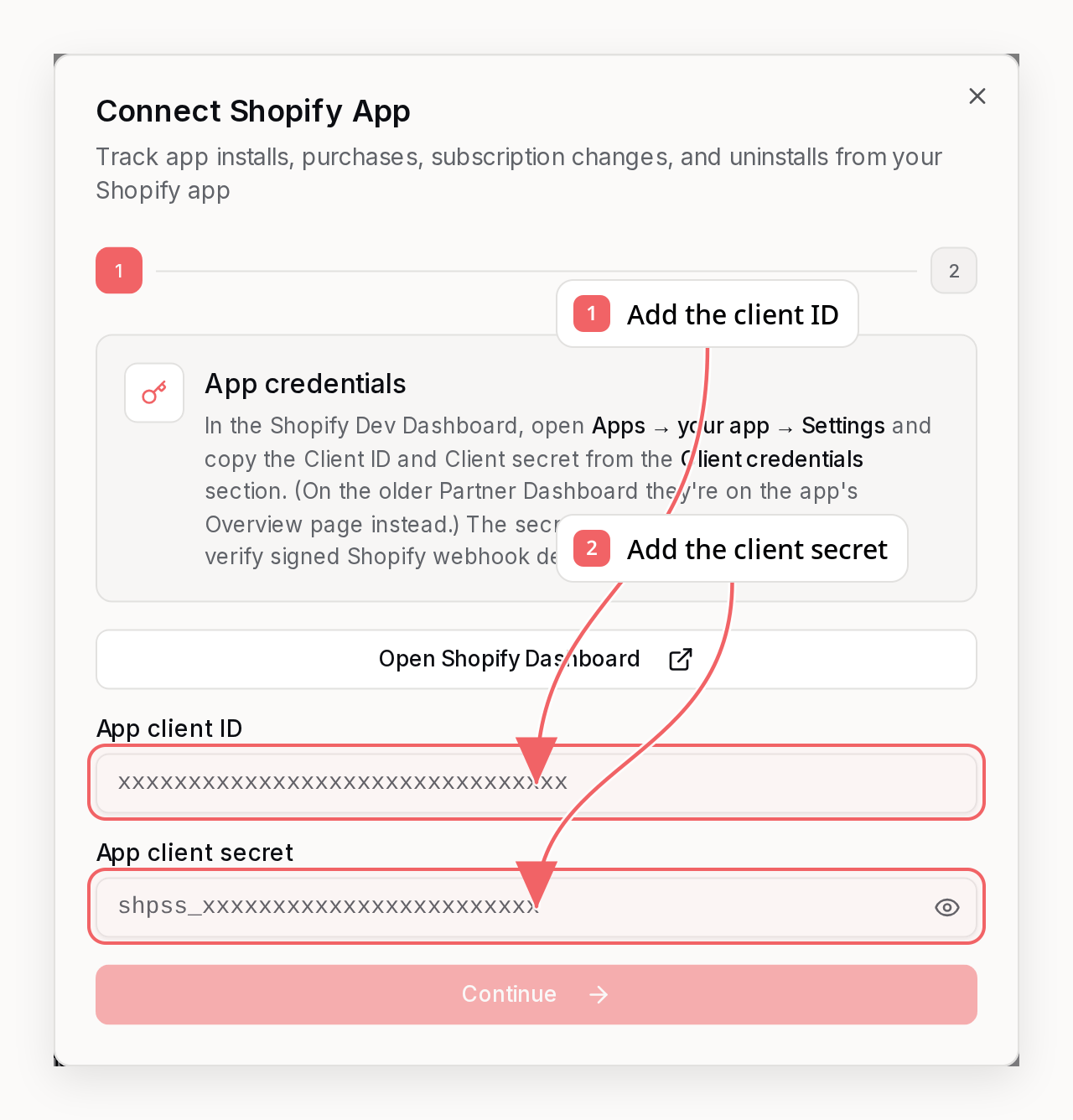
  2. Click Connect next to Shopify App.
  3. Enter your Shopify app Client ID and Client secret. In the Shopify Dev Dashboard, open Apps > your app > Settings and copy both from the Client credentials section (on the older Partner Dashboard they are on the app’s Overview page instead). Shopify sometimes labels these the API key and API secret key - they are the same values.
  4. Copy the generated webhook URL and identify URL and add them to your Shopify app configuration.
  5. Click Connect Shopify App.
The client secret is encrypted and used only to verify Shopify webhook HMAC signatures.

Configure Shopify app webhooks

In your Shopify app configuration or Partner Dashboard, subscribe to these topics:
[[webhooks.subscriptions]]
topics = [
  "app/uninstalled",
  "app_subscriptions/update",
  "app_subscriptions/approaching_capped_amount",
  "app_purchases_one_time/update"
]
uri = "https://api.sequenzy.com/api/webhooks/shopify-app/{companyId}"
Shopify signs webhook deliveries with X-Shopify-Hmac-SHA256. Sequenzy verifies that signature with your app client secret before processing the event.

Identify the merchant after OAuth

Shopify app billing webhooks usually do not include a merchant email. After your app completes OAuth, call the identify endpoint from your backend:
curl -X POST "https://api.sequenzy.com/api/webhooks/shopify-app/{companyId}/identify" \
  -H "Authorization: Bearer YOUR_SHOPIFY_APP_CLIENT_SECRET" \
  -H "Content-Type: application/json" \
  -d '{
    "shopDomain": "merchant.myshopify.com",
    "email": "owner@example.com",
    "shopName": "Merchant Store",
    "appId": "your-shopify-app-client-id",
    "planName": "Pro"
  }'
This creates or updates the subscriber, stores shopifyAppShopDomain, and records a shopify_app.installed event. Later subscription and uninstall webhooks use the shop domain to find the same subscriber.

Backfill existing merchants

Shopify never replays installs, so connecting only tracks merchants from that point forward. To sync the merchants you already have, send them in bulk from your backend. Each merchant is created or updated as a subscriber, its Shopify app attributes plus mrr and ltv are set, and a shopify_app.installed event is recorded. The backfill does not trigger automations, so it will not email your existing merchants.
curl -X POST "https://api.sequenzy.com/api/webhooks/shopify-app/{companyId}/identify/bulk" \
  -H "Authorization: Bearer YOUR_SHOPIFY_APP_CLIENT_SECRET" \
  -H "Content-Type: application/json" \
  -d '{
    "merchants": [
      {
        "email": "owner@store.com",
        "shopDomain": "store.myshopify.com",
        "shopName": "Acme Store",
        "planName": "Pro",
        "interval": "month",
        "planPrice": 49,
        "status": "active",
        "mrr": 49,
        "ltv": 588
      }
    ]
  }'
Send up to 1000 merchants per request and page through the rest. Each merchant needs a valid email and a myshopify.com shopDomain; everything else is optional.
FieldDescription
email (required)Merchant contact email
shopDomain (required)Shop domain, for example merchant.myshopify.com
shopNameStore display name
name / firstName / lastNameMerchant name
planNameCurrent plan, for example Pro
intervalmonth, year, or one_time (defaults to month)
planPricePlan price per interval, in major units (for example dollars)
statusactive, frozen, cancelled, or one_time (defaults to active)
mrrMonthly recurring revenue. Derived from planPrice + interval when omitted
ltvLifetime value. Falls back to planPrice when omitted; pass it for accurate history
subscriptionIdShopify app subscription or one-time purchase id
installedAtISO install timestamp
The request is queued and processed in the background. The response returns queued and skipped counts (rows missing a valid email or shop domain are skipped).

Synced attributes

AttributeDescription
shopifyAppShopDomainMerchant shop domain, for example merchant.myshopify.com
shopifyAppStoreNameStore name supplied during identify or webhook parsing
shopifyAppIdShopify app client ID supplied during identify
shopifyAppPlanNameCurrent app plan name
shopifyAppSubscriptionIdShopify app subscription or one-time purchase ID
shopifyAppSubscriptionStatusLatest app subscription status
shopifyAppPurchaseStatusLatest one-time app purchase status
shopifyAppIntervalmonth, year, or one_time
mrrMonthly recurring revenue in dollars
ltvLifetime value in dollars

Automation ideas

  • Start onboarding from shopify_app.installed.
  • Send plan-specific activation emails from saas.purchase.
  • Send usage-cap warnings from segments using shopifyAppCappedAmount and shopifyAppBalanceUsed.
  • Trigger win-back or exit surveys from saas.churn.
  • Trigger dunning or support outreach from saas.payment_failed.

Troubleshooting

Webhook says no customer email found

Call the identify endpoint after OAuth for that shop. Shopify app billing webhooks are matched by shopifyAppShopDomain, not by email.

Invalid webhook signature

Verify that the secret saved in Sequenzy is the Shopify app client secret from the Partner Dashboard. Shopify signs the raw request body, so proxy layers must not rewrite the body before it reaches Sequenzy.

Install event not firing

Shopify does not send a general app/installed webhook. The install event comes from your backend calling the identify endpoint after OAuth.