
Reusable Email Components
Reusable email components let you save parts of an email and insert them again later in other drafts. Sequenzy stores these components as normal email blocks, so when you insert one it stays fully editable in the editor.What You Can Save
- A single selected block, such as a hero, button row, testimonial, or footer
- A top-level section made of multiple adjacent blocks
- A new component generated by AI from a prompt
How To Save A Component
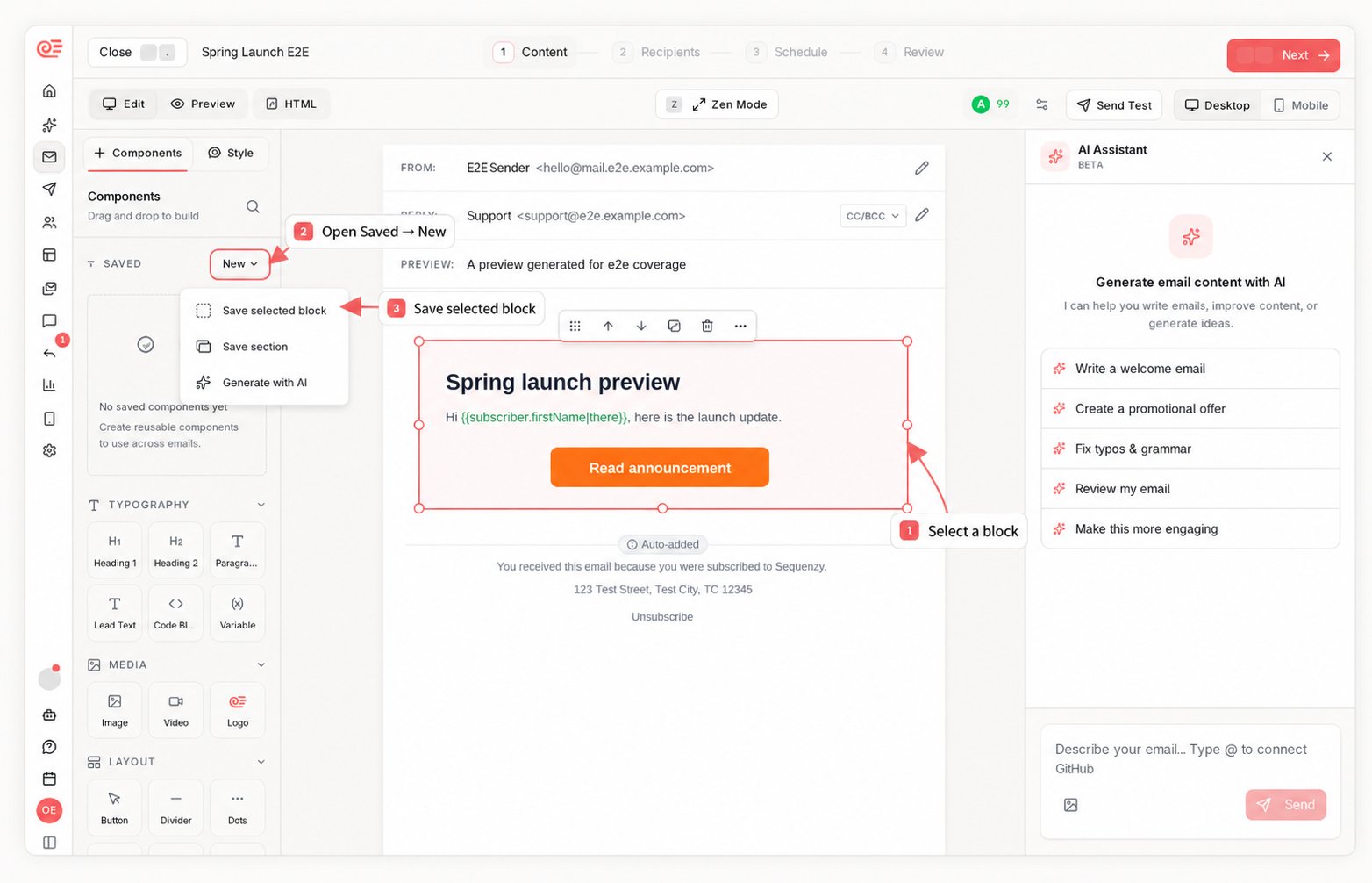
- Open the Components tab in the email editor
- Choose one of these actions:
- Click Save Block to save the currently selected block
- Click Save Section to save a contiguous top-level range of blocks
- Click AI to generate and save a new reusable component from a prompt
- Give the component a name so you can find it later
How To Reuse A Component
You can insert saved components in three places:- From the Components sidebar
- From the inline Add Block popover between blocks
- By dragging a saved component onto the canvas
Built-In Shop Components
The Shop category in the Components sidebar (and the/ menu) holds
storefront layouts that work without a product catalog. Each one ships with
placeholder photography, so it looks designed the moment you insert it; swap
in your own photos and copy in place.
- Lookbook Tiles - two photo tiles with a caption and link each, the editorial lookbook grid row.
- Category Tiles - three shop-by-category tiles.
- Product Spotlight - one photo beside a headline, a short blurb, and a button.
- Review Strip - a star rating over a customer quote on a soft panel.
- Perks Row - shipping, returns, and secure-checkout badges.
- Announcement Bar - a slim full-width strip for shipping thresholds and promo codes.
Best Practices
- Save stable building blocks you reuse often, such as hero sections, feature grids, testimonial groups, and footers
- Use clear names so search is fast later
- Save sections when the layout depends on multiple blocks staying together
- Use AI-generated components as a starting point, then adjust spacing, copy, and links before sending
Limitations
- Section saving currently works on contiguous top-level block ranges
- Saved components are scoped to the company you created them in
- Inserting a component copies its current blocks; later edits to the saved version do not update emails that already used it
Apply a default footer to existing emails
You can save for future emails only, or preview and apply to selectedsequences,
campaigns, transactional, and templates. Campaigns must be draft or scheduled;
sent and in-progress content stays unchanged. Draft A/B variants and localizations
are included. Customized footers are preserved unless you explicitly include them.
Raw HTML, missing or ambiguous footers, and content shared with a protected owner
are skipped with reasons.
Preview is read-only. Review the affected counts, skipped reasons, and optional
before/after HTML, then apply with the returned token and identical blocks,
metadata, and scope options. If the relevant saved content changes, application
returns 409; preview again. A successful application saves the default and
selected content atomically. It does not send emails.
Layout previews use the email theme and locale, with placeholder personalization.
They are not subscriber-specific inbox previews. You can request a particular
sample by its affected item id and kind (email, ab_variant, or localization).
Renaming your company in footers
When you change your company name in Settings, select the option to also replace matching names in existing email footers. Only footer company names exactly equal to the previous name change. Saved components and editable emails are included; custom names, body copy, sent or sending campaigns and active A/B tests are preserved. The operation does not send emails. Existing open editor drafts may still contain the old name; reload them before continuing to edit. With the API or MCPupdate_company, pass name, renameMatchingFooters: true
and previousCompanyName from get company. In the CLI, use
sequenzy companies update comp_123 --name Grove --rename-matching-footers --previous-company-name Linear.
The option defaults to false. A stale previous name returns 409 with no changes;
refresh the company and confirm again. Repeating a completed rename is safe.
Only the new renameMatchingFooters: true option additionally requires emails:write, templates:write, campaigns:write, sequences:write, transactional:write and ab_tests:write. Personal keys also require workspace owner or admin access. Ordinary company updates keep their existing permissions.