> ## Documentation Index
> Fetch the complete documentation index at: https://docs.sequenzy.com/llms.txt
> Use this file to discover all available pages before exploring further.
# PostHog Integration
> Trigger email automations based on product analytics events
Connect your PostHog account to trigger email automations based on product analytics events. Send emails when users perform (or don't perform) specific actions in your product.
## What is PostHog?
[PostHog](https://posthog.com) is an open-source product analytics platform that tracks user behavior, feature usage, and more. It's popular with SaaS teams who want self-hosted analytics.
## Prerequisites
Before setting up the integration, ensure your PostHog setup includes user emails:
```javascript theme={null}
// When a user logs in, identify them with their email
posthog.identify(userId, {
email: "user@example.com",
name: "John Doe",
});
```
Events from anonymous users (without email) are automatically skipped. Only
events from identified users with an email address will trigger automations in
Sequenzy.
## Connecting PostHog
### Step 1: Get Your Webhook Configuration
1. Go to **Settings → Integrations** in Sequenzy
2. Find **PostHog** under Product Analytics
3. Click **Connect**
4. Copy the **Webhook URL** and **Webhook Secret** shown
### Step 2: Create Webhook Destination in PostHog
1. Go to your [PostHog Dashboard](https://app.posthog.com)
2. Navigate to **Data Pipelines** → **Destinations**
3. Click **+ New** → **Destination**
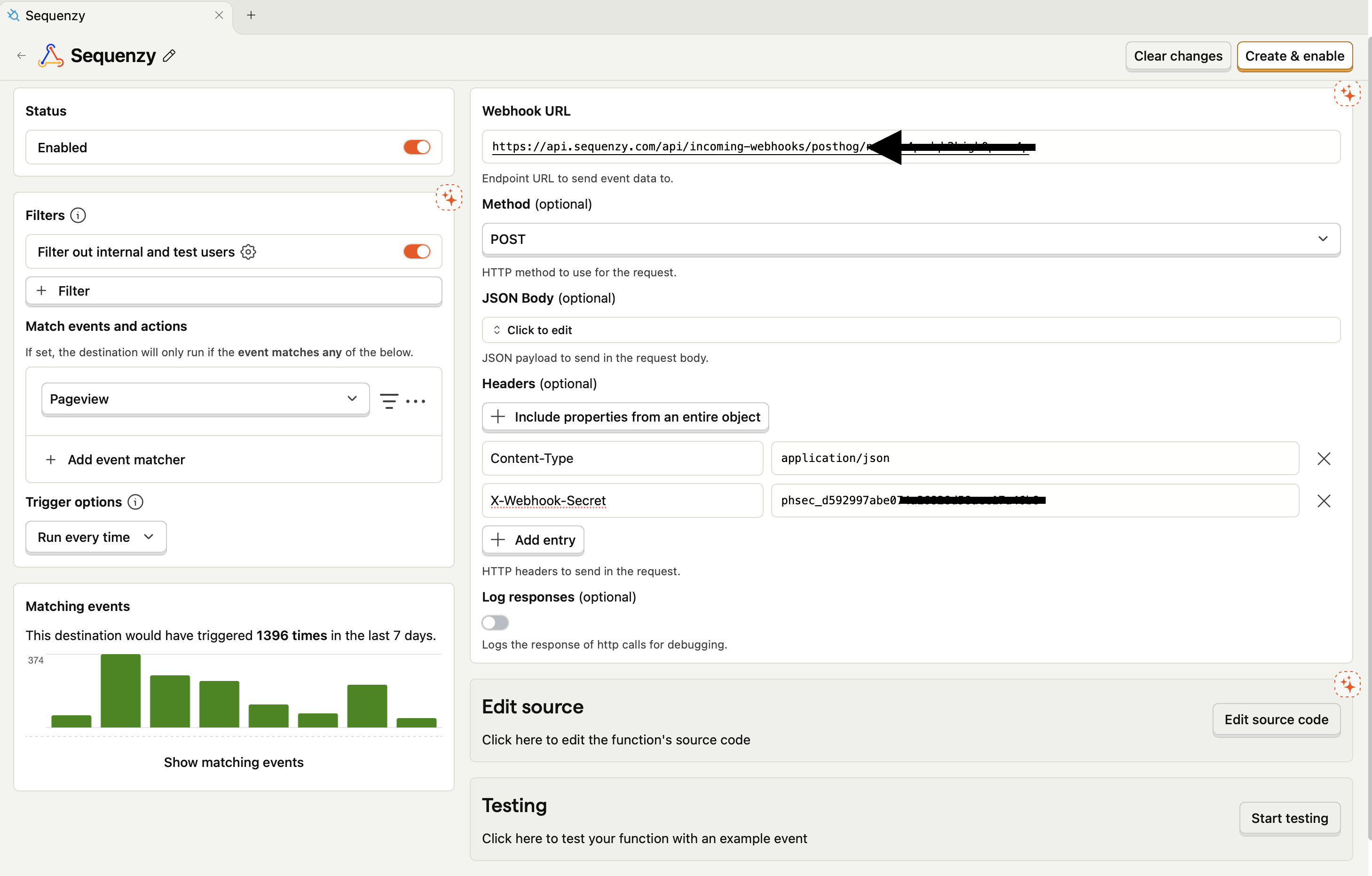
4. Search for **"Webhook"** in the list and click **+ Create**
5. Configure the webhook:
* **Webhook URL**: Paste your Sequenzy webhook URL
* **Headers**: Add `X-Webhook-Secret` with your secret from Step 1
6. Optionally filter which events to send (or send all - we'll handle filtering)
7. Click **Create & Enable**
 ### Step 3: Complete Connection in Sequenzy
1. Return to Sequenzy's PostHog connection modal
2. Click **Connect PostHog**
That's it! PostHog events will now flow into Sequenzy.
## What Gets Synced
All PostHog events are accepted by default, including pageviews (`$pageview`). When an event is received, Sequenzy:
1. Checks for an email in the event properties (`email`, `user_email`, `$email`, or nested `user.email`), identify `$set` properties, or `person.properties`
2. **Skips events without email** - anonymous events are silently ignored
3. Creates or updates the subscriber with that email
4. Records the event with the `product.` prefix (e.g., `product.$pageview`, `product.feature_used`)
5. Triggers any automations listening for that event
### Event Naming
PostHog events are prefixed with `product.` in Sequenzy:
| PostHog Event | Sequenzy Event |
| ---------------------- | ------------------------------ |
| `feature_used` | `product.feature_used` |
| `onboarding_completed` | `product.onboarding_completed` |
| `$pageview` | `product.$pageview` |
### Synced Attributes
Only `$identify` events update subscriber attributes. Raw properties from all other events stay on the event (available to automations and event-based segments) and are never copied onto the subscriber profile:
| Attribute | Source |
| ------------------- | --------------------------------------------------------- |
| `posthogDistinctId` | PostHog distinct\_id |
| Profile properties | `$set`, `$set_once`, and person properties on `$identify` |
To set subscriber attributes from your product, use PostHog's `identify` call. Passing `$set` or person properties on another event does not update the subscriber profile in Sequenzy.
## Using with Automations
### Feature Adoption Sequence
Trigger emails when users haven't used a key feature:
1. Go to **Automations** → **Create New**
2. Set trigger to **Event Received** → `product.signup_completed`
3. Add a **Wait** step: 3 days
4. Add a **Condition**: Check if `product.feature_used` was NOT received
5. Send a "Did you know about this feature?" email
### Onboarding Based on Product Usage
Send different onboarding based on what users do:
```
Trigger: product.signup_completed
├── Wait 1 day
├── Check: product.first_project_created received?
│ ├── Yes → Send "Great start!" email
│ └── No → Send "Need help getting started?" email
```
### Re-engagement for Inactive Users
Target users who stopped using the product:
1. Create a segment: "No `product.` events in last 14 days"
2. Send a re-engagement campaign to this segment
## Event Properties as Variables
Use PostHog event properties in your emails:
```
Hi {{firstName}},
We noticed you used {{featureName}} - here are some tips to get more out of it!
```
## Event Allowlist (Optional)
By default, all PostHog events are synced. To sync only specific events:
1. Go to **Settings → Integrations**
2. Click the **gear icon** next to PostHog
3. Toggle **Only sync selected events**
4. Add event names to the allowlist
This is useful if you have high-volume events (like `$pageview`) that you don't need in Sequenzy.
## Troubleshooting
### Events Not Appearing
1. Verify the webhook URL is correct in PostHog
2. Check that the `X-Webhook-Secret` header matches your Sequenzy secret
3. **Most common issue**: Events don't have an email - call `posthog.identify()` with user email when they log in
### Subscriber Not Created
Events without email are silently skipped. Ensure:
1. You're calling `posthog.identify(userId, { email: '...' })` when users log in
2. The email is in one of these fields: `email`, `user_email`, `$email`, `userEmail`, `user.email` (nested), identify `$set.email`, or `person.properties.email`
3. The email is a valid format
### Anonymous Events Being Skipped
This is expected behavior. Sequenzy can't send emails to anonymous users, so we skip events without email addresses. Once a user is identified with `posthog.identify()`, all their subsequent events will be synced.
### Missing Subscriber Attributes
Subscriber attributes are updated only by `$identify` events. If an attribute isn't appearing on the subscriber, set it via `posthog.identify(userId, { ... })`; `$set`, `$set_once`, and person properties attached to other event types do not update the subscriber profile in Sequenzy. PostHog internal fields (starting with `$`) are always excluded.
## FAQ
Both work! The webhook destination feature is available in PostHog Cloud and self-hosted installations.
They're silently skipped. Sequenzy needs an email to match events to
subscribers. Make sure you call `posthog.identify()` with the user's email
when they log in.
Yes! Pageviews (`$pageview`) are synced like any other event, as long as the
user has been identified with an email. They'll appear as `product.$pageview`
in Sequenzy.
Yes, you can configure event filtering in PostHog's webhook destination
settings, or use Sequenzy's event allowlist feature in the integration
settings.
Events are processed in real-time. Most events appear in Sequenzy within
seconds of being sent from PostHog.
Yes, PostHog integration is included at no extra cost.
### Step 3: Complete Connection in Sequenzy
1. Return to Sequenzy's PostHog connection modal
2. Click **Connect PostHog**
That's it! PostHog events will now flow into Sequenzy.
## What Gets Synced
All PostHog events are accepted by default, including pageviews (`$pageview`). When an event is received, Sequenzy:
1. Checks for an email in the event properties (`email`, `user_email`, `$email`, or nested `user.email`), identify `$set` properties, or `person.properties`
2. **Skips events without email** - anonymous events are silently ignored
3. Creates or updates the subscriber with that email
4. Records the event with the `product.` prefix (e.g., `product.$pageview`, `product.feature_used`)
5. Triggers any automations listening for that event
### Event Naming
PostHog events are prefixed with `product.` in Sequenzy:
| PostHog Event | Sequenzy Event |
| ---------------------- | ------------------------------ |
| `feature_used` | `product.feature_used` |
| `onboarding_completed` | `product.onboarding_completed` |
| `$pageview` | `product.$pageview` |
### Synced Attributes
Only `$identify` events update subscriber attributes. Raw properties from all other events stay on the event (available to automations and event-based segments) and are never copied onto the subscriber profile:
| Attribute | Source |
| ------------------- | --------------------------------------------------------- |
| `posthogDistinctId` | PostHog distinct\_id |
| Profile properties | `$set`, `$set_once`, and person properties on `$identify` |
To set subscriber attributes from your product, use PostHog's `identify` call. Passing `$set` or person properties on another event does not update the subscriber profile in Sequenzy.
## Using with Automations
### Feature Adoption Sequence
Trigger emails when users haven't used a key feature:
1. Go to **Automations** → **Create New**
2. Set trigger to **Event Received** → `product.signup_completed`
3. Add a **Wait** step: 3 days
4. Add a **Condition**: Check if `product.feature_used` was NOT received
5. Send a "Did you know about this feature?" email
### Onboarding Based on Product Usage
Send different onboarding based on what users do:
```
Trigger: product.signup_completed
├── Wait 1 day
├── Check: product.first_project_created received?
│ ├── Yes → Send "Great start!" email
│ └── No → Send "Need help getting started?" email
```
### Re-engagement for Inactive Users
Target users who stopped using the product:
1. Create a segment: "No `product.` events in last 14 days"
2. Send a re-engagement campaign to this segment
## Event Properties as Variables
Use PostHog event properties in your emails:
```
Hi {{firstName}},
We noticed you used {{featureName}} - here are some tips to get more out of it!
```
## Event Allowlist (Optional)
By default, all PostHog events are synced. To sync only specific events:
1. Go to **Settings → Integrations**
2. Click the **gear icon** next to PostHog
3. Toggle **Only sync selected events**
4. Add event names to the allowlist
This is useful if you have high-volume events (like `$pageview`) that you don't need in Sequenzy.
## Troubleshooting
### Events Not Appearing
1. Verify the webhook URL is correct in PostHog
2. Check that the `X-Webhook-Secret` header matches your Sequenzy secret
3. **Most common issue**: Events don't have an email - call `posthog.identify()` with user email when they log in
### Subscriber Not Created
Events without email are silently skipped. Ensure:
1. You're calling `posthog.identify(userId, { email: '...' })` when users log in
2. The email is in one of these fields: `email`, `user_email`, `$email`, `userEmail`, `user.email` (nested), identify `$set.email`, or `person.properties.email`
3. The email is a valid format
### Anonymous Events Being Skipped
This is expected behavior. Sequenzy can't send emails to anonymous users, so we skip events without email addresses. Once a user is identified with `posthog.identify()`, all their subsequent events will be synced.
### Missing Subscriber Attributes
Subscriber attributes are updated only by `$identify` events. If an attribute isn't appearing on the subscriber, set it via `posthog.identify(userId, { ... })`; `$set`, `$set_once`, and person properties attached to other event types do not update the subscriber profile in Sequenzy. PostHog internal fields (starting with `$`) are always excluded.
## FAQ
Both work! The webhook destination feature is available in PostHog Cloud and self-hosted installations.
They're silently skipped. Sequenzy needs an email to match events to
subscribers. Make sure you call `posthog.identify()` with the user's email
when they log in.
Yes! Pageviews (`$pageview`) are synced like any other event, as long as the
user has been identified with an email. They'll appear as `product.$pageview`
in Sequenzy.
Yes, you can configure event filtering in PostHog's webhook destination
settings, or use Sequenzy's event allowlist feature in the integration
settings.
Events are processed in real-time. Most events appear in Sequenzy within
seconds of being sent from PostHog.
Yes, PostHog integration is included at no extra cost.